Android push notifications: permission, channels and Doze
Android push in 2026: asking for POST_NOTIFICATIONS, designing channels, message priority, Doze, App Standby buckets and OEM battery managers.
Oricato Team Published 12 min read
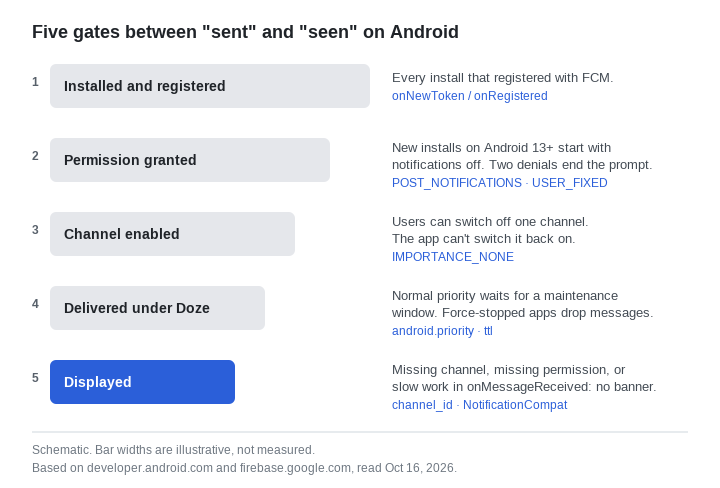
Your server gets a message ID back from FCM, yet some of your Android users never see the notification. Four things decide that, and teams often own them in different places: the POST_NOTIFICATIONS runtime permission on Android 13 (API 33) and later, the channel the notification posts to, the FCM priority you send against Doze and App Standby, and the phone maker’s battery manager. This guide takes them in order, with Kotlin that follows the current Android and Firebase docs, and ends with a testing checklist.
Where these facts come from. The Android Developers and Firebase pages under Sources, re-read Oct 16, 2026, plus dontkillmyapp.com for phone-maker behavior.
For the end-to-end picture, read how push notifications reach a phone; SDK references live under /developers/sdks.
1. The POST_NOTIFICATIONS permission (API 33+)
Since Android 13, posting a non-exempt notification requires android.permission.POST_NOTIFICATIONS. The FCM SDK (23.0.6 or higher) declares it in the merged manifest, but declaring isn’t granting: on a new install on Android 13+, notifications stay off until the user says yes. Exemptions are narrow: media sessions, and CallStyle notifications from self-managed calling apps.
What happens on upgrade from older Android versions
Per the permission doc:
| Situation | What Android does |
|---|---|
| Installed app, device upgrades to 13+ | Pre-grants if the app has a notification channel and the user hadn’t disabled its notifications; an earlier denial carries over |
| Restored from backup onto a 13+ device | Treated as an existing app |
| New install on 13+ | Off until the user grants |
| App targets 12L (API 32) or lower | System prompts when an activity starts after the first channel exists; one “Don’t allow” and it won’t ask again until reinstall or a 13+ target |
Firebase’s Android setup guide flags a trap in that last row. If a 12L-targeting app creates its first channel in the background, which the FCM SDK does when a notification message arrives, Android neither shows it nor prompts until the next open, and those notifications are lost. Target API 33+ and you decide when the dialog appears.
When to ask
The Android docs suggest asking after a user action that explains itself, such as tapping a bell icon, or around the third or fourth launch. In a language-learning app, that’s when someone picks a daily goal and taps “Remind me at 8:00 PM.” A first-launch prompt asks for trust before the app has shown anything; our permission prompt guide covers pre-prompt screens.
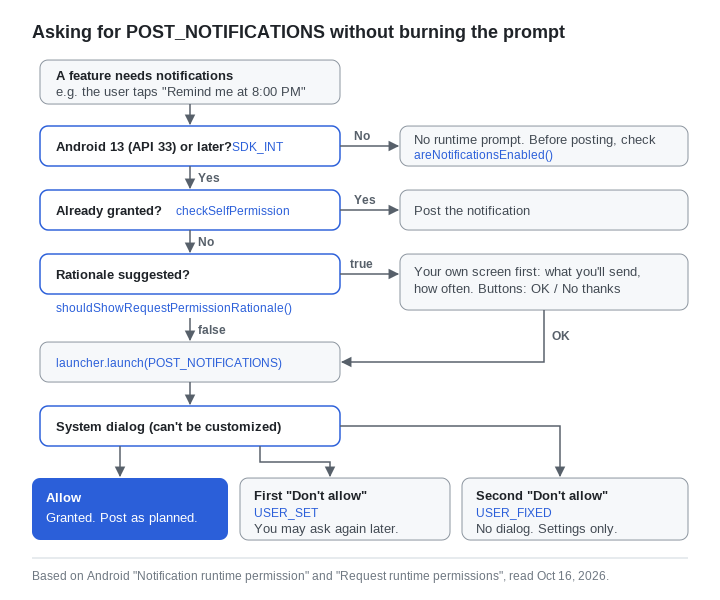
// Declare the launcher at the top of your Activity/Fragment:
private val requestPermissionLauncher = registerForActivityResult(
    ActivityResultContracts.RequestPermission(),
) { isGranted: Boolean ->
    if (isGranted) {
        // FCM SDK (and your app) can post notifications.
    } else {
        // Inform the user that your app will not show notifications.
    }
}

private fun askNotificationPermission() {
    // This is only necessary for API level >= 33 (TIRAMISU)
    if (Build.VERSION.SDK_INT >= Build.VERSION_CODES.TIRAMISU) {
        if (ContextCompat.checkSelfPermission(this, Manifest.permission.POST_NOTIFICATIONS) ==
            PackageManager.PERMISSION_GRANTED
        ) {
            // FCM SDK (and your app) can post notifications.
        } else if (shouldShowRequestPermissionRationale(Manifest.permission.POST_NOTIFICATIONS)) {
            // Show your own screen with "OK" (then launch) and "No thanks" (continue without).
        } else {
            requestPermissionLauncher.launch(Manifest.permission.POST_NOTIFICATIONS)
        }
    }
}
shouldShowRequestPermissionRationale and the “denied twice” rule
The runtime permissions doc is blunt: deny a permission more than once during an install’s lifetime and the system dialog stops appearing, a permanent denial. adb shell dumpsys package shows it as USER_SET after one denial and USER_FIXED after two. You can’t customize the dialog’s text, so your rationale screen does the explaining, and the system dialog should only follow a yes on that screen.
After USER_FIXED, the way back is the app’s notification settings, linked from where the user asked for the feature:
val intent = Intent(Settings.ACTION_APP_NOTIFICATION_SETTINGS).apply {
    putExtra(Settings.EXTRA_APP_PACKAGE, context.packageName)
}
context.startActivity(intent)
Permissions can also change without the user touching your app, so check areNotificationsEnabled() before relying on a notification rather than caching the answer.
2. Channels and importance
Since Android 8.0 (API 26), every notification needs a notification channel; target API 26+ and post without one, and nothing appears. Once a channel exists, the channels doc gives the user complete control over its behavior. That makes channel design a reach decision: if everything shares one channel, one annoying promo silences your reminders too.
Designing channels people keep on
Split by content type, the way users think about what you send. A sample set for a fictional language-learning app:
| Channel ID | Name (en-US) | Example | Importance |
|---|---|---|---|
lesson_reminders |
Lesson reminders | “Your 5-minute Spanish lesson is ready” | IMPORTANCE_DEFAULT (sound) |
streaks |
Streak alerts | “Your streak ends at midnight” | IMPORTANCE_DEFAULT (sound) |
live_classes |
Live classes | “Japanese conversation practice starts in 10 minutes” | IMPORTANCE_HIGH (sound, heads-up) |
progress |
Weekly progress | “Your week in French: 5 lessons done” | IMPORTANCE_LOW (silent) |
offers |
Offers and news | “New course: Business German” | IMPORTANCE_LOW (silent) |
Offers get their own channel, so muting them leaves reminders alone. Heads-up is reserved for the one thing that loses its value within minutes.
Channel names are user-visible, so localize them. The NotificationManager reference says to update a channel’s name when the locale changes by calling createNotificationChannel() again with the same ID. Sample names for lesson_reminders, to be checked by native speakers: Recordatorios de lecciones (es), Lektionserinnerungen (de), Lembretes de lição (pt-BR), レッスンのリマインダー (ja), पाठ रिमाइंडर (hi), تذكيرات الدروس (ar).
if (Build.VERSION.SDK_INT >= Build.VERSION_CODES.O) {
    val channels = listOf(
        NotificationChannel(
            "lesson_reminders",
            getString(R.string.channel_lesson_reminders),
            NotificationManager.IMPORTANCE_DEFAULT,
        ).apply { description = getString(R.string.channel_lesson_reminders_desc) },
        NotificationChannel(
            "live_classes",
            getString(R.string.channel_live_classes),
            NotificationManager.IMPORTANCE_HIGH,
        ),
        NotificationChannel(
            "offers",
            getString(R.string.channel_offers),
            NotificationManager.IMPORTANCE_LOW,
        ),
    )
    // You can't raise the importance or change other behaviors after this.
    getSystemService(NotificationManager::class.java)?.createNotificationChannels(channels)
}
On the server, set android.notification.channel_id in the FCM HTTP v1 message. If it’s missing or the app hasn’t created that channel yet, the REST reference says FCM uses the manifest’s com.google.firebase.messaging.default_notification_channel_id.
Importance can’t be raised by the app after creation
The channels doc says that once you submit a channel, you can’t change its importance. The NotificationManager reference adds one exception: re-creating it with a lower importance works if the user hasn’t changed that channel’s settings. Nothing raises it.
The only route up is a new channel ID, and the settings screen shows how many channels an app has deleted, which the doc calls a spam-prevention mechanism. Get importance right in the release that creates the channel. What you can do later is read the user’s choice and offer a way back:
val manager = getSystemService(NotificationManager::class.java)
val channel = manager?.getNotificationChannel("lesson_reminders")
if (channel != null && channel.importance == NotificationManager.IMPORTANCE_NONE) {
    // Blocked by the user. From a tap, open this channel's settings:
    val intent = Intent(Settings.ACTION_CHANNEL_NOTIFICATION_SETTINGS).apply {
        putExtra(Settings.EXTRA_APP_PACKAGE, packageName)
        putExtra(Settings.EXTRA_CHANNEL_ID, "lesson_reminders")
    }
}
3. Priority, Doze and App Standby buckets
When a device sits unplugged, still and screen-off, Doze suspends network access and defers alarms and JobScheduler work, so WorkManager too. Short maintenance windows open, and the Doze doc notes they come less often the longer the device stays idle. FCM priority decides whether your message waits for one.
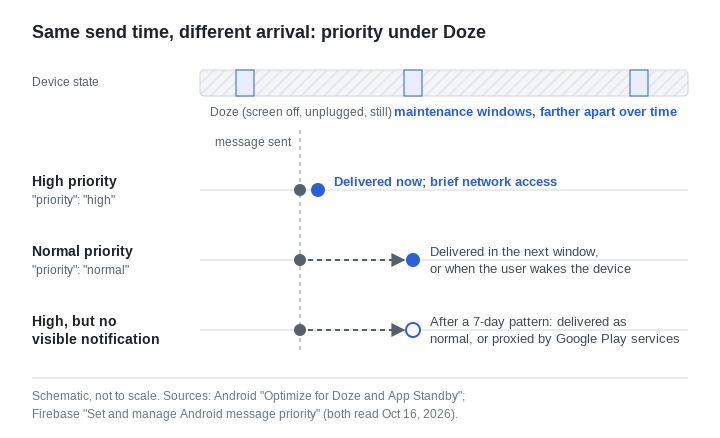
High vs normal priority in FCM
Normal priority arrives immediately on an awake device and may wait for Doze to end on a sleeping one. High priority asks FCM to deliver now, wake the device if needed and allow limited processing, including very limited network access. Use high for user-visible, time-sensitive notifications and normal for syncs.
Firebase’s pages disagree on the default. “Set and manage Android message priority” (Oct 15, 2026) says normal for data and notification messages; the REST reference (Sep 8, 2026) says HIGH for notification messages and NORMAL for data. Set android.priority on every send.
{
  "message": {
    "token": "DEVICE_REGISTRATION_TOKEN",
    "notification": {
      "title": "Live class in 10 minutes",
      "body": "Japanese conversation practice starts at 7:30 PM."
    },
    "android": {
      "priority": "high",
      "ttl": "600s",
      "notification": { "channel_id": "live_classes" }
    }
  }
}
Set ttl too. The default and maximum is 4 weeks, so without it a “class starts in 10 minutes” message can show up hours after the class, when the phone reconnects. With "600s" FCM drops it instead.
Deprioritization when high-priority messages don’t show a notification
High priority carries a condition: it should end in a user-facing notification. If FCM sees a pattern where it doesn’t, judged on 7 days of behavior per app account, it may lower messages to normal or delegate them to Google Play services. Firebase’s troubleshooting notes add that if the user disabled notifications, nothing posts and your messages are deprioritized. Permission and priority are one problem, not two.
Delegation (“proxying”) means Google Play services displays the notification without starting your app. Per the priority page, it’s the default on Android 10+ with Play services 19054000 or later for HTTP v1 messages, it’s in Beta, and proxied messages are missing from standard FCM delivery metrics. Steer it per message with android.notification.proxy: ALLOW, DENY or IF_PRIORITY_LOWERED (the unset default).
To detect it, compare RemoteMessage.getPriority() with getOriginalPriority() on the device, or query the FCM Aggregate Delivery Data API. The rule that follows: a high-priority data message must post a notification every time.
Buckets and their limits
Since Android 9 (API 28), each app sits in a standby bucket based on how recently and how often it’s used. Approximate limits from the power limits page (May 19, 2026), which warns they aren’t guarantees:
| Bucket | Meaning | Regular jobs | Network |
|---|---|---|---|
| Active | In use or used very recently | Up to 20 min per rolling 60 min | No restrictions |
| Working set | In regular use | Up to 10 min per rolling 4 h | No restrictions |
| Frequent | Often used, not daily | Up to 10 min per rolling 12 h | No restrictions |
| Rare | Not used often | Up to 10 min per rolling 24 h | Disabled |
| Restricted | Heavy resource use, or long unused | Once a day, up to 10 min | Disabled |
Three details matter for push. Since Android 13, the bucket no longer determines how many high-priority FCM messages an app gets. In Doze, high-priority FCM has no execution limits while normal priority waits for a window. And on Android 13 an app lands in the restricted bucket after 8 days without user interaction (45 on Android 12), so a normal-priority data message that schedules a fetch for a lapsed user can wait a long time.
Posting a notification the user sees also takes an app out of App Standby, per the Doze doc. Read the bucket with UsageStatsManager.getAppStandbyBucket() or adb shell am get-standby-bucket PACKAGE_NAME.
4. OEM battery managers
Many phone makers add battery managers on top of Doze, with their own names and menus. We haven’t measured any of them. This table summarizes dontkillmyapp.com, a community site that rates vendors from 0 to 5 (higher means more aggressive with background apps), as read Oct 16, 2026:
| Vendor (site score) | Features the site names | Exemption path the site gives |
|---|---|---|
| Samsung (5) | Sleeping and Deep sleeping apps, Adaptive battery | Settings > Apps > your app > Battery; recheck after firmware updates |
| Xiaomi (5) | Autostart, Battery saver, clearing recents | Background autostart (MIUI 14); battery saver “No restrictions” |
| OnePlus (5) | Deep optimization, Sleep standby optimization | Battery optimization > Don’t optimize; Advanced optimization |
| Oppo (4) | Auto launch, startup manager | App info > Allow Auto Start-up (ColorOS 6) |
| Pixel / stock (0) | Standard Doze, Adaptive battery | Battery > not optimized, only if needed |
Firebase’s delivery explainer (Jul 18, 2024) lists “App is force-stopped” as its own outcome: dropped because the app was force-stopped at delivery and retries failed. It suggests checking whether problems cluster on one OEM, model or Android version. From the app side:
- Don’t request a blanket exemption. Google Play policy prohibits asking for direct exemption from Doze and App Standby unless your core function is adversely affected. Most apps may open
ACTION_IGNORE_BATTERY_OPTIMIZATION_SETTINGS. - Link vendor steps from a “Not getting reminders?” row in your notification settings.
- Don’t make push the only path for state. Sync on app open, and do a full sync in
onDeletedMessages(), which FCM calls when more than 100 messages were pending or the device hadn’t connected for over a month.
The full diagnosis flow is in our checklist for push notifications not delivered.
5. Receiving and displaying
Where a message lands depends on app state and message type, per Receive messages in Android apps:
| App state | Notification message | Data message | Both |
|---|---|---|---|
| Foreground | onMessageReceived |
onMessageReceived |
onMessageReceived |
| Background | System tray | onMessageReceived |
Tray; data in the launcher intent extras |
FirebaseMessagingService.onMessageReceived
Declare one service for com.google.firebase.MESSAGING_EVENT, plus a default channel:
<service
    android:name=".MyFirebaseMessagingService"
    android:exported="false">
    <intent-filter>
        <action android:name="com.google.firebase.MESSAGING_EVENT" />
    </intent-filter>
</service>

<meta-data
    android:name="com.google.firebase.messaging.default_notification_channel_id"
    android:value="@string/default_notification_channel_id" />
The callback runs on a worker thread with a few seconds to work. Firebase says to post the notification right away and move slow work, like an image download, to WorkManager: an expedited job for high priority (briefly exempt from the expedited quota right after a high-priority onMessageReceived), a regular WorkRequest for normal.
override fun onMessageReceived(remoteMessage: RemoteMessage) {
    // Lower than the original priority means FCM deprioritized this message.
    Log.d(TAG, "priority=${remoteMessage.priority} original=${remoteMessage.originalPriority}")

    if (remoteMessage.data.isNotEmpty()) {
        val builder = NotificationCompat.Builder(this, "lesson_reminders")
            .setSmallIcon(R.drawable.ic_stat_notification)
            .setContentTitle(remoteMessage.data["title"])
            .setContentText(remoteMessage.data["body"])
            .setAutoCancel(true)

        with(NotificationManagerCompat.from(this)) {
            if (ActivityCompat.checkSelfPermission(
                    this@MyFirebaseMessagingService,
                    Manifest.permission.POST_NOTIFICATIONS
                ) != PackageManager.PERMISSION_GRANTED
            ) {
                return@with
            }
            notify(remoteMessage.messageId.hashCode(), builder.build())
        }
        // Image or other slow work: enqueue an expedited WorkManager job here.
    }
}
onNewToken
The registration token can change when the app is restored on a new device, reinstalled, or has its data cleared. onNewToken fires for every new token, including the first:
override fun onNewToken(token: String) {
    Log.d(TAG, "Refreshed token: $token")
    sendRegistrationToServer(token)
}
Plan for its replacement. firebase-messaging 25.1.0 (Jun 16, 2026) added registration by Firebase Installation ID (FID) and deprecated getToken, deleteToken and onNewToken. The setup guide now shows onRegistered(installationId: String), and the HTTP v1 message has a fid target; token is deprecated and accepts an FID during the transition. firebase-messaging 26.0.0 (Oct 7, 2026) also raised the minimum SDK to API 24.
override fun onRegistered(installationId: String) {
    Log.d(TAG, "Registered installation ID: $installationId")
    sendRegistrationToServer(installationId)
}
Notification messages in the background are shown by the system
With your app in the background, a notification message goes straight to the tray and onMessageReceived never runs. Android uses the payload’s channel_id or your manifest default, and the default_notification_icon metadata; with no icon set, your app icon appears rendered in white. Your code gets no chance to check anything or log a receipt before display.
Data-only messages give you that control, at a price: sent at high priority, each one must still post a notification or the deprioritization above applies. Flutter apps face the same split; see Flutter push notifications.
6. Rich notifications and actions
An image in the expanded view uses BigPictureStyle:
val notification = NotificationCompat.Builder(context, CHANNEL_ID)
    .setSmallIcon(R.drawable.ic_stat_notification)
    .setContentTitle("New course: Business German")
    .setContentText("12 short lessons for meetings and email")
    .setStyle(
        NotificationCompat.BigPictureStyle()
            .bigPicture(bitmapImage)
    )
    .build()
For notification messages, HTTP v1 notification.image takes a URL; the REST reference gives Android a 1 MB image limit, with full support for JPEG, PNG and BMP. For data messages, download the image in the WorkManager job, not inside onMessageReceived.
Create a notification allows up to three addAction() buttons, which must not duplicate the tap action: “Snooze 1 hour” on a lesson reminder, not “Open lesson.” Images, actions and deep links get their own guide on rich push notifications.
7. Testing matrix
This guide has no test-log entry, so here is a checklist with no results column; setups and commands come from the docs cited. FCM needs Android 7.0+ with the Play Store app, or an emulator with Google APIs. Plan one API 33+ image and one API 32 or lower.
| Scenario | Setup | What to check |
|---|---|---|
| Fresh install, API 33+ | Install, don’t grant | areNotificationsEnabled() is false; prompt appears only from your trigger |
| One denial, then two | Tap “Don’t allow”; run adb shell dumpsys package PACKAGE_NAME |
USER_SET, then USER_FIXED; after two, no dialog and the Settings link works |
| Reset | adb shell pm clear-permission-flags PACKAGE_NAME android.permission.POST_NOTIFICATIONS user-set user-fixed |
Dialog appears again |
| Channel off | Disable offers in Settings |
Reminders still show; app reads IMPORTANCE_NONE |
| Doze | adb shell dumpsys deviceidle force-idle, send high, then normal |
High shows now with priority equal to originalPriority; normal waits for unforce |
| App Standby | adb shell dumpsys battery unplug, adb shell am set-inactive PACKAGE_NAME true |
Delivery while idle; undo with set-inactive ... false, dumpsys battery reset |
| Background notification message | App in background | Tray, right channel, your icon |
| Short TTL | "ttl": "60s" to an offline device, reconnect after 2 minutes |
Never arrives |
8. What Oricato does here
Early access · launching soon
Oricato is a push notification platform for app studios. It sends Android push through FCM HTTP v1, so everything above still applies, Doze and OEM battery managers included. Per its README, the Android SDK handles:
- Permission:
Oricato.requestPermission(activity),getPermissionStatus()andopenNotificationSettings(). It reports the permission on every foreground and Activity resume, and a push that arrives while notifications are off reportsdenied, so the server stops targeting that device. - Channels: created from the dashboard config whenever it changes; a channel whose
res/rawsound is missing is skipped, since Android fixes a channel’s sound at creation. - Token refresh: handled by its messaging service, or by delegating
onNewToken(andonRegisteredwith the firebase-messaging 25.1 API) from yours. - Delivered receipts: the device reports
deliveredfor pushes the server samples, and every open. Images on API 31+ load in an expedited WorkManager job.
Details are in the Android SDK docs. The same composer is designed to cover web push and email, both Early access.
Request early access if you want help setting this up across your apps.
FAQ
Do I need to ask for permission on Android 12 and below?
No. POST_NOTIFICATIONS is a runtime permission only on Android 13 (API 33) and later, so guard the request with SDK_INT >= TIRAMISU. Older versions allow notifications unless the user turns them off, so still check areNotificationsEnabled() and channel importance.
Why are my high-priority messages being delivered as normal priority?
FCM keeps high priority for user-visible content. If an app account’s high-priority messages don’t produce visible notifications over 7 days, or the user disabled notifications, FCM may lower them to normal or let Google Play services display them. Compare getPriority() with getOriginalPriority() to confirm.
Sources
All accessed Oct 16, 2026.
- Android Developers, Notification runtime permission, last updated Oct 1, 2026.
- Android Developers, Request runtime permissions, last updated Oct 1, 2026.
- Android Developers, Create and manage notification channels, last updated Oct 1, 2026.
- Android Developers, Optimize for Doze and App Standby, last updated Aug 18, 2026.
- Android Developers, App Standby Buckets, last updated Oct 1, 2026.
- Android Developers, Power management resource limits, last updated May 19, 2026.
- Android Developers, Create a notification, last updated Oct 7, 2026.
- Android Developers, Create an expandable notification, last updated Oct 1, 2026.
- Android API reference, NotificationManager (
createNotificationChannel), last updated Aug 3, 2026. - Android API reference, Settings (
ACTION_APP_NOTIFICATION_SETTINGS), last updated Aug 28, 2026. - Firebase, Set and manage Android message priority, last updated Oct 15, 2026.
- Firebase, Receive messages in Android apps, last updated Oct 15, 2026.
- Firebase, Get started with Firebase Cloud Messaging in Android apps, last updated Oct 15, 2026.
- Firebase Cloud Messaging REST API, REST Resource: projects.messages, last updated Sep 8, 2026.
- Firebase, Android SDK release notes (firebase-messaging 25.1.0, Jun 16, 2026; 26.0.0, Oct 7, 2026; BoM 35.0.1, Oct 14, 2026).
- Firebase blog, Understanding FCM Message Delivery on Android, Jul 18, 2024.
- DontKillMyApp, vendor ranking and the vendor pages for Samsung, Xiaomi, OnePlus, Oppo and Google.
- Oricato Android SDK README (
sdk/android/README.md), for section 8 only.
Keep reading
All guides
Flutter push notifications with FCM: a production setup
Set up Flutter push notifications with FCM for Android and iOS: APNs key, background handler, foreground display, token refresh, deep links and debugging.
Push notification permission: when and how to ask
On iOS and Android 13+, a denied push prompt is hard to undo. Learn the OS rules, pre-prompt and provisional patterns, timing, and measuring opt-in.