Push notification permission: when and how to ask
On iOS and Android 13+, a denied push prompt is hard to undo. Learn the OS rules, pre-prompt and provisional patterns, timing, and measuring opt-in.
Oricato Team Published 10 min read

On iOS, the system asks for notification permission once. On Android 13 and later, two denials and the dialog stops appearing. After that, a “no” stays a “no” until the person digs through Settings, so the timing of your first ask decides how many people you can reach for the life of the install. The short answer: ask right after someone does something a notification would help with, explain it on your own screen first when the reason isn’t obvious, consider provisional authorization on iOS, keep a Settings link for people who change their minds, and measure opt-in against the people who actually saw the prompt.
Where these facts come from. Apple’s and Android’s developer documentation, Apple’s design and review guidelines, WebKit and MDN, and Airship’s and YouGov’s reports, all re-read on Oct 16, 2026 (see Sources). The app in the wireframes is fictional.
1. Why the first ask matters
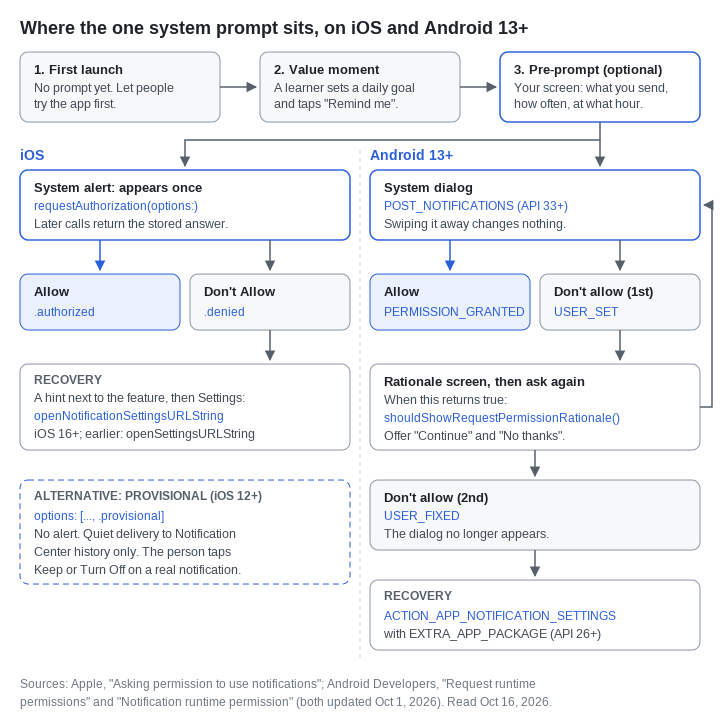
Apple’s permission guide puts it in one sentence: the first time your app calls requestAuthorization(options:), the system prompts and records the answer, and “subsequent authorization requests don’t prompt the person.” Your code can call it a hundred times; the person sees it once.
Android is slightly more forgiving and a lot stricter than it was. Since Android 13 (API 33), a new install has notifications off until the user grants POST_NOTIFICATIONS. The runtime permissions doc says that if the user taps Deny more than once during the app’s lifetime on that device, the dialog stops appearing and Android treats it as a permanent denial. Internally, one denial sets the USER_SET flag and two set USER_FIXED.
| iOS and iPadOS | Android 13+ (app targets API 33+) | |
|---|---|---|
| What you request | requestAuthorization(options:) on UNUserNotificationCenter |
The POST_NOTIFICATIONS runtime permission |
| State on a new install | .notDetermined |
Notifications off until granted |
| How often the system prompt can appear | Once | Until the second denial (USER_FIXED) |
| Who decides when it appears | Your app | Your app. If you still target 12L (API 32) or lower, the system shows it when an activity starts after a channel exists, and one “Don’t allow” holds until reinstall or until you target 13+ |
| Devices upgraded from older versions | Not applicable | Pre-granted if the app already had a channel and the user hadn’t turned notifications off |
| Can the prompt say why? | No; the options take no usage string, so your own screen explains | No; the doc says the dialog states what you want, not why |
| Trial without a prompt | .provisional (iOS 12+) |
None |
| Way back after a “no” | openNotificationSettingsURLString (iOS 16+) |
ACTION_APP_NOTIFICATION_SETTINGS (API 26+) |
| Read the current state | notificationSettings().authorizationStatus |
checkSelfPermission(), areNotificationsEnabled() |
Two details from the notification permission page matter later. Swiping the dialog away without choosing changes nothing, so it doesn’t count as a denial. And the pre-grant on upgrade means an Android fleet mixes devices that were asked with devices that never were. The platform guides cover the surrounding setup: Android push notifications for channels and Doze, and iOS push notifications for APNs keys and the service extension.
2. What published reports say about opt-in
Benchmarks are useful for one thing here: seeing how definitions differ. Read the definition before the number.
- Airship, 2026 report. Opt-in rate is “the percentage of an app’s audience that has granted permission,” measured monthly and averaged over 12 months. The sample is Airship customer apps with at least 1,000 active users that sent at least 1,000 pushes in one month, January to December 2025. The medians: Android 53.3%, iOS 48.85%, which Airship calls near parity now that Android 13+ is universal (airship.com).
- Airship, 2025 PDF. Same definition, as 10th, 50th and 90th percentiles per vertical. It explains the old gap (iOS always required an explicit opt-in; Android apps could send by default) and predicted Android’s rates would keep falling under Android 13 (PDF, pages 6 and 7). Its tips recommend a “soft prompt” before the system dialog; its opt-in gains for onboarding and in-app prompts come without a described method, so read them as the vendor’s claims.
- YouGov, 2021. An attitudes survey, not a permission rate: 1,167 US adults polled online on Jun 3, 2021. 47% said they get too many notifications. If notifications are too frequent, 42% said they would change settings, 39% would turn notifications off entirely and 8% would delete the app (yougov.com).
YouGov is a reminder that a grant isn’t permanent. Airship’s medians describe other companies’ apps under Airship’s denominator. Neither tells you whether your prompt is placed well; your own funnel does (section 5). The push notification benchmarks guide compares the reports’ definitions side by side.
3. Patterns that respect the one ask
The wireframes below use a fictional habit tracker. They’re drawings, not screenshots.
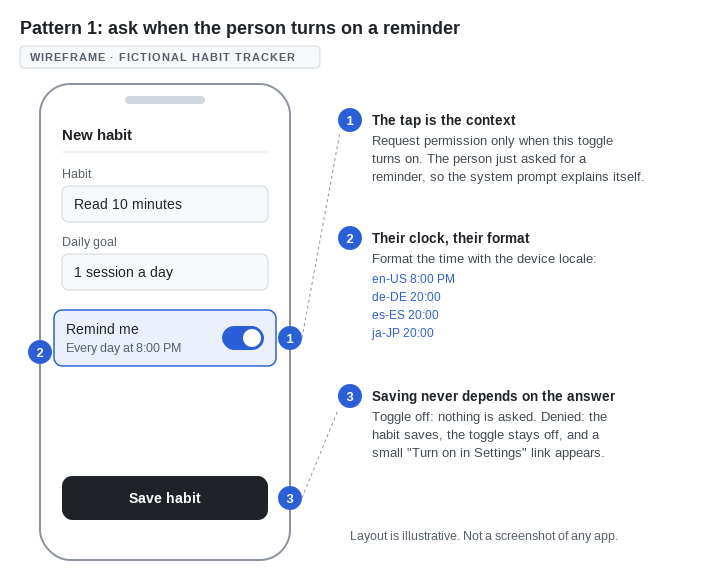
Ask at a value moment
Apple’s own example is a task app that asks “after the person schedules a first task.” Android lists a tap on an alert-bell button, following an account and submitting a food order, or waiting until the third or fourth launch. The common thread: the request follows a choice the person just made, so the system prompt explains itself.
In a habit tracker, that moment is the “Remind me” toggle; in a language-learning app, setting a daily goal; in a news digest, picking topics for a morning briefing. Show the time in the person’s format: 8:00 PM for en-US, 20:00 for de-DE, es-ES and ja-JP.
import UIKit
import UserNotifications

// Called when the person turns on "Remind me" for a habit.
func reminderToggleTurnedOn() async {
    let center = UNUserNotificationCenter.current()
    let settings = await center.notificationSettings()

    switch settings.authorizationStatus {
    case .notDetermined:
        // The only state in which the system alert can appear.
        do {
            let granted = try await center.requestAuthorization(options: [.alert, .sound, .badge])
            if granted {
                // Schedule the 8:00 PM reminder; register with APNs as your push setup already does.
            } else {
                // Save the habit with the reminder off and show the Settings hint.
            }
        } catch {
            // Handle the error here.
        }
    case .denied:
        // No alert will appear. Show the Settings hint next to the toggle.
        break
    default:
        // .authorized, .provisional or .ephemeral: schedule the reminder.
        break
    }
}
Saving the habit never depends on the answer. Apple’s Guideline 4.5.4 says push “must not be required for the app to function,” and Android’s principles say that if the user denies a permission, “gracefully degrade your app so that the user can continue using your app.”
A pre-permission screen, and its honest wording
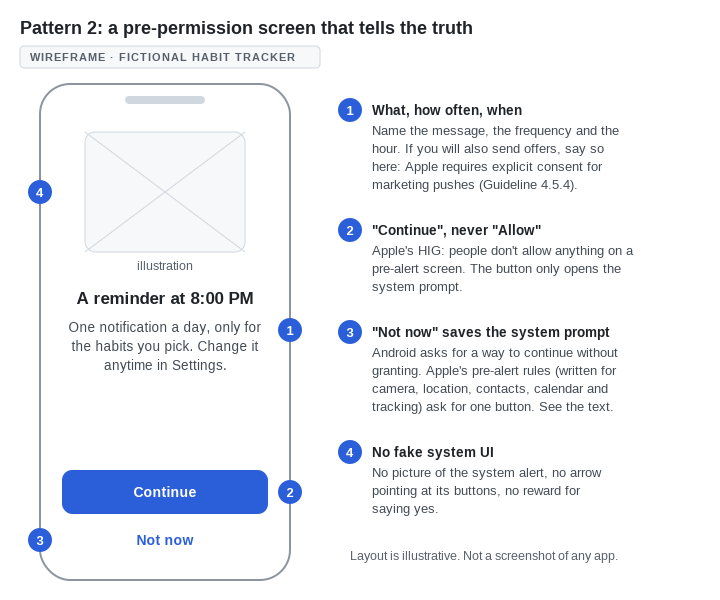
Use one when the context alone doesn’t explain the request, for example during onboarding. Neither system prompt can say why you’re asking, so this screen does that work: what you’ll send, how often, and at what hour. If you’ll also send promotions, say so here. Apple’s Guideline 4.5.4 requires explicit opt-in “via consent language displayed in your app’s UI” for marketing pushes, plus an in-app way to opt out, and the HIG’s managing notifications page asks for an in-app settings screen.
The HIG’s Privacy page has rules for “pre-alert” screens, and they’re clear about wording: title the single button with a term like “Continue” or “Next,” not “Allow.” Its rules for tracking requests add that “people don’t allow anything in a pre-alert screen,” and ban showing an image of the standard alert or a visual cue pointing at its Allow button. Nothing in that reasoning is specific to tracking.
One rule needs a judgment call. Apple’s pre-alert section, written for camera, microphone, location, contacts, calendar and tracking, asks for a single button and no cancel option. Android says the opposite: “Always provide the option to cancel.” Notifications aren’t on Apple’s list.
Our recommendation: on Android, always include “No thanks.” On iOS, show the pre-prompt only behind an explicit action like the “Remind me” toggle, where the person already chose; then a single Continue button fits both the rule and the moment.
Write the pre-prompt in the person’s language, with the time in their format. Sample headlines (have a native speaker review before shipping):
| Locale | Headline |
|---|---|
| en-US | A reminder at 8:00 PM |
| es-ES | Un recordatorio a las 20:00 |
| de-DE | Eine Erinnerung um 20:00 Uhr |
| pt-BR | Um lembrete às 20:00 |
| ja-JP | 毎日20:00にリマインダー |
| hi-IN | रात 8:00 बजे एक रिमाइंडर |
| ar | تذكير الساعة 8:00 مساءً |
Provisional authorization on iOS
Provisional authorization (iOS 12+) lets the notifications make their own case. Add .provisional to the options and iOS grants it without an alert. Notifications then arrive quietly: no sound or banner, not on the Lock Screen, only in Notification Center history, with buttons to keep or turn them off. See the provisional authorization glossary entry for the short version.
let center = UNUserNotificationCenter.current()

do {
    try await center.requestAuthorization(options: [.alert, .sound, .badge, .provisional])
} catch {
    // Handle errors that may occur during requestAuthorization.
}
Know the trade-off. Tapping Keep leads to Deliver Immediately or Deliver in Scheduled Summary, and Deliver Immediately still doesn’t let your app show alerts, play sounds or badge the icon. Turn Off asks for confirmation, then denies. Until the person picks, authorizationStatus reports .provisional.
Provisional fits apps whose first notification is useful by itself, like a news digest’s morning summary or a habit streak. It fits poorly when the point of a notification is to interrupt, like a timer.
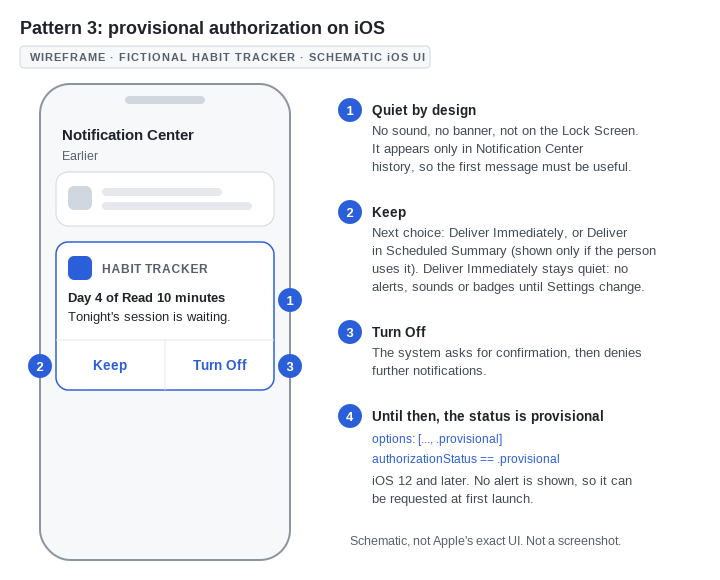
Because no alert appears, Apple says you can request provisional authorization when the app first launches.
Recovering: a Settings link where the feature lives
After a denial, the only route back is the Settings app. Put the link where the person feels the loss, under the “Remind me” toggle (“Notifications are off. Turn on in Settings.”), not in a modal on every launch.
import UIKit

@MainActor
func openNotificationSettings() async {
    let urlString: String
    if #available(iOS 16.0, *) {
        urlString = UIApplication.openNotificationSettingsURLString
    } else {
        urlString = UIApplication.openSettingsURLString
    }
    if let url = URL(string: urlString) {
        await UIApplication.shared.open(url)
    }
}
Re-read the status whenever the app returns to the foreground. Apple notes people can change authorization “at any time,” and a toggle that still shows “off” after they fixed it in Settings is a bug.
Android: a rationale screen with shouldShowRequestPermissionRationale
Android’s workflow is: wait for the action that needs the permission, check checkSelfPermission(), and if it’s denied, call shouldShowRequestPermissionRationale(). If that returns true, show your educational screen with a way to continue without granting; otherwise request directly. Android’s docs don’t list every case in which it returns true, so treat it as a signal, not a counter.
class HabitActivity : AppCompatActivity() {

    private val requestPermissionLauncher =
        registerForActivityResult(ActivityResultContracts.RequestPermission()) { isGranted ->
            if (isGranted) {
                // Schedule the 8:00 PM reminder.
            } else {
                // Keep the habit, leave the reminder off, show the Settings hint.
            }
        }

    // Called when the user turns on "Remind me".
    private fun onReminderToggled() {
        if (Build.VERSION.SDK_INT < Build.VERSION_CODES.TIRAMISU) {
            // No runtime permission before Android 13; check areNotificationsEnabled() instead.
            return
        }
        when {
            ContextCompat.checkSelfPermission(this, Manifest.permission.POST_NOTIFICATIONS) ==
                PackageManager.PERMISSION_GRANTED -> {
                // Schedule the reminder.
            }
            ActivityCompat.shouldShowRequestPermissionRationale(
                this, Manifest.permission.POST_NOTIFICATIONS
            ) -> {
                // Your rationale screen with "Continue" and "No thanks".
                // "Continue" calls requestPermissionLauncher.launch(...).
                showReminderRationale()
            }
            else -> {
                // After a permanent denial no dialog appears; route to Settings instead.
                requestPermissionLauncher.launch(Manifest.permission.POST_NOTIFICATIONS)
            }
        }
    }

    private fun openAppNotificationSettings() {
        val intent = Intent(Settings.ACTION_APP_NOTIFICATION_SETTINGS).apply {
            putExtra(Settings.EXTRA_APP_PACKAGE, packageName)
        }
        startActivity(intent)
    }
}
The else branch covers both a first request and a permanent denial. Neither the permission check nor the rationale call returns a “never asked” value, so keep your own count of dialog launches per install; at two denials, show the Settings link instead of a button that silently does nothing. To retest from scratch, the runtime permissions doc gives adb shell pm clear-permission-flags PACKAGE_NAME PERMISSION_NAME user-set user-fixed.
4. What not to do
Most of these are rules, not taste. Each one comes from the platform’s own text.
- Prompting at first launch with no context. Apple’s HIG says “avoid requesting permission at launch unless the data or resource is required for your app to function.” Android’s page opens with “let them familiarize themselves with your app.”
- Gating the app behind the permission. Guideline 5.1.2(i): your app “may not require users to enable system functionalities (e.g. push notifications, location services, tracking)” to access functionality or content, or to receive compensation.
- Rewards for saying yes. The same guideline names “monetary or other compensation, including but not limited to gift cards and codes.” A streak freeze in exchange for enabling notifications is the habit-tracker version.
- Fake system dialogs. The HIG’s tracking-request rules ban showing an image of the standard alert and annotating the screen behind it, and its pre-alert rules rule out a button titled “Allow.” Guideline 5.1.1(iv) says apps must not “manipulate, trick, or force people to consent.”
- Re-prompt loops on Android. After
USER_FIXED,launch()shows nothing. A button that calls it again and again looks broken to the person and to you. - Marketing without consent. Guideline 4.5.4 and the HIG both require explicit opt-in for promotional pushes, separate from the system permission.
5. Measuring opt-in correctly
“Opt-in rate” usually means three different numbers, and only one of them tells you whether your prompt works.
| Metric | Numerator | Denominator | What it answers |
|---|---|---|---|
| Pre-prompt continue rate | Taps on Continue | Pre-prompt views | Is your screen’s wording and placement working? |
| System prompt acceptance | Grants | System prompts actually shown | Does the moment you chose convince people? |
| Reachable share (what reports call opt-in rate) | Active devices whose current state allows notifications | Active devices, with “active” written down | How much of your audience can you reach today? |
Installs are the wrong denominator for the first two. They include people who never reached the “Remind me” toggle, so moving the prompt later can make an install-based rate look worse while acceptance improves.
“Actually shown” needs care. On iOS, log the prompt only if the status was .notDetermined right before the call; otherwise no alert appeared. On Android, log it only if the permission wasn’t granted and your launch counter for that install is under two. Log the pre-prompt view, the Continue tap, the system prompt and the result as separate events, with the app version, so you can compare placements release by release.
Then split every number:
- By platform and OS version. Android below 13 has no runtime prompt, and upgraded 13+ devices may be pre-granted. Report new installs on 13+ separately, or your acceptance rate includes people who were never asked.
- Provisional as its own bucket. A
.provisionaldevice, or one that chose Deliver Immediately (authorized, withalertSettingnot enabled), isn’t reachable the way a banner-enabled device is. - By country and language, since your pre-prompt copy is translated and each language is effectively its own variant.
Re-read the state on every foreground on both platforms. People turn notifications off in Settings, and a reachable share computed from install-time answers overstates your reach more each month.
6. Web push permission
Since iOS and iPadOS 16.4, web apps added to the Home Screen can receive Web Push through the Push API, Notifications API and Service Workers. WebKit’s announcement (Feb 16, 2023) sets two conditions: the site needs a web app manifest with display set to standalone or fullscreen, and the permission request must be “in response to direct user interaction,” such as tapping a Subscribe button.
The same rule is good practice everywhere. MDN notes that Firefox has disallowed notification permission requests not triggered by a user gesture since version 72. Chrome 80 introduced a quieter permission UI, turned on automatically for users who typically block requests and for sites with very low acceptance rates.
// Runs only inside a click handler, as WebKit and MDN describe.
subscribeButton.addEventListener("click", async () => {
  const permission = await Notification.requestPermission();
  if (permission !== "granted") {
    // "denied" or "default": keep the button and explain how to re-enable in browser settings.
    return;
  }
  const registration = await navigator.serviceWorker.ready;
  const subscription = await registration.pushManager.subscribe({
    userVisibleOnly: true,
    applicationServerKey, // your VAPID public key (RFC 8292)
  });
  await fetch("/api/push-subscriptions", {
    method: "POST",
    headers: { "Content-Type": "application/json" },
    body: JSON.stringify(subscription),
  });
});
7. What Oricato does here
Early access · launching soon
Oricato is a push notification platform for app studios. It doesn’t choose your moment; that’s your product’s job. What its SDKs handle, per their READMEs:
- Permission helpers. Android:
Oricato.requestPermission(activity),getPermissionStatus()(GRANTED,DENIED,NOT_DETERMINED) andopenNotificationSettings(). iOS:Oricato.requestPermission(options:completion:)andgetPermissionStatus(_:), which includesprovisional. Flutter:Oricato.requestPermission({provisional})andgetPermissionStatus(). - Permission reported, whoever asked. All three SDKs re-read the permission when the app returns to the foreground, including right after a system dialog closes and on return from Settings, so a grant from your own prompt counts too. On Android and Flutter, a push that arrives while notifications are off reports
denied, and the server stops targeting that device. - Opt-in you can see. Each subscriber’s permission state shows on the dashboard’s Audience page, with counts by platform.
Web push and email are Early access channels in the same composer. The full SDK reference is under SDKs.
Request early access if you want help setting this up for your apps.
FAQ
Can I ask again after a user says no?
On iOS, not with the system alert: after the first answer, requestAuthorization returns the stored decision without showing anything, so the only way back is the Settings app, which you can open with UIApplication.openNotificationSettingsURLString on iOS 16 and later. On Android 13 and later you get one more try: after a first denial, show your rationale screen when shouldShowRequestPermissionRationale() returns true, then request again. A second denial is treated as permanent and the dialog stops appearing, so send people to Settings.ACTION_APP_NOTIFICATION_SETTINGS instead.
Should I ask on first launch?
Usually not. Apple says asking in context works better than asking automatically on first launch, and Android suggests letting people get to know the app first, for example after a user action or on the third or fourth launch. The exception on iOS is provisional authorization: it shows no alert, so Apple says you can request it when the app first launches.
Sources
All accessed Oct 16, 2026. Apple’s documentation and HIG pages show no last-updated date except where a change log is noted.
- Apple Developer, Asking permission to use notifications.
- Apple Developer, requestAuthorization(options:completionHandler:).
- Apple Developer, UNAuthorizationOptions.provisional (iOS 12.0+).
- Apple Developer, UNAuthorizationStatus.
- Apple Developer, openNotificationSettingsURLString (iOS 16.0+) and openSettingsURLString (iOS 8.0+).
- Apple Human Interface Guidelines, Notifications (change log Oct 24, 2023), Managing notifications and Privacy (change log Jun 21, 2023).
- Apple, App Review Guidelines, Guidelines 4.5.4, 5.1.1(iv) and 5.1.2(i), last updated Jun 8, 2026.
- Android Developers, Notification runtime permission, last updated Oct 1, 2026.
- Android Developers, Request runtime permissions, last updated Oct 1, 2026.
- Android API reference, Settings (
ACTION_APP_NOTIFICATION_SETTINGS,EXTRA_APP_PACKAGE), last updated Aug 28, 2026. - Android API reference, NotificationManagerCompat (
areNotificationsEnabled), last updated Jun 24, 2026. - WebKit blog, Web Push for Web Apps on iOS and iPadOS, Brady Eidson and Jen Simmons, Feb 16, 2023.
- MDN, Notification.requestPermission(), last modified Jun 11, 2025, and PushManager.subscribe(), last modified Jun 23, 2025.
- Chromium Blog, Introducing quieter permission UI for notifications, Jan 7, 2020.
- Airship, Mobile App Push Notification Benchmarks for 2026 (data Jan to Dec 2025).
- Airship, 2025 Mobile App Push Notification Benchmarks (PDF), pages 6, 7 and 12.
- YouGov, How consumers feel about push notifications in 2021, Graeme Bruce, Jun 4, 2021.
- Oricato Android, iOS and Flutter SDK READMEs (
sdk/android/README.md,sdk/ios/README.md,sdk/flutter/README.md), for section 7 only.
Keep reading
All guides
Android push notifications: permission, channels and Doze
Android push in 2026: asking for POST_NOTIFICATIONS, designing channels, message priority, Doze, App Standby buckets and OEM battery managers.
iOS push notifications setup: APNs key, NSE, rich media
iOS push setup in Swift: capabilities, the APNs auth key, provisional permission, interruption levels and a Notification Service Extension for images.