Push notifications not delivered: a troubleshooting tree
Push notifications not arriving? Walk a decision tree from server response to the lock screen: tokens, payloads, Android power rules, iOS Focus and more.
Oricato Team Published 12 min read
Your server says the push went out, and the phone shows nothing. The short answer: a 200 from FCM only means Firebase accepted the message. Between that response and a person seeing a banner there are several places a notification can stop, and each one leaves a signal you can check: an errorCode, a token state, a channel importance, a priority field, an authorization status. Walk the nine checks below from the top, one yes/no at a time, and stop at the first “no.”
For the end-to-end picture, read how push notifications reach a phone first.
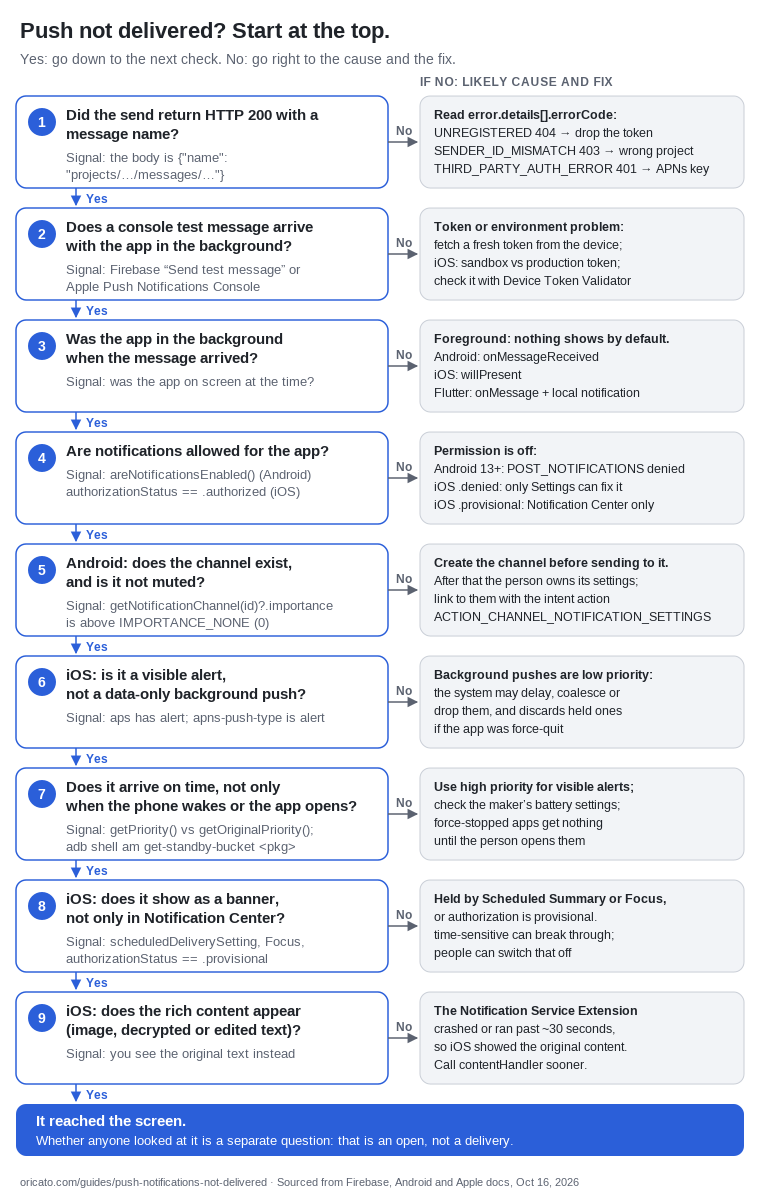
Printable: the SVG prints on one Letter or A4 page.
Quick lookup: symptom to signal
| Symptom | Where to look | Likely cause |
|---|---|---|
| Send fails with 404 | error.details[].errorCode in the response |
UNREGISTERED: the token is dead |
| Send fails with 403 | Same field | SENDER_ID_MISMATCH: token belongs to another Firebase project |
| Android works, iOS sends fail with 401 | Same field | THIRD_PARTY_AUTH_ERROR: APNs key or certificate missing or invalid |
| Send fails with 400 | details[] with google.rpc.BadRequest |
Payload too big, reserved data key, bad TTL or token format |
| 200, nothing on screen, app open | Your foreground handler | Notification messages aren’t shown automatically in the foreground |
| 200, nothing at all on Android 13+ | areNotificationsEnabled() |
POST_NOTIFICATIONS denied |
| Arrives only when the phone wakes | getPriority() vs getOriginalPriority() |
Normal priority in Doze, or a high-priority message was lowered |
| iOS: only in Notification Center | UNNotificationSettings |
Provisional authorization, Scheduled Summary or Focus |
| iOS: plain text, image missing | Notification Service Extension | Extension crashed or ran past its time limit |
Start here: did the send request succeed?
A successful FCM HTTP v1 send returns HTTP 200 and a body with one field, name: projects/<project-id>/messages/<message-id>. Anything else is an error body whose details array holds the reason, in an entry of type google.firebase.fcm.v1.FcmError under errorCode. To check a payload without delivering it, add "validate_only": true next to message.
curl -X POST \
  -H "Authorization: Bearer $ACCESS_TOKEN" \
  -H "Content-Type: application/json" \
  -d '{
    "validate_only": true,
    "message": {
      "token": "DEVICE_REGISTRATION_TOKEN",
      "notification": {
        "title": "Tu racha de 30 días te espera",
        "body": "La lección de hoy dura 5 minutos."
      }
    }
  }' \
  https://fcm.googleapis.com/v1/projects/<FIREBASE_PROJECT_ID>/messages:send
The error codes that matter, from Firebase’s error-code table:
errorCode |
HTTP | What it means | What to do |
|---|---|---|---|
UNREGISTERED |
404 | App account no longer registered (uninstall, expiry) | Delete the token |
SENDER_ID_MISMATCH |
403 | Token issued for a different sender | Use the app’s own Firebase project |
INVALID_ARGUMENT |
400 | Bad token, package name, size, data key or TTL | Read the BadRequest field violation |
THIRD_PARTY_AUTH_ERROR |
401 | APNs credential invalid or missing | Upload a valid APNs key to Firebase |
QUOTA_EXCEEDED (429), UNAVAILABLE (503) and INTERNAL (500) are retry cases: back off exponentially and honor Retry-After. Our planned FCM error pages go deeper on each code.
Firebase is moving from registration tokens to Firebase Installation IDs: the projects.messages reference (updated Sep 8, 2026) marks
message.tokendeprecated in favor ofmessage.fid, and accepts both during the transition.
Token problems
Stale or unregistered (UNREGISTERED)
A registration token dies when the app is uninstalled or unregisters, when Google refreshes it, or when the underlying APNs token expires. On Android, FCM expires a registration after 270 days of inactivity; on iOS it relies on APNs, which has no such timer. Firebase’s advice for UNREGISTERED is blunt: delete the token.
APNs also issues a new token after a restore from backup, a new device or an OS reinstall, which is why Apple says never to cache tokens locally. Sending to APNs directly, the equivalents are 410 Unregistered and 410 ExpiredToken.
Wrong project (SENDER_ID_MISMATCH)
A token is tied to the sender that registered it. If your server authenticates with one Firebase project and the app shipped with another project’s google-services.json or GoogleService-Info.plist, every send returns 403 SENDER_ID_MISMATCH. Typical case: a staging build on a test phone, a production server sending to it.
iOS sandbox vs production tokens and APNs environment
The aps-environment entitlement decides which APNs environment the app registers with. Xcode sets it from the provisioning profile: development (sandbox) for development builds, production for App Store and TestFlight. A token from one environment doesn’t work in the other.
Direct to APNs, sandbox is api.sandbox.push.apple.com and production is api.push.apple.com. A token sent to the wrong one returns 400 BadDeviceToken (“the token matches the environment” is Apple’s hint), and a key restricted to the other environment returns 403 BadEnvironmentKeyIdInToken. Through FCM, check that the Firebase project holds an APNs key for the environment you’re testing.
Payload problems
Over 4,096 bytes
FCM rejects messages over 4,096 bytes (2,048 for topics), keys and values included; APNs has the same limit and returns 413 PayloadTooLarge. That’s bytes, not characters, and UTF-8 needs up to 3 bytes for most non-Latin scripts (RFC 3629):
| Language | Sample title | Characters | UTF-8 bytes |
|---|---|---|---|
| English | Your daily lesson is ready | 26 | 26 |
| Spanish | Tu lección diaria está lista | 28 | 30 |
| Arabic | درسك اليومي جاهز | 16 | 30 |
| Hindi | आज का पाठ तैयार है | 18 | 46 |
| Japanese | 今日のレッスンの準備ができました | 16 | 48 |
| Chinese (Simplified) | 你的每日课程已准备好 | 10 | 30 |
Byte counts computed with Python’s UTF-8 encoder for these sample strings. A payload that fits in English can fail in Japanese.
Malformed apns headers or missing apns-push-type
Through FCM, APNs headers go in message.apns.headers as strings; unset, FCM defaults apns-expiration to 30 days and apns-priority to 10. Apple recommends apns-push-type on iOS and warns that a missing or mismatched value can mean an error, a delay or a dropped notification. Bad values return 400 InvalidPushType or 400 BadPriority.
{
  "message": {
    "token": "DEVICE_REGISTRATION_TOKEN",
    "notification": {
      "title": "Deine Tageslektion ist bereit",
      "body": "Fünf Minuten, dann ist die Serie gesichert."
    },
    "apns": {
      "headers": {
        "apns-push-type": "alert",
        "apns-priority": "10"
      }
    }
  }
}
Data-only messages on iOS (background limits)
A data message to iOS becomes a background notification, and FCM allows only "apns-priority": "5" for it. Apple treats these as low priority: no delivery guarantee, possible throttling, only the newest one held, and a held one discarded if the app was force-quit. Apple’s guidance is no more than two or three per hour. If people need to see it, send an alert.
Android channel_id that doesn’t exist
On Android 8.0 (API 26) and higher, every notification needs a channel. If an FCM message names a channel_id the app hasn’t created, FCM falls back to the manifest’s com.google.firebase.messaging.default_notification_channel_id, or its own default channel. It still appears, with that channel’s importance.
Notifications you post yourself are stricter: post one without specifying a channel and “the notification doesn’t appear and the system logs an error.” A Developer options toggle shows a warning toast when that happens.
Android device problems
Setup detail lives in our Android push notifications guide.
POST_NOTIFICATIONS denied (API 33+)
On Android 13 (API 33) and higher, notifications need the POST_NOTIFICATIONS runtime permission, and “Don’t allow” blocks every channel. Apps targeting 12L or lower get no second prompt until a reinstall or a target-SDK update. Call areNotificationsEnabled() before you blame the server. To reset a test device:
adb shell pm revoke PACKAGE_NAME android.permission.POST_NOTIFICATIONS
adb shell pm clear-permission-flags PACKAGE_NAME android.permission.POST_NOTIFICATIONS user-set
adb shell pm clear-permission-flags PACKAGE_NAME android.permission.POST_NOTIFICATIONS user-fixed
Channel muted or importance lowered
Once a channel exists, the person controls it; your code can’t change its importance. Read it with getNotificationChannel(id) and getImportance(): IMPORTANCE_NONE (0) never shows, IMPORTANCE_MIN doesn’t appear in the status bar, IMPORTANCE_LOW makes no sound, and only IMPORTANCE_HIGH (4) gives a heads-up banner. If the setting defeats the point of the channel, link to it with Settings.ACTION_CHANNEL_NOTIFICATION_SETTINGS.
Normal vs high priority, Doze and App Standby buckets
An unplugged phone left still with the screen off enters Doze: network access is suspended until maintenance windows that grow further apart. Normal-priority FCM messages wait for those windows; high-priority messages can wake the device.
If high-priority messages don’t produce a visible notification, FCM may lower them to normal, judging 7 days of behavior per app account. Log remoteMessage.priority next to remoteMessage.originalPriority to catch it. The docs also disagree on the default (the priority guide says normal; the REST reference says high for notification messages), so set android.priority explicitly.
App Standby buckets (Android 9+) limit jobs, alarms and, in the rare bucket, network access. Since Android 13 the bucket no longer caps high-priority messages. Check it with adb shell am get-standby-bucket PACKAGE_NAME, and force Doze with adb shell dumpsys deviceidle force-idle (undo with unforce and adb shell dumpsys battery reset).
OEM battery managers (sourced, not measured)
Some manufacturers add their own background limits. This table is sourced, not measured: we haven’t tested these devices, menus change between OS versions, and dontkillmyapp.com is a community site (last rebuilt Jun 9, 2026; several entries describe Android 13-era menus).
| Manufacturer | Setting (as the source names it) | Where it lives, per the source | Source |
|---|---|---|---|
| Samsung | Put unused apps to sleep; Sleeping, Deep sleeping and Never sleeping apps | Settings > Battery and device care > Battery > Background usage limits | Samsung US Support |
| Samsung | Deep sleeping apps “can’t perform any activities, including notifications or updates.” Sleeping applies to apps unused for about 3 days that affect system health; deep sleeping after 16 days, “subject to change” | Developer reference; the menu path varies by model and One UI version | Samsung Developer |
| Xiaomi | Background autostart (MIUI 14); App Battery Saver set to No restriction | Settings > Apps > your app > App permissions; Security > Battery > App Battery Saver | dontkillmyapp.com/xiaomi |
| OnePlus | Battery optimization: Don’t optimize; Sleep standby optimization (the page says it “will prevent push notifications from being delivered”) | Settings > Battery > Battery optimization > Advanced optimization | dontkillmyapp.com/oneplus |
| Oppo | Allow Auto Start-up; per-app Power Saver | App info | dontkillmyapp.com/oppo |
| vivo | Autostart; Background power consumption management | Settings > More settings > Applications > Autostart; Settings > Battery | dontkillmyapp.com/vivo |
| realme | App battery management: Allow background activity | Settings > Battery > Power saving settings > App battery management | dontkillmyapp.com/realme |
| Motorola | App battery usage: Unrestricted | Settings > Apps > your app > App battery usage | dontkillmyapp.com/motorola |
| Google Pixel / stock Android | Background restrictions; battery optimization | Settings > Apps > your app > Advanced > Battery (Android 9 path) | dontkillmyapp.com/google |
Android’s docs confirm that a manual battery restriction restricts background execution, and Firebase wrote in 2019 that FCM “will not deliver messages to apps which were put into background restriction by the user.”
Force-stopped apps don’t receive FCM
“Force stop” puts an app in Android’s stopped state until the person launches it or interacts with it, through a widget for example. Firebase’s 2019 post on message delivery says a force-stopped app may not get messages, and Android 15 also cancels all its pending intents. Your server can’t see any of this; on Android 15+, ApplicationStartInfo.wasForceStopped() tells you on the next launch.
iOS device problems
Setup questions belong in our iOS push notifications guide.
Authorization status
UNAuthorizationStatus has five values: notDetermined, denied, authorized, provisional and ephemeral. .denied can only be undone by the person in Settings. Read the full picture, not just the status, because alerts can be off while Notification Center is on.
let settings = await UNUserNotificationCenter.current().notificationSettings()
print("status:", settings.authorizationStatus.rawValue)
print("alerts:", settings.alertSetting.rawValue,
      "lock screen:", settings.lockScreenSetting.rawValue,
      "scheduled:", settings.scheduledDeliverySetting.rawValue,
      "time-sensitive:", settings.timeSensitiveSetting.rawValue)
Focus and Scheduled Summary
If the person put your app in Scheduled Summary, notifications arrive bundled at times they chose; scheduledDeliverySetting reports it, and Focus can hold them too. The payload key interruption-level takes passive, active, time-sensitive or critical. Apple says time-sensitive notifications “can break through system controls such as Notification Summary and Focus,” and people can turn that off, so keep it for content that really is time-bound.
Provisional (delivered quietly to Notification Center)
With provisional authorization there’s no prompt, and notifications arrive quietly: no sound, no banner, no Lock Screen, only Notification Center history. Even after Keep and Deliver Immediately they stay quiet until the person changes settings. “It’s there if I swipe down” with .provisional is working as designed.
Notification Service Extension crashes or timeouts
The extension runs only for alerts with "mutable-content": 1 in aps, and didReceive(_:withContentHandler:) gets no more than 30 seconds. Past that, iOS calls serviceExtensionTimeWillExpire(), and if no content comes back, it shows the original notification. So an alert without its image means the extension failed; no alert at all points elsewhere in the tree.
App in the foreground
Android. A notification message that arrives while the app is in the foreground goes to onMessageReceived and isn’t displayed for you. In the background, the system tray shows it and onMessageReceived isn’t called. Firebase says the handler gets only a few seconds; anything slower, like fetching an image, belongs in WorkManager.
class PushService : FirebaseMessagingService() {
    override fun onMessageReceived(remoteMessage: RemoteMessage) {
        Log.d("PushDebug", "id=${remoteMessage.messageId} " +
            "priority=${remoteMessage.priority} original=${remoteMessage.originalPriority}")
        val n = remoteMessage.notification ?: return // data messages: handle separately
        val manager = NotificationManagerCompat.from(this)
        if (!manager.areNotificationsEnabled()) return
        // "lessons" must already exist as a channel (created at app startup)
        val builder = NotificationCompat.Builder(this, "lessons")
            .setSmallIcon(R.drawable.ic_notification)
            .setContentTitle(n.title)
            .setContentText(n.body)
            .setAutoCancel(true)
        manager.notify(remoteMessage.messageId.hashCode(), builder.build())
    }
}
iOS. When the app is in the foreground, iOS calls userNotificationCenter(_:willPresent:withCompletionHandler:). If your delegate doesn’t implement it, the system behaves as if you passed no presentation options. Assign the delegate before the app finishes launching, or you can miss notifications.
func userNotificationCenter(_ center: UNUserNotificationCenter,
                            willPresent notification: UNNotification) async
    -> UNNotificationPresentationOptions {
    return [.banner, .list, .sound]
}
Flutter. Foreground messages arrive on FirebaseMessaging.onMessage, and notification messages aren’t displayed by default on either platform. On iOS, setForegroundNotificationPresentationOptions turns display on, and the options persist until you set them back to false. On Android, Firebase says to create a high-importance channel and show the notification yourself, usually with flutter_local_notifications. More in our Flutter push notifications guide.
const channel = AndroidNotificationChannel(
  'lessons', 'Lessons',
  importance: Importance.high,
);
final local = FlutterLocalNotificationsPlugin();

Future<void> setUpForegroundDisplay() async {
  await local.initialize(
    settings: const InitializationSettings(
      android: AndroidInitializationSettings('@mipmap/ic_launcher'),
    ),
  );
  await local
      .resolvePlatformSpecificImplementation<
          AndroidFlutterLocalNotificationsPlugin>()
      ?.createNotificationChannel(channel);

  await FirebaseMessaging.instance
      .setForegroundNotificationPresentationOptions(
          alert: true, badge: true, sound: true);

  FirebaseMessaging.onMessage.listen((RemoteMessage message) {
    final n = message.notification;
    if (n == null || n.android == null) return; // iOS shows it via the options above
    local.show(
      id: n.hashCode,
      title: n.title,
      body: n.body,
      notificationDetails: NotificationDetails(
        android: AndroidNotificationDetails(channel.id, channel.name,
            importance: Importance.high),
      ),
    );
  });
}
How to test on real devices
Firebase console. Go to DevOps & Engagement > Messaging, create a campaign, choose Notifications, then “Send test message” and paste the device’s token. Put the app in the background first. Two limits: console sends don’t support Android-specific fields, and they aren’t proxied by Google Play services the way HTTP v1 sends are.
Apple Push Notifications Console. It sends test pushes to a device token, validates device tokens and JWTs, and generates the matching cURL command. Its Delivery Log, keyed by the apns-unique-id APNs returns, exists only in the development environment and keeps logs for 7 days. Only team admins can send to production.
adb. Filter logcat to your own tag with the documented syntax, for example adb logcat PushDebug:D *:S (quote it if your shell expands *). Combine it with the Doze, standby-bucket and permission commands above to reproduce the “arrives late” and “never arrives” cases on purpose.
What delivery receipts can and can’t tell you
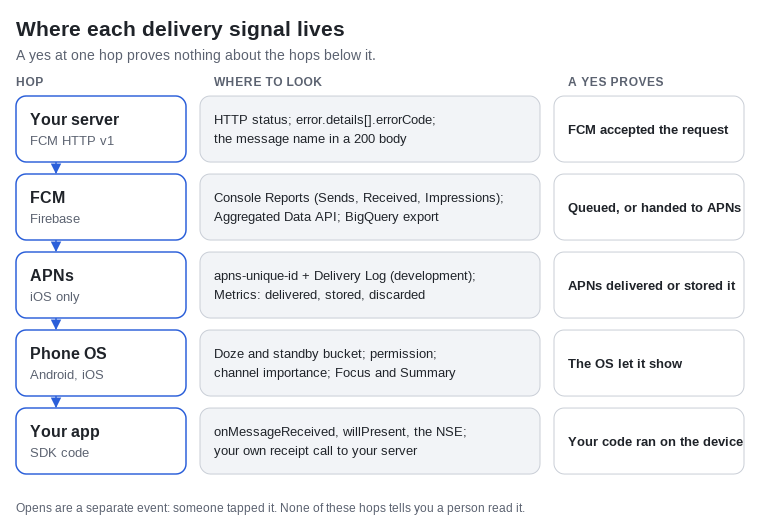
A 200 means accepted. Everything after that is partial:
- FCM console reports: Sends (enqueued or handed to APNs), Received (Android only, SDK 18.0.1+), Impressions (Android notification messages shown in the background) and Opens. Figures can lag up to 24 hours.
- FCM Aggregated Data API: Android only. Outcomes such as delivered, pending,
droppedTooManyPendingMessagesanddroppedDeviceInactive, pluspriorityLowered. History covers 7 days, delayed up to 5 days, best effort. - BigQuery export: events such as
MESSAGE_ACCEPTEDandMESSAGE_DELIVERED; delivery events aren’t exported by default. - APNs Metrics: delivered, stored and discarded, with reasons like “Stored - Device Offline.” APNs keeps one notification per app per device while it waits, so newer sends can overwrite older ones; stored items expire after your
apns-expirationor 30 days. - onDeletedMessages: Android calls it when more than 100 messages were pending or the device hadn’t connected for over a month. Treat it as “do a full sync.”
None of these says a person saw it. The closest thing to “delivered” is your own app code reporting arrival, which has gaps too: on Android, background notification messages go straight to the system tray without calling onMessageReceived, and proxied notifications are displayed by Google Play services without starting the app. An open is a different event again; our push notification analytics page explains how we keep the two apart.
What Oricato does here
Status: Early access · launching soon. Oricato sends mobile push through FCM, which hands iPhone messages to APNs, so every check above still applies, and it can’t make a blocked notification arrive.
What it adds is the reading of signals. Health checks explain the common breaks in plain words: Firebase rejected your credentials, the APNs key in your Firebase project is missing or invalid, or some devices were built with a different Firebase project, with the share of phones affected. Reports keep Sent (Firebase accepted it) and Delivered (the Oricato SDK on the device confirmed arrival) as separate numbers, and Delivered is never higher than Sent. When FCM answers UNREGISTERED, the token is marked invalid and isn’t sent to again.
Request early access if you’d like to try it on your own apps.
Frequently asked questions
Why do notifications arrive late on some Android phones?
Why do I get them on Android but not iOS?
Does a 200 response mean the phone got it?
Sources
- Firebase: Understanding message delivery (last updated Oct 15, 2026) · accessed Oct 16, 2026
- Firebase: FCM error codes (last updated Oct 15, 2026) · accessed Oct 16, 2026
- Firebase: ErrorCode, FCM REST v1 reference (last updated Feb 3, 2026) · accessed Oct 16, 2026
- Firebase: projects.messages, FCM REST v1 reference (last updated Sep 8, 2026) · accessed Oct 16, 2026
- Firebase: projects.messages.send (last updated Sep 21, 2026) · accessed Oct 16, 2026
- Firebase: Send a message using FCM HTTP v1 API (last updated Oct 15, 2026) · accessed Oct 16, 2026
- Firebase: Best practices for FCM registration management (last updated Oct 15, 2026) · accessed Oct 16, 2026
- Firebase: Receive messages in an Android app (last updated Oct 15, 2026) · accessed Oct 16, 2026
- Firebase: Set up an FCM client app on Android (last updated Oct 15, 2026) · accessed Oct 16, 2026
- Firebase: Android message priority (last updated Oct 15, 2026) · accessed Oct 16, 2026
- Firebase: Set up an FCM client app on Apple platforms (last updated Oct 15, 2026) · accessed Oct 16, 2026
- Firebase: Receive messages in an Apple app (last updated Oct 15, 2026) · accessed Oct 16, 2026
- Firebase: Receive messages in a Flutter app (last updated Oct 15, 2026) · accessed Oct 16, 2026
- Firebase Blog: What's the life of a message? (Feb 2019) · accessed Oct 16, 2026
- pub.dev: firebase_messaging 17.0.0, setForegroundNotificationPresentationOptions · accessed Oct 16, 2026
- pub.dev: flutter_local_notifications 22.3.2 API reference · accessed Oct 16, 2026
- Android Developers: Optimize for Doze and App Standby (last updated Aug 18, 2026) · accessed Oct 16, 2026
- Android Developers: App Standby Buckets (last updated Oct 1, 2026) · accessed Oct 16, 2026
- Android Developers: Power management restrictions (last updated May 19, 2026) · accessed Oct 16, 2026
- Android Developers: Create and manage notification channels (last updated Oct 1, 2026) · accessed Oct 16, 2026
- Android Developers: Notification runtime permission (last updated Oct 1, 2026) · accessed Oct 16, 2026
- Android Developers: Create a notification (last updated Oct 7, 2026) · accessed Oct 16, 2026
- Android Developers: Behavior changes, all apps (Android 15) (last updated Oct 1, 2026) · accessed Oct 16, 2026
- Android Developers: Android 3.1 APIs, launch controls on stopped applications · accessed Oct 16, 2026
- Android Developers: Logcat command-line tool · accessed Oct 16, 2026
- Apple Developer: Sending notification requests to APNs · accessed Oct 16, 2026
- Apple Developer: Handling notification responses from APNs · accessed Oct 16, 2026
- Apple Developer: APS Environment Entitlement · accessed Oct 16, 2026
- Apple Developer: Registering your app with APNs · accessed Oct 16, 2026
- Apple Developer: Pushing background updates to your App · accessed Oct 16, 2026
- Apple Developer: Generating a remote notification · accessed Oct 16, 2026
- Apple Developer: Asking permission to use notifications · accessed Oct 16, 2026
- Apple Developer: UNNotificationSettings · accessed Oct 16, 2026
- Apple Developer: UNNotificationInterruptionLevel.timeSensitive · accessed Oct 16, 2026
- Apple Developer: didReceive(_:withContentHandler:) · accessed Oct 16, 2026
- Apple Developer: UNUserNotificationCenterDelegate · accessed Oct 16, 2026
- Apple Developer: userNotificationCenter(_:willPresent:withCompletionHandler:) · accessed Oct 16, 2026
- Apple Developer: Testing notifications using the Push Notification Console · accessed Oct 16, 2026
- Apple Developer: Viewing the status of push notifications using Metrics and APNs · accessed Oct 16, 2026
- Samsung US Support: Sleeping apps on your Galaxy device · accessed Oct 16, 2026
- Samsung Developer: App management (sleeping and deep sleeping apps) · accessed Oct 16, 2026
- dontkillmyapp.com (community reference; Samsung, Xiaomi, OnePlus, Oppo, vivo, realme, Motorola and Google pages) · accessed Oct 16, 2026
- RFC 3629: UTF-8, a transformation format of ISO 10646 · accessed Oct 16, 2026
Keep reading
All guides
How push notifications work: from your server to a phone
How a push notification travels from your server through FCM and APNs to a phone, what the OS does next, and what can fail at each hop. Diagrams included.
FCM HTTP v1 API: auth, payloads, errors and retries
A server-side guide to the FCM HTTP v1 API: OAuth tokens, message anatomy, Android and APNs overrides, every error code with the right action, and backoff.