FCM HTTP v1 API: auth, payloads, errors and retries
A server-side guide to the FCM HTTP v1 API: OAuth tokens, message anatomy, Android and APNs overrides, every error code with the right action, and backoff.
Oricato Team Published 13 min read

If your server still sends Authorization: key=… to https://fcm.googleapis.com/fcm/send, it is calling an API
whose shutdown began on July 22, 2024. Its replacement, FCM HTTP v1, asks five things of a production sender: a
service account, a short-lived OAuth 2.0 access token that you cache and refresh, one JSON message per request with
android and apns overrides, a decision for every error code, and retries that honor Retry-After.
This guide covers each of those, with cURL, Node and Go samples.
How this guide was checked. The samples have not been run yet, so there is no “Tested on” box. Facts come from Google, Apple and IETF pages read Oct 16, 2026 (see Sources), and each code block names the doc it follows. For the big picture first, read how push notifications work.
What changed from the legacy API
The legacy HTTP protocol took a server key, a flat JSON body and up to 1,000 tokens in one registration_ids
array, according to the archived legacy reference. HTTP v1 changes all three.
| Legacy HTTP | HTTP v1 | |
|---|---|---|
| Endpoint | POST https://fcm.googleapis.com/fcm/send |
POST https://fcm.googleapis.com/v1/projects/{project_id}/messages:send |
| Auth header | Authorization: key=<server key> |
Authorization: Bearer <OAuth 2.0 access token> |
| Body | Flat fields: to, notification, data |
Everything inside "message", plus an optional "validate_only" flag |
| Recipients | to, or registration_ids (1 to 1,000 tokens) |
Exactly one of token, fid, topic, condition |
| Per-platform options | Resolved by the backend | Explicit android, apns and webpush blocks |
data values |
Nested JSON allowed | Strings only; stringify nested JSON yourself |
Google framed the security change plainly in the migration guide: a leaked access token “can only be maliciously used for an hour or so”. A leaked server key worked until someone rotated it.
Where did the migration guide go? On Oct 16, 2026,
firebase.google.com/docs/cloud-messaging/migrate-v1returned HTTP 404. The dates and the quote above come from an archived copy of the guide dated Jan 8, 2026, linked in the sources.
Two newer changes matter if you are writing a sender today:
tokenis deprecated in favor offid. The REST reference (last updated Sep 8, 2026) marksmessage.tokendeprecated and addsmessage.fid, the Firebase Installation ID. During the transition,tokenalso accepts an FID, so existing senders keep working.- A second round of deprecations started in September 2026. The Account ID server APIs (
iid.googleapis.com) and device groups are deprecated and will be decommissioned on September 29, 2027. New users cannot start using them after January 1, 2027. If you calliid/infoonly to check whether a token is valid, Firebase’s FAQ says to send through HTTP v1 withvalidate_onlyset totrueinstead.
Leaving a hosted vendor at the same time? See the OneSignal migration guide.
Service account and access token
HTTP v1 requests are authorized as a Google service account. On Compute Engine, GKE, App Engine or Cloud Functions,
Firebase recommends Application Default Credentials (ADC), which use the attached service account and need no key
file. Anywhere else, download a JSON key (Firebase console, Settings > Service accounts > Generate New Private
Key) and point GOOGLE_APPLICATION_CREDENTIALS at it, which Firebase calls “more secure” than a path in code.
Scope https://www.googleapis.com/auth/firebase.messaging
The messages.send reference also accepts https://www.googleapis.com/auth/cloud-platform, but that scope covers
every Google Cloud API the account can reach. Ask for the narrow one. The caller also needs the IAM permission
cloudmessaging.messages.create on the project.
Getting a token with google-auth-library (Node)
GoogleAuth reads ADC, mints the token, caches it and refreshes it 5 minutes before expiry (the default
eagerRefreshThresholdMillis in 11.3.1). That version needs Node 22 or later, which also gives you a global fetch.
// google-auth-library 11.3.1 README, Node.js 22.
const { GoogleAuth } = require('google-auth-library');

const PROJECT_ID = 'lingora-app';
const auth = new GoogleAuth({
  scopes: ['https://www.googleapis.com/auth/firebase.messaging'],
});

async function sendMessage(message) {
  const accessToken = await auth.getAccessToken(); // cached; refreshed before expiry
  const res = await fetch(
    `https://fcm.googleapis.com/v1/projects/${PROJECT_ID}/messages:send`,
    {
      method: 'POST',
      headers: {
        Authorization: `Bearer ${accessToken}`,
        'Content-Type': 'application/json',
      },
      body: JSON.stringify({ message }),
      signal: AbortSignal.timeout(10_000), // scale-fcm: at least a 10 s timeout
    },
  );
  const body = await res.json().catch(() => ({}));
  return { status: res.status, retryAfter: res.headers.get('retry-after'), body };
}
Go (golang.org/x/oauth2/google)
google.FindDefaultCredentials follows the same ADC order. For a key file, its TokenSource is an
oauth2.ReuseTokenSource, which caches the token and renews it 10 seconds before expiry (defaultExpiryDelta in
v0.37.0). Create the sender once; a new TokenSource per request throws the cache away.
// golang.org/x/oauth2 v0.37.0 (package google; its go.mod requires Go 1.26).
package fcmsend

import (
	"bytes"
	"context"
	"io"
	"net/http"
	"time"

	"golang.org/x/oauth2"
	"golang.org/x/oauth2/google"
)

const endpoint = "https://fcm.googleapis.com/v1/projects/lingora-app/messages:send"

type Sender struct {
	ts     oauth2.TokenSource // reused across requests; caches the access token
	client *http.Client
}

func NewSender(ctx context.Context) (*Sender, error) {
	creds, err := google.FindDefaultCredentials(ctx, "https://www.googleapis.com/auth/firebase.messaging")
	if err != nil {
		return nil, err
	}
	return &Sender{ts: creds.TokenSource, client: &http.Client{Timeout: 10 * time.Second}}, nil
}

// Send posts one request body ({"message": {...}}) and returns the raw answer for classification.
func (s *Sender) Send(ctx context.Context, body []byte) (int, http.Header, []byte, error) {
	tok, err := s.ts.Token()
	if err != nil {
		return 0, nil, nil, err
	}
	req, err := http.NewRequestWithContext(ctx, http.MethodPost, endpoint, bytes.NewReader(body))
	if err != nil {
		return 0, nil, nil, err
	}
	req.Header.Set("Authorization", "Bearer "+tok.AccessToken)
	req.Header.Set("Content-Type", "application/json; charset=UTF-8")
	resp, err := s.client.Do(req)
	if err != nil {
		return 0, nil, nil, err // network error or timeout: retryable
	}
	defer resp.Body.Close()
	respBody, err := io.ReadAll(resp.Body)
	return resp.StatusCode, resp.Header, respBody, err
}
If you load key JSON from your own store instead of a file, use google.CredentialsFromJSONWithType(ctx, data, google.ServiceAccount, scope). The older CredentialsFromJSON is marked deprecated in v0.37.0 because it does not
validate the credential configuration it is given.
cURL with gcloud for testing
For a one-off test, let gcloud mint the token. validate_only makes FCM check the request without delivering it.
# and "gcloud auth application-default print-access-token" (Google Cloud SDK reference, last updated 2026-05-27).
export GOOGLE_APPLICATION_CREDENTIALS="$HOME/keys/lingora-app-fcm-sender.json"
ACCESS_TOKEN="$(gcloud auth application-default print-access-token \
  --scopes=https://www.googleapis.com/auth/firebase.messaging)"

curl -X POST \
  -H "Authorization: Bearer ${ACCESS_TOKEN}" \
  -H "Content-Type: application/json" \
  -d '{
    "validate_only": true,
    "message": {
      "token": "DEVICE_REGISTRATION_TOKEN",
      "notification": { "title": "Neue Lektion bereit", "body": "Fünf Minuten Vokabeln für heute." }
    }
  }' \
  https://fcm.googleapis.com/v1/projects/lingora-app/messages:send
A success returns the message name, in the form {"name": "projects/lingora-app/messages/<id>"}.
Caching and refreshing
Firebase only calls the token “short-lived”. Google’s OAuth 2.0 service-account doc shows "expires_in": 3600, and
the gcloud reference gives 3,600 seconds as the default lifetime. Keep one token per service account, let the library
refresh it early, and treat an HTTP 401 with no FcmError in details as a rejected access token: force a refresh
and resend once. If that fails too, stop and alert, because the credential is the problem.
Message anatomy
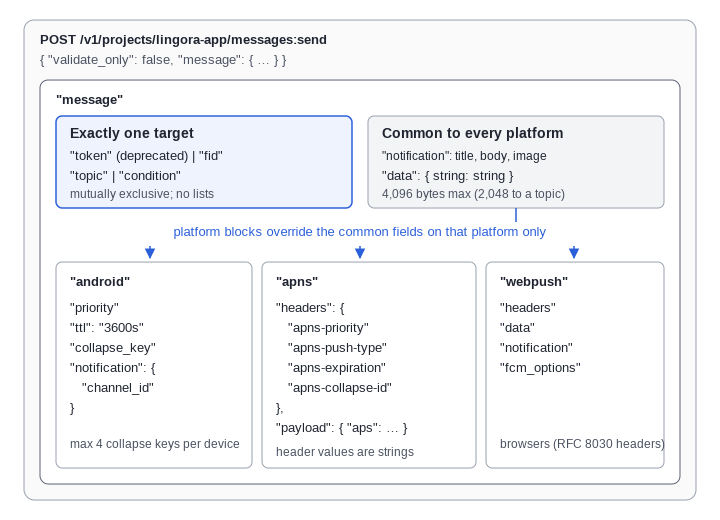
Every request body is {"validate_only": bool, "message": {…}}. Inside message, the common fields go to every
platform, and the android, apns and webpush blocks override them on that platform only.
notification vs data
notification holds title, body and image, and the FCM SDK displays it when the app is in the background.
data is a string-to-string map your code handles; alone, it makes a data message. With
both, a background app shows the notification and gets the data when the person taps it.
Three rules catch people out:
- The payload limit is 4,096 bytes, or 2,048 bytes for messages to topics, keys and values included. That is bytes, not characters: in UTF-8, most Japanese, Chinese and Hindi characters take 3 bytes each (RFC 3629), so a 1,000 character Japanese body already uses about 3,000 bytes.
- Keys can’t be reserved words:
from,message_type, or anything starting withgoogle.orgcm.notification.. - Values must be strings. Send
"count": "3", not"count": 3. Firebase’s error-codes page shows exactly that mistake coming back asINVALID_ARGUMENTonmessage.data[0].value.
The android block (priority, ttl, collapse_key, notification.channel_id)
{
  "message": {
    "token": "DEVICE_REGISTRATION_TOKEN",
    "notification": {
      "title": "Tu racha de 12 días sigue viva",
      "body": "Cinco minutos de vocabulario y mañana serán 13."
    },
    "data": { "lesson_id": "es-a2-0412" },
    "android": {
      "priority": "normal",
      "ttl": "3600s",
      "collapse_key": "streak",
      "notification": { "channel_id": "streak_reminders" }
    },
    "apns": {
      "headers": {
        "apns-priority": "5",
        "apns-push-type": "alert",
        "apns-expiration": "1793642400",
        "apns-collapse-id": "streak"
      },
      "payload": {
        "aps": { "sound": "default" }
      }
    }
  }
}
Apple’s “Sending notification requests to APNs”. The sample is a fictional language-learning app’s streak reminder.*
priorityis"normal"or"high"(notification messages default to high, data messages to normal). High can wake a sleeping device; normal may wait to save battery. A streak reminder can wait, so we set normal.ttlis a Duration string such as"3600s", from 0 to 2,419,200 seconds (28 days); the default is the maximum."0s"means deliver now or drop it. See TTL.collapse_keylets a newer message replace an older one still waiting, with at most four keys per device. Notification messages are always collapsible and ignore it. See collapse key.notification.channel_idmust match a channel the app has already created (Android 8.0 and later). Otherwise FCM falls back to the channel in the app manifest.
The apns block (apns-priority, apns-push-type, apns-expiration, apns-collapse-id; payload.aps)
apns.headers is a map of APNs request headers, all as strings. apns.payload is the APNs JSON, including aps.
apns-priority:10sends immediately,5respects the device’s power state,1never wakes the device. If you set nothing, FCM uses10. Apple says to use10only when the person needs to act now.apns-push-type:alertfor anything the person sees or hears,backgroundfor silent updates. Apple recommends sending it on every push and requires it on watchOS 6 and later.apns-expiration: a UNIX timestamp in seconds, not a duration;0means try once and don’t store. FCM defaults to 30 days. Compute it at send time; the sample’s value is just an example date.apns-collapse-id: the iOS equivalent of a collapse key, at most 64 bytes.
Silent updates have stricter rules. A data-only message to iOS may only use apns-priority 5. Apple’s
background push uses an aps that holds only "content-available": 1, needs apns-push-type: background, and
treats priority 10 as an error. Apple also warns not to send more than two or three background pushes per hour.
webpush block
Browser options (headers such as TTL, data, notification, an HTTPS fcm_options.link) are in the
WebpushConfig reference;
Oricato’s own browser channel is Early access, so we skip it here.
Sending to a token, a topic, or a condition
Set exactly one target. They are mutually exclusive, and there is no array form.
{ "message": { "topic": "digest-de", "notification": { "title": "Ihr Morgenüberblick", "body": "Fünf Meldungen, drei Minuten." } } }{ "message": { "condition": "'digest-ja' in topics && ('sports' in topics || 'tech' in topics)", "data": { "edition": "2026-10-16" } } }topics” (page last updated 2026-10-15). Fictional news-digest app.*
token/fid: one app install. Use it for anything personal, local-time or per-language.topic: the name without a/topics/prefix. Topic sends have the smaller 2,048-byte payload limit.condition: a boolean expression over up to five topics. Firebase suggests a dedicated topic if you send to the same combination often.
v1 has no recipient list, so 800 devices means 800 requests from your worker pool, or the Admin SDK’s
sendEachForMulticast, which takes up to 500 FIDs or tokens per call.
Errors and what to do with each
An HTTP v1 error looks like {"error": {"code", "message", "status", "details": […]}}. Read the FCM-specific
errorCode from the detail whose @type is type.googleapis.com/google.firebase.fcm.v1.FcmError. Fall back to
status, then to the HTTP code. Unlike the legacy API, which could answer 200 with an error inside, v1 uses real
HTTP status codes.
errorCode |
HTTP | What it means | What to do | Retry? |
|---|---|---|---|---|
UNSPECIFIED_ERROR |
not stated | No more information is available | Log the full body; mark the send failed; alert if it repeats | No |
INVALID_ARGUMENT |
400 | A field is invalid: bad token, wrong package name, payload over 4,096 bytes (2,048 for topics), reserved data key, ttl out of range |
If the error points at the token and the payload is valid, delete the token. Otherwise fix the payload | No |
UNREGISTERED |
404 | The app account is no longer registered: uninstall, expired token, app updated without messaging configured | Delete the token and stop sending to it | No |
SENDER_ID_MISMATCH |
403 | The token belongs to a different sender (Firebase project) than the credentials | Check you are using the right project’s service account. These tokens will not work with this one | No |
QUOTA_EXCEEDED |
429 | Project, single-device or topic rate exceeded | Wait for Retry-After, or 60 s if absent; back off from a 1-minute minimum; slow down sends to that device |
Yes |
UNAVAILABLE |
503 | FCM is overloaded | Honor Retry-After; exponential backoff with jitter |
Yes |
INTERNAL |
500 | Unknown internal error | Retry with backoff; contact Firebase support if it persists | Yes |
THIRD_PARTY_AUTH_ERROR |
401 | The APNs certificate or auth key, or the browser VAPID key (RFC 8292), is invalid or missing | Check the development and production APNs (or VAPID) credentials on the Firebase project | No |
(no FcmError) UNAUTHENTICATED |
401 | The OAuth access token was rejected | Refresh the access token; resend once | Once |
(no FcmError) PERMISSION_DENIED |
403 | The service account lacks cloudmessaging.messages.create on this project |
Fix IAM; check the Firebase Cloud Messaging API is enabled | No |
The first eight rows are Google’s ErrorCode enum (last updated Feb 3, 2026). The last two are standard
google.rpc statuses (401 and 403 in code.proto) that show up without an FCM detail. Their actions are our reading,
not Google text.
INVALID_ARGUMENT can mean the token or the payload, and Firebase says to delete a token on it only if the payload
is valid. Look for a google.rpc.BadRequest violation on message.token, or the message “The registration token is
not a valid FCM registration token”. Also keep the two 401s apart: THIRD_PARTY_AUTH_ERROR is your APNs or VAPID
credential, which no OAuth refresh will fix.
If tokens are valid and FCM answers 200 but nothing shows up on the phone, the problem is past FCM. Our delivery troubleshooting checklist picks up there.
Retries and backoff
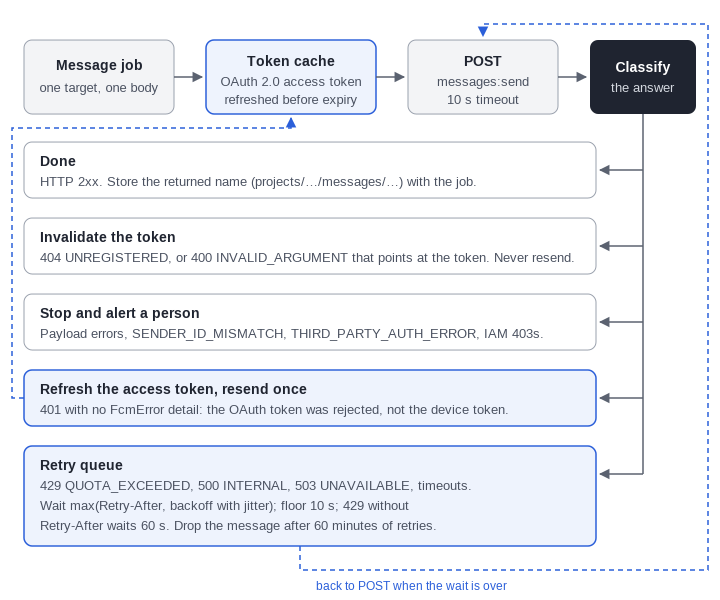
Retry only 429, 500, 503 and network timeouts. Firebase’s scaling guide is blunt about the rest: for 400, 401,
403 and 404, “abort, and do not retry”. The one exception we make is the single forced token refresh on a
detail-less 401.
Firebase’s rules: a request timeout of at least 10 seconds; no retry sooner than 10 seconds; on 429, wait for
Retry-After or 60 seconds; on 500 and 503, exponential backoff with jitter; and after 60 minutes of failures,
stop, because the error is misclassified or retries are feeding an outage.
The UNAVAILABLE entry in the ErrorCode reference uses a 1 s, 2 s, 4 s sequence as its example. The scaling
guide’s 10-second floor is stricter, and that is the one we follow. Retry-After can be a number of seconds
or an HTTP date (RFC 9110, section 10.2.3), so parse both.
// and "ErrorCode" (page last updated 2026-02-03). Standard library only; Go 1.22+ (math/rand/v2, built-in max).
package fcmsend

import (
	"math/rand/v2"
	"net/http"
	"strconv"
	"time"
)

// nextWait returns the wait before retry n (1, 2, 3, ...), or false once the message is too old to keep trying.
func nextWait(n, status int, h http.Header, firstTry, now time.Time) (time.Duration, bool) {
	if now.Sub(firstTry) >= 60*time.Minute {
		return 0, false
	}
	backoff := 10 * time.Minute
	if n <= 6 {
		backoff = (10 * time.Second) << (n - 1) // 10 s, 20 s, 40 s ... 320 s
	}
	jittered := backoff/2 + rand.N(backoff/2) // somewhere between half and all of it
	floor := 10 * time.Second                 // never sooner than 10 s
	if status == http.StatusTooManyRequests {
		floor = 60 * time.Second // QUOTA_EXCEEDED: 1-minute minimum; 60 s when Retry-After is absent
	}
	return max(jittered, floor, retryAfter(h, now)), true
}

// retryAfter reads delay-seconds or an HTTP-date.
func retryAfter(h http.Header, now time.Time) time.Duration {
	v := h.Get("Retry-After")
	if v == "" {
		return 0
	}
	if secs, err := strconv.Atoi(v); err == nil && secs > 0 {
		return time.Duration(secs) * time.Second
	}
	if t, err := http.ParseTime(v); err == nil && t.After(now) {
		return t.Sub(now)
	}
	return 0
}
Put retries on a queue with a due time, not in a sleeping goroutine: a queue survives a deploy.
Throttling and quotas
The numbers below are Firebase’s own, from “FCM Throttling and Quotas” (last updated Oct 15, 2026, read Oct 16, 2026). Google says they can change, so check the page before you plan around them.
- Project quota: 600,000 messages per minute by default. It counts messages, not requests, and the minutes are not aligned to the clock.
- Client errors count. 4xx responses other than 429 use quota. Sending to tokens you should have deleted burns sends you could have used.
- One Android device: up to 240 messages per minute and 5,000 per hour. For iOS, FCM returns an error once APNs limits are exceeded.
- Collapsible messages: a burst of 20 per app per device, refilling at one message every 3 minutes.
FCM sees more than double its usual traffic in the first 30 seconds to 2 minutes of each hour, so the scaling guide asks you to avoid the 2 minutes around :00, :15, :30 and :45, and to ramp from zero to full rate over at least 60 seconds.
Security: storing the service account
A service account key works like a password that skips 2-step verification. Google’s IAM guide (last updated Oct 13, 2026) says the best key is no key:
- On Google Cloud, don’t download a key. Use the attached service account through ADC. For workloads on AWS,
Azure or another OIDC provider, the
golang.org/x/oauth2/googledocs describe Workload Identity Federation as the keyless route. Google Cloud organizations created on or after May 3, 2024 block key creation by default. - Least privilege. Create a dedicated sender account. The predefined role
roles/firebasecloudmessaging.admin(Firebase Cloud Messaging API Admin) includescloudmessaging.messages.create, and also topic-subscription management. A custom role with onlycloudmessaging.messages.createis tighter. Never give a sender Editor or Owner. - Where the key lives. Google advises against keeping keys on a file system, and prefers an HSM, a TPM or a software key store. It also advises against storing service account keys in Secret Manager or similar cloud secret stores: if your app already has an identity that cloud recognizes, it can use that identity instead.
- Never commit it, and scan commits for secrets with a pre-commit hook.
- Rotate and expire. Downloaded keys never expire by default. Rotate on a schedule and set expiry times where you can.
One more rule: send only from a trusted server. Firebase’s migration guide says sending directly from client app logic “carries extreme security risk and is not supported”, and Google’s IAM guide warns that a key embedded in a binary can be extracted by anyone who has the binary.
What Oricato does here
Early access · launching soon. Oricato sends mobile push through FCM HTTP v1. Our sender handles answers this way:
UNREGISTERED, orINVALID_ARGUMENTthat points at the token: the token is marked invalid and isn’t sent to again.SENDER_ID_MISMATCH: flagged as tokens from the wrong Firebase project, so you can fix the credentials.- HTTP 401 without an
FcmErrordetail: the access token is refreshed once and the request resent once. 429,500,503and network errors: retried, honoringRetry-After.- Firebase service account keys you upload are encrypted at rest.
You bring your own Firebase project and APNs key. Oricato uses the same FCM and APNs pipes, so delivery is no better than a sender built to this page; what it saves you is building and running one. See the REST API reference.
Request early access if you would rather not maintain this pipeline yourself.
Frequently asked questions
Can I still use the FCM server key?
How long does an FCM access token last?
Sources
- Send a message using FCM HTTP v1 API (Firebase; served at the old auth-server URL; last updated 2026-10-15) · accessed Oct 16, 2026
- Migrate from legacy FCM APIs to HTTP v1 (archived copy of Jan 8, 2026; the live URL returned 404 on Oct 16, 2026) · accessed Oct 16, 2026
- Firebase Cloud Messaging HTTP protocol, legacy reference (archived copy of Dec 28, 2024) · accessed Oct 16, 2026
- REST Resource: projects.messages (Firebase; last updated 2026-09-08) · accessed Oct 16, 2026
- Method: projects.messages.send (Firebase; last updated 2026-09-21) · accessed Oct 16, 2026
- ErrorCode (Firebase; last updated 2026-02-03) · accessed Oct 16, 2026
- FCM Error Codes (Firebase; last updated 2026-10-15) · accessed Oct 16, 2026
- Firebase Cloud Messaging message types (Firebase; last updated 2026-10-15) · accessed Oct 16, 2026
- Setting the lifespan of a message (Firebase; last updated 2026-10-15) · accessed Oct 16, 2026
- Collapsible and non-collapsible messages (Firebase; last updated 2026-10-15) · accessed Oct 16, 2026
- Send messages to topics (Firebase; last updated 2026-10-15) · accessed Oct 16, 2026
- Send messages using the Admin SDK (Firebase; last updated 2026-10-15) · accessed Oct 16, 2026
- Best practices for FCM registration management (Firebase; last updated 2026-10-15) · accessed Oct 16, 2026
- FCM troubleshooting and FAQ: legacy API deprecations (Firebase; last updated 2026-10-15) · accessed Oct 16, 2026
- Best practices when sending FCM messages at scale (Firebase; last updated 2026-10-15) · accessed Oct 16, 2026
- FCM Throttling and Quotas (Firebase; last updated 2026-10-15) · accessed Oct 16, 2026
- Using OAuth 2.0 for Server to Server Applications (Google Identity; last updated 2026-03-23) · accessed Oct 16, 2026
- gcloud auth application-default print-access-token (Google Cloud SDK reference; last updated 2026-05-27) · accessed Oct 16, 2026
- google-auth-library-nodejs (README and src/auth/authclient.ts; npm version 11.3.1, published 2026-10-15) · accessed Oct 16, 2026
- google-auth-library on the npm registry (version 11.3.1, engines node >=22) · accessed Oct 16, 2026
- golang.org/x/oauth2/google package documentation (module v0.37.0, published 2026-08-25) · accessed Oct 16, 2026
- golang.org/x/oauth2 token.go at v0.37.0 (defaultExpiryDelta) · accessed Oct 16, 2026
- golang.org/x/oauth2 v0.37.0 go.mod (go 1.26.0) · accessed Oct 16, 2026
- Sending notification requests to APNs (Apple Developer) · accessed Oct 16, 2026
- Generating a remote notification (Apple Developer) · accessed Oct 16, 2026
- Pushing background updates to your App (Apple Developer) · accessed Oct 16, 2026
- Best practices for managing service account keys (Google Cloud IAM; last updated 2026-10-13) · accessed Oct 16, 2026
- Firebase Cloud Messaging roles and permissions (Google Cloud IAM) · accessed Oct 16, 2026
- google/rpc/code.proto (googleapis) · accessed Oct 16, 2026
- RFC 9110, HTTP Semantics, section 10.2.3 Retry-After · accessed Oct 16, 2026
- RFC 3629, UTF-8 · accessed Oct 16, 2026
- RFC 8292, VAPID for Web Push · accessed Oct 16, 2026
Keep reading
All guides
How push notifications work: from your server to a phone
How a push notification travels from your server through FCM and APNs to a phone, what the OS does next, and what can fail at each hop. Diagrams included.
Push notifications not delivered: a troubleshooting tree
Push notifications not arriving? Walk a decision tree from server response to the lock screen: tokens, payloads, Android power rules, iOS Focus and more.