Migrate from OneSignal without losing subscribers
Move off OneSignal without losing reach: who owns your push tokens, the overlap release, identity mapping, a cut-over checklist and a rollback plan.
Oricato Team Published 10 min read
When teams plan to migrate from OneSignal, the fear is losing reach: people who get your notifications today getting nothing next month. That’s avoidable, because OneSignal doesn’t own the thing that reaches the phone. FCM and APNs issue push tokens to your app on each device, for your Firebase project and your Apple team. OneSignal stores records that point at them.
The safe path: one app release running both SDKs, identity mapped through your own user IDs, every scheduled message moved and checked, and a cut-over measured against a baseline. Each step is below, plus a printable checklist and a rollback plan.
*Facts come from OneSignal, Firebase, Apple, Android and IETF docs read Oct 16, 2026 (see Sources).
Still choosing a destination? Start with OneSignal alternatives. If the free plan pushed you here, the 1,000 MAU limit explainer covers the dates.
What you own and what you don’t in a OneSignal migration
| Thing | Who issues or holds it | What it means for the move |
|---|---|---|
| Firebase project and service account key | You: OneSignal’s setup has you create the key in your own project and upload it | A new sender needs credentials for the same project; FCM HTTP v1 sends go to projects/PROJECT_ID/messages:send |
| Android registrations (FCM tokens) | FCM, per app account | OneSignal: “Device tokens are tied to the original Sender ID.” Switching projects resets them until people reopen the app |
APNs auth key (.p8) |
Your Apple developer team | Apple: token-based auth can send for “all or a subset of your company’s apps” |
| APNs device tokens | APNs, “unique to both the device and your app” | Your app can forward them to any server |
| Notification permission | The operating system, per app | No SDK owns it, so it survives the switch |
| Your user IDs | You | Stored in OneSignal as external_id, up to 128 characters |
Subscription id and onesignal_id |
OneSignal (UUID v4) | Useless elsewhere; don’t make them your new keys |
| Segments, templates, Journeys, history | OneSignal | Export or rebuild; nothing carries over by itself |
So a new SDK in your app registers each device again the first time that phone opens the new build. Firebase is moving FCM from registration tokens to Firebase Installation IDs, both “fully co-supported” during the transition; either way, the registration belongs to your app and project. What you can’t change without a release is code on phones that never update.
Find both credentials first. If nobody can locate the Firebase service account OneSignal uses, create a new key in that same project. OneSignal’s FAQ warns that a different Sender ID invalidates existing tokens, and people stop getting push “until they reopen the app and generate new tokens.” Check that the .p8 key lives in your company’s Apple account, not a contractor’s.
Plan the move in two halves: server first, apps second
The server half is your scheduler, triggered sends such as a habit tracker’s streak reminder, segment logic and templates. The app half is one release per app with the new SDK.
Do the server half first: point a copy of your scheduler at the new platform and send to test devices in every language. List the fields your requests use, such as included_segments, filters, include_aliases.external_id, send_after, delayed_option and template_id, and the exact URL: OneSignal’s current reference uses POST https://api.onesignal.com/notifications.
By release day, the scheduler must send each campaign to two disjoint audiences. Move one app at a time, simplest send pattern first.
The overlap release
Shipping both SDKs in one release
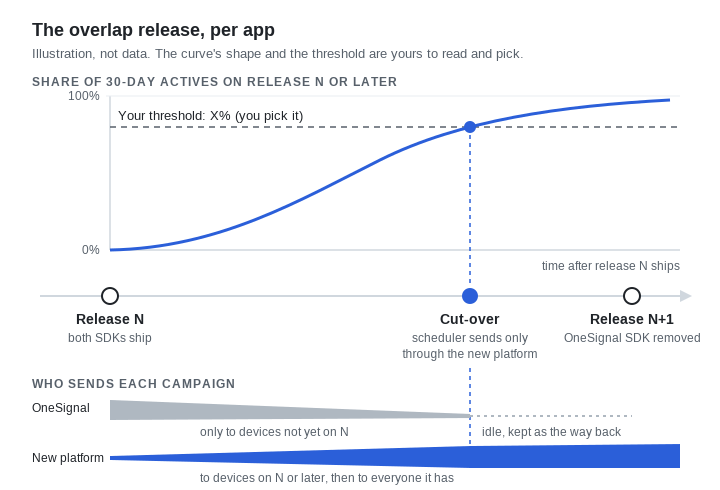
Release N keeps the OneSignal SDK and adds the new one. Phones on older builds stay reachable only through OneSignal; phones on N register with both.
Ask for permission once. Apple’s docs say the first authorization request prompts the person, the system records the answer, and later requests don’t prompt. On Android 13 (API level 33) and later, POST_NOTIFICATIONS is a runtime permission. Let one SDK, or your own code, own the prompt.
Keep the audiences disjoint. Otherwise a phone on release N gets every campaign twice. One fix: tag those devices through the OneSignal SDK, then exclude the tag from every OneSignal send.
// Release N only: mark this install as reachable through the new platform.
OneSignal.User.addTag("migrated", "1")"filters": [
{ "field": "tag", "key": "migrated", "relation": "not_exists" }
]OneSignal notes that negation relations such as not_exists are slower and that tag limits depend on your plan. An app_version filter with < also works, if your version strings compare as you expect.
Test both receive paths on real devices. Confirm a message from each platform shows and opens. On iOS, check how each SDK hooks the notification delegate and service extension, and test rich media from both sides.
How long the overlap runs
Run it by adoption, not by calendar: track the share of 30-day active devices on release N or later, from analytics, store consoles or OneSignal’s version field. Per the Export subscriptions CSV reference, game_version holds Android’s versionCode and iOS’s CFBundleShortVersionString.
Choose your threshold, X%, before you ship. At cut-over, devices on old builds can only hear from OneSignal, so you have three honest choices for that tail:
- Keep OneSignal sending to the tail with the
migratedexclusion, for good or for a set period. - Stop sending to the tail and accept that those devices get no push until they update.
- Shorten the tail. If older builds check a minimum supported version from your server, raising it asks people to update.
X decides how many devices that choice affects, which is why it comes first.
The 30-day window matches Firebase’s view of freshness: it treats a registration as stale after a month without connecting, and on Android expires one after 270 days of inactivity.
Mapping identity
External user ID
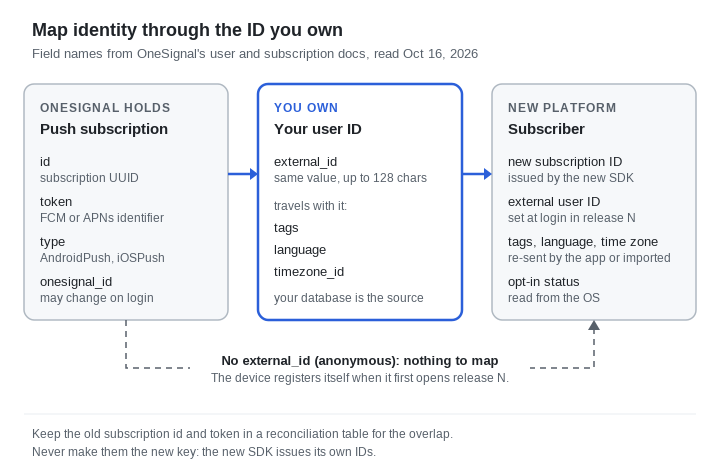
Your user ID is the bridge. OneSignal stores it as external_id, and its Mobile SDK reference says to call login(external_id) every time the app starts once the user’s ID is known. In release N, call the new SDK’s equivalent at the same moments with the same value. Each logged-in device then attaches to the right person without an import.
Anonymous subscriptions are separate users in OneSignal with no external_id, so there’s nothing to map: each registers itself when it opens release N. One OneSignal user can hold up to 20 subscriptions, so a phone and a tablet stay two devices under one ID.
Tags and segments
OneSignal tags are user-level key-value pairs with string values. Re-send tags your own data can produce, such as plan tier or streak length, from your server or app; copy only tags that exist nowhere else.
Segments are saved filters, so rebuild them from an inventory. Flag any that use OneSignal-only properties such as session_count, or the time_elapsed_gt relation, which OneSignal lists as paid-only.
Language and time zone
OneSignal stores language as an ISO 639-1 code and timezone_id as a TZ database name. The CSV’s timezone column is deprecated, so request timezone_id. Then check how your target handles regional variants: a language-learning app with learners in São Paulo and Lisbon, or readers of 简体 and 繁體 Chinese, needs to know whether pt-BR and zh-Hant survive or collapse.
Field mapping
| OneSignal field (where) | Meaning per OneSignal | Generic target field | Note |
|---|---|---|---|
external_id (user; CSV external_user_id) |
Your ID for the user | external_user_id |
Your key; max 128 characters |
onesignal_id (user) |
OneSignal’s UUID | lookup column only | May change when an External ID is assigned |
id (subscription) |
Subscription ID | legacy_subscription_id |
The new SDK issues its own |
token (CSV identifier) |
FCM or APNs identifier | push_token |
Only usable with the same sender or Apple team |
type (CSV device_type) |
0 iOSPush, 1 AndroidPush |
platform |
|
tags (user) |
String key-value pairs | tags |
Re-send derived tags |
language (user) |
ISO 639-1 code | language |
Check regional codes |
timezone_id (user) |
TZ database name | timezone (IANA) |
Skip the deprecated timezone column |
notification_types (CSV) |
1 or higher subscribed, -2 opted out |
opt_in_status (reference only) |
The OS holds real status; never widen consent |
last_active, session_count |
Activity | last_seen, baseline only |
Adoption denominator |
game_version (CSV) / app_version |
App build on the device | app_version |
Drives the overlap curve |
Moving scheduled and recurring messages
Build an inventory first: one row per message with source, audience, schedule, languages, payload and how it moves. Two rows for a fictional language-learning app:
| Message | Source | Audience | Schedule | Languages | Payload | Moves how |
|---|---|---|---|---|---|---|
| Daily lesson reminder | API (cron) | Subscribed Users |
delayed_option: "timezone", 6:30PM |
en, es, de, ja, hi, ar | data.screen = "lesson" |
Scheduler URL and key |
| Win-back after 7 days away | Journey | Built-in trigger | Journey wait step | en, es, pt-BR, fr | Template | Rebuild |
OneSignal’s “View messages” endpoint fills most of it (kind 0 dashboard, 1 API, 3 automated; 50 per request), but skips Journey messages and keeps API-sent ones for 30 days. Templates come from “View templates”.
Local-time sends need care: delayed_option: "timezone" with delivery_time_of_day: "8:00AM" means 8:00 AM in each person’s zone, whether Mexico City, Berlin or Tokyo. Your target needs an equivalent that handles half-hour zones such as Delhi (+5:30). delayed_option: "last-active" is OneSignal’s per-user option; decide what replaces it.
Check every template in every language plus the fallback, and preview Arabic right to left. Switch each recurring message off in OneSignal as it goes on in the new platform, never both at once.
Getting your data out
Export early, while you still have your current plan. OneSignal offers dashboard exports under Audience and Messages, and an API for subscriptions:
curl -X POST "https://api.onesignal.com/players/csv_export?app_id=<ONESIGNAL_APP_ID>" \
  -H "Authorization: Key <ONESIGNAL_REST_API_KEY>" \
  -H "Content-Type: application/json" \
  -d '{"extra_fields": ["external_user_id", "onesignal_id", "country", "timezone_id", "notification_types"]}'
The file lasts 3 days, one export per account runs at a time, and users without a subscription aren’t in it. Per-message events (sent, delivered, clicked, failed, unsubscribed) come from “Export audience activity CSV”, which can 404 for messages older than 30 days.
As of Oct 16, 2026, OneSignal’s pricing page lists “Notification Data Exports (CSV)” on Professional and Enterprise only, and “Reporting History” from up to 30 days (Free) to up to 2 years (Enterprise). Check your plan before you need it.
These files hold personal data: export only the columns you need, encrypt them, and delete them afterward. Our upcoming guide to exporting data from OneSignal goes deeper.
The cut-over checklist
Print it, or copy it into your tracker.
Measuring that nothing dropped
Before release N, record two weeks of daily sent, delivered and opened per platform, plus opted-in devices. Compare the same weekdays afterward, so a quiet Sunday doesn’t look like a drop.
| Baseline metric | Where to get it from OneSignal | Compare it with |
|---|---|---|
| Sent per day, per platform | Message reports, or “Export audience activity CSV” | New platform’s sent count, same weekdays |
| Delivered per day | “Delivered” (accepted by FCM or APNs) or “Confirmed Receipt” (device-confirmed) | The metric with the same meaning, not just the same name |
| Opened per day | “Clicked” in message reports | The new platform’s open or tap metric |
| Opted-in devices | notification_types of 1 or higher |
New opted-in subscribers plus OneSignal’s tail |
During the overlap, OneSignal’s numbers for old builds plus the new platform’s for release N should land inside your baseline range.
Compare like with like. FCM’s aggregated delivery data covers Android only, arrives up to 5 days late and is rounded. Read your new platform’s definition of delivered and opened before putting two charts side by side.
Watch failures. FCM HTTP v1 returns UNREGISTERED (HTTP 404) and INVALID_ARGUMENT (HTTP 400) for invalid targets. A climbing failure share in week one usually points to a registration or credentials problem, not lost people. Our FCM HTTP v1 guide explains each code.
What doesn’t move
Besides the IDs, last-active sends and segment properties covered above:
- Journeys. “View journey” returns each journey’s audience, schedule and node graph. Use it to document them, then rebuild or retire each one.
- In-app messages. OneSignal’s SDK renders them, so they leave with it.
- Web push subscribers. Under RFC 8292, section 4, a subscription can be restricted to the application server key that created it, so moving them depends on carrying that key pair, a project of its own.
- History you didn’t export stays in OneSignal, within its retention limits.
Rollback plan
While release N still contains the OneSignal SDK, rollback is a server-side switch: point the scheduler back at OneSignal, remove the migrated exclusion, and OneSignal reaches every phone it reached before. That’s why N+1 waits for a clean cut-over.
Write the triggers down before cut-over day: say, delivered or opened for release-N devices below baseline for a set number of days, or failures above a level you name.
Until N+1 is widely installed, keep the OneSignal app, its API key, a plan that lets it send, and the Firebase key uploaded to it. Revoking that key ends OneSignal’s Android sends, and your rollback.
What Oricato does here
Early access · launching soon
Oricato is a push notification platform for app studios. Its POST /api/v1/notifications endpoint accepts the common send fields of OneSignal’s create-message request, so server-side sending moves by changing a URL and a key; options it can’t match, such as delayed_option: "last-active", are refused with a plain error. On the language check above: Oricato normalizes pt-BR to pt (two Portuguese variants in one message keep one, with a warning), while zh-Hans and zh-Hant stay separate. Apps still need the Oricato Android, iOS or Flutter SDK in release N; web push, email and OneSignal history import (part of Oricato Intelligence) are in early access, and the code reference and /migrate cover the rest.
Sources
All accessed Oct 16, 2026.
- OneSignal documentation, Users.
- OneSignal documentation, User & Subscription properties.
- OneSignal documentation, Subscriptions.
- OneSignal documentation, Tags.
- OneSignal documentation, Android Firebase credentials.
- OneSignal documentation, Mobile SDK reference.
- OneSignal documentation, Exporting data.
- OneSignal API reference, Export subscriptions CSV.
- OneSignal API reference, Export audience activity CSV.
- OneSignal API reference, View messages.
- OneSignal API reference, View templates.
- OneSignal API reference, View journey.
- OneSignal API reference, Create message.
- OneSignal API reference, View user.
- OneSignal documentation, Push message reports.
- OneSignal, Pricing (plan rows only).
- Firebase, Best practices for FCM registration management, last updated Oct 15, 2026.
- Firebase, Send messages with the FCM HTTP v1 API, last updated Oct 15, 2026.
- Firebase, REST reference: projects.messages.send, last updated Sep 21, 2026.
- Firebase, Understanding message delivery, last updated Oct 15, 2026.
- Apple Developer, Registering your app with APNs.
- Apple Developer, Establishing a token-based connection to APNs.
- Apple Developer, Asking permission to use notifications.
- Android Developers, Notification runtime permission, last updated Oct 1, 2026.
- IETF, RFC 8292: Voluntary Application Server Identification (VAPID) for Web Push.
Frequently asked questions
Will users have to allow notifications again?
Can I move without an app release?
How long should both SDKs run?
Keep reading
All guides
OneSignal alternatives: an honest guide by use case (2026)
OneSignal alternatives grouped by what your team needs: plain FCM, push-first platforms, lifecycle suites, notification infrastructure or self-hosting.
OneSignal free plan limit: what the 1,000 MAU cap changes
OneSignal's Free plan now pauses mobile push once an organization hits 1,000 MAU. How MAU is counted, who is affected, and your four options, with dates.