OneSignal free plan limit: what the 1,000 MAU cap changes
OneSignal's Free plan now pauses mobile push once an organization hits 1,000 MAU. How MAU is counted, who is affected, and your four options, with dates.
Oricato Team Published 11 min read

If OneSignal stopped sending your mobile push this month, or you just got an email saying you are at 90% of a limit, this is why. As of Oct 16, 2026, OneSignal’s Free plan sends mobile push and in-app messages only for organizations with fewer than 1,000 monthly active users (MAU). The count covers every app in the organization, and a device counts whether or not it allowed notifications.
Cross the line and you have 24 hours to upgrade before mobile sending pauses. Web push and email keep working. Below: how the count works, three worked examples, what happens in the first day, and four ways forward.
Where these facts come from. Every OneSignal fact on this page comes from OneSignal’s own blog, documentation and pricing page, as of Oct 16, 2026. Each is linked where it appears and listed under Sources. We re-check them every 90 days.
What changed, and when
OneSignal announced the change on Sep 1, 2026, in What’s Changing on OneSignal’s Free plan. The Free plan now has a 1,000 MAU limit per organization for mobile push and in-app messaging. Above it, in OneSignal’s words, “mobile push and in-app messages will pause until you upgrade.”
| Who | When the limit applies (as of Oct 16, 2026) |
|---|---|
| New organizations signing up for Free | Sep 1, 2026 |
| Existing Free customers | Oct 1, 2026 |
The same post adds features to Free, including 3 Journeys with unlimited steps. OneSignal also gave existing customers a month of notice, alerts before the line and a 24-hour window after it. That is a fair way to run a plan change, even if it hurts small portfolios.
One wording detail matters if you sit right at the edge. The billing FAQ says “fewer than” 1,000 MAU, the blog post says existing customers “must be under 1,000 MAU,” and the pricing page says “up to 1,000.” Treat 999 as the last safe number.
If you are already weighing other providers, our guide to OneSignal alternatives sorts them by use case.
How OneSignal counts a MAU
OneSignal’s pricing page defines a MAU as a mobile subscription record active in your app within the last 30 days, “regardless of whether it has opted in” to push. The billing FAQ adds that a session is recorded when the app opens with the OneSignal SDK active, or when you update the last_active property through the API. API updates count even if the person never opened the app, including during data imports.
“Mobile” is broader than phones. As of Oct 16, 2026, the billing FAQ lists iOS, Android, Huawei, Amazon, macOS, Windows and Chrome Extensions. Web push and email subscriptions do not count.
Opted in or not, it counts
The billing FAQ puts it plainly: MAU “does not depend on subscription status.” The reason is in-app messaging. OneSignal’s Subscriptions doc explains that a person who declines the push permission can still receive in-app messages, so OneSignal counts every active device.
So your MAU tracks devices that opened your app in the last 30 days, not people you can reach with push. Each device counts on its own. One person with a phone and a tablet is 2 MAU, and setting an External ID links the two without reducing the count.
Summed across every app in the organization
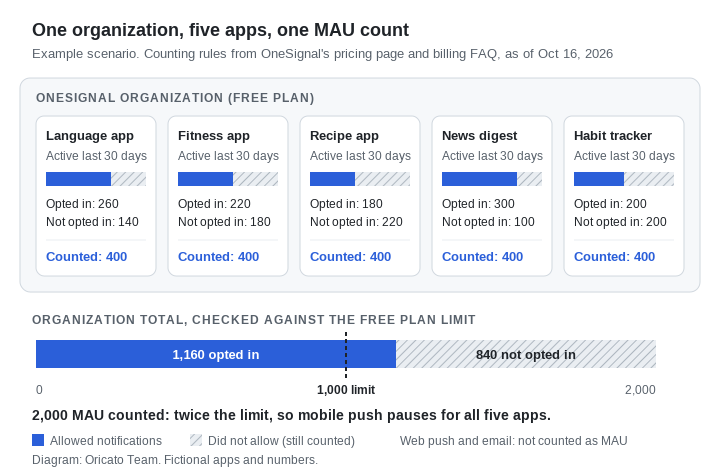
The limit is “calculated as the sum of your MAU across all Apps in the Organization,” per the billing FAQ. Apps are not billed or limited one by one. You can see per-app usage under Settings > Usage, but the number that decides the pause is the organization total on the Organizations page.
The trailing 30-day window
For the Free plan limit, OneSignal counts MAU over a trailing 30 days, not your billing cycle. The billing FAQ adds that once the organization total crosses 1,000, the limit is applied even if activity drops off afterward. A quiet week does not undo a crossing.
Who is affected: three worked examples
Fictional apps, made-up counts, arithmetic only.
One app with 1,400 monthly active devices
Example scenario. A recipe app on Android and iOS had 1,400 devices open it in the last 30 days. Only 650 of them allowed notifications, so the team reads “650 subscribers” in its own analytics and assumes it is fine.
OneSignal counts 1,400. That is 401 over the last safe number of 999, and mobile push pauses 24 hours after the crossing.
A studio with five apps of 400 MAU each
Example scenario. A small studio runs a language-learning app (Spanish and Japanese courses), a fitness tracker, a recipe app, a news digest and a habit tracker, all in one OneSignal organization. Each app has 400 active devices. None of them is close to 1,000 alone.
The organization total is 2,000, twice the limit. All five apps lose mobile push and in-app messages together, including the habit tracker that has not grown in a year. This is the case that surprises studios: the limit punishes a portfolio of small apps exactly as hard as one bigger app.
A seasonal spike: a fitness app in January
Example scenario. A fitness tracker sits around 700 MAU through the fall. New-year sign-ups in Berlin, São Paulo and Mexico City push the trailing 30-day count to 1,150 by mid-January.
The alerts arrive on the way up, at 75% (80% in the FAQ) and 90%. The crossing at 1,000 starts the 24-hour window. And because OneSignal applies the limit once you cross, even if activity drops off afterward, a quiet February does not bring Free-plan mobile push back on its own. Decide before the peak, not during it.
Already paused? What happens in the first 24 hours
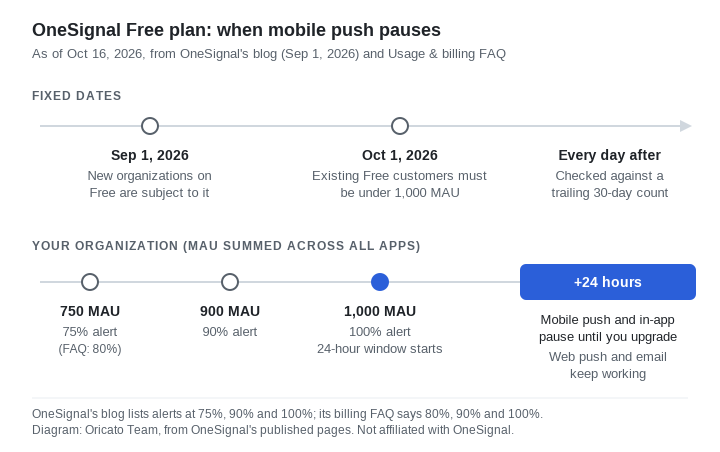
Here is the sequence as OneSignal documents it, as of Oct 16, 2026:
- Alerts on the way up. The blog post lists alerts at 75%, 90% and 100% of the limit. The billing FAQ says 80%, 90% and 100%. Either way, the first warning lands somewhere between 750 and 800 MAU.
- 24 hours after crossing 1,000. You have one day to upgrade before sending is blocked.
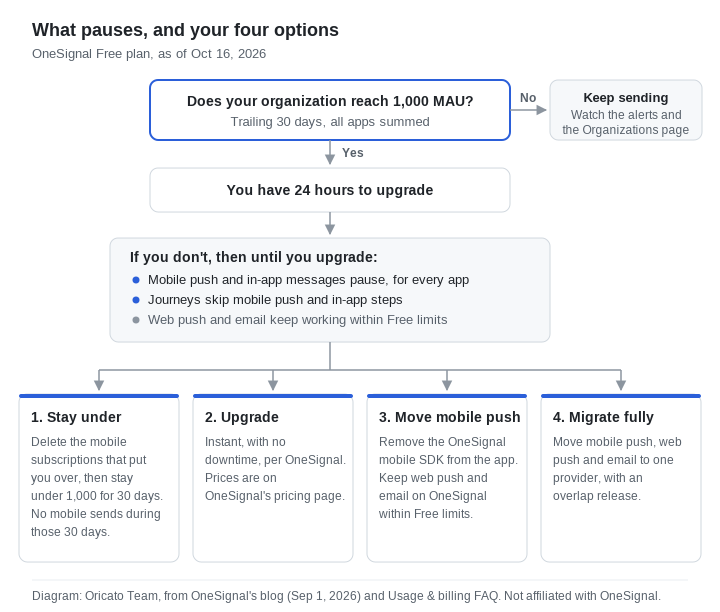
- Then, until you upgrade: mobile push and in-app messages stop. Journeys that use push or in-app steps skip sending to mobile subscriptions.
- What keeps working: web push and email continue within the same plan limits as before. On the Free plan, per the pricing page, web push allows a maximum of 10,000 subscribers per send and email allows 10,000 sends a month.
Upgrades happen on the organization’s Billing page, which the billing FAQ places under Organization settings > Billing. The same FAQ says you must be an Organization Admin to view it. If you are not one, find out who is now, not on hour 23.
In the first hour, confirm the organization total, list each app’s count (the worksheet below helps), and look for surprises such as test devices or imports that set last_active.
Your four options
Stay under the limit
OneSignal documents one way back without upgrading. Delete the mobile subscriptions that put you over, then stay under 1,000 MAU for 30 days. Per the billing FAQ, your plan “can re-enable” 30 days after the deletion as long as you stay under the limit for that whole period, and you cannot send mobile push or in-app messages until then. Deleting does not lower the count right away either: the FAQ says the count only drops once that activity ages out of the window.
Three details from OneSignal’s Delete users doc decide whether this works for you:
- Deletion is permanent. Export first; our guide to exporting your data from OneSignal covers what to pull and how.
- A deleted mobile user can become active again when they reopen the app. Deleting real, active users does not keep them out of the count for long, so this route only fits devices that will not return: test phones, emulators, old installs, records an import touched.
- The dashboard’s Delete Subscriptions In Segment action deletes only subscribed users. Devices that never opted in still count toward MAU, so removing them means exporting the records and calling the Delete Subscription API.
To keep the count down afterward, the billing FAQ points to the SDK privacy methods. Calling setConsentRequired(true) before initialization means no subscription is created until you call setConsentGiven(true), per the Mobile SDK reference. The trade is that people without consent get neither push nor in-app messages from OneSignal.
Our view: for apps people actually use, this option costs 30 days of mobile push and then caps your growth. It suits test organizations and dormant apps.
Upgrade
OneSignal says upgrading is instant, with no downtime. The billing FAQ adds that you can downgrade later, keep the paid plan until the end of that billing cycle, and then return to Free plan limits. Current prices are on OneSignal’s pricing page; we do not repeat them here.
Billing MAU is measured over your billing cycle, which is a different window from the trailing 30 days used for the Free limit. Our guide to OneSignal MAU billing walks through that difference with worked examples.
Move mobile push elsewhere, keep web push and email
Web push and email subscriptions do not count toward MAU and keep their Free limits, so one split is to leave web push and email on OneSignal and send mobile push through someone else.
The detail that makes or breaks this: a MAU is recorded when the app opens with the OneSignal SDK active. To bring the count down, the OneSignal mobile SDK has to leave the app, or stop initializing. It follows from that definition that devices still running an older build with the SDK keep recording sessions until people update, so expect a tail. You also lose OneSignal’s in-app messages in that app.
Where mobile push can go:
- Firebase Cloud Messaging directly. FCM is listed as no-cost on Firebase pricing, and it reaches iOS through APNs once you upload an APNs authentication key (Firebase docs). You then own token storage, scheduling, time zones, translations and delivery reporting.
- A hosted provider, such as Airship, Braze, Pushwoosh or Oricato (early access, launching soon). Compare what each needs inside your app, not just the send API.
If you want a person to plan the move with you, that is what /migrate is for.
Migrate fully
One provider for every channel is the biggest project. Mobile is the predictable part: ship the new SDK in a release, run both until enough people have updated, then cut over sending.
Web push is the hard part. Under RFC 8292 (section 4), a subscription can be restricted to the application server key it was created with, and push messages must be signed with the matching private key. Whether your existing subscribers can move depends on whether you can carry that key pair to the new sender. Export subscribers, segments, tags and templates before you start (how to export your data from OneSignal); our step-by-step guide to migrating from OneSignal covers the cut-over in detail.
A decision checklist
| Question | If yes | Next step |
|---|---|---|
| Is your organization total under 750 MAU? | You are clear for now | Keep the worksheet; re-check before any seasonal peak |
| Do several apps share one organization? | Their MAU adds up | Fill in the worksheet per app; read the FAQ on separate organizations below |
| Do you need mobile push this week? | Only an upgrade restores it within a day | Upgrade now; plan any move afterward |
| Is the excess test devices, old installs or imported records? | Staying under may work | Export, delete through the API, then 30 days under 1,000 with no mobile sends |
| Does your app rely on OneSignal in-app messages? | They pause too, and leave with the SDK | Count them in whatever you choose |
| Is OneSignal mainly your web push and email tool? | A split fits | Remove the mobile SDK and move mobile push |
| Do you want one provider for every channel? | Full migration | Plan an overlap release and the web push key question |
Portfolio MAU worksheet
List every app in the organization with its active devices over the last 30 days, then add them up. This example uses the five-app studio from above.
| App | Platforms | Active devices, last 30 days | Of which opted in |
|---|---|---|---|
| Language-learning app | Android, iOS | 400 | 260 |
| Fitness tracker | Android, iOS | 400 | 220 |
| Recipe app | Android | 400 | 180 |
| News digest | iOS | 400 | 300 |
| Habit tracker | Android, iOS | 400 | 200 |
| Organization total | 2,000 | 1,160 (does not change the count) | |
| Against the Free limit | Over (needs 999 or fewer) |
The CSV template has one row per app with columns for organization, app, platforms, trailing 30-day MAU, whether test or internal devices are included, and whether imports or API calls set last_active. Copy it into any spreadsheet, replace the example rows with the numbers from your Organizations page, and sum the MAU column.
Or use the calculator: add one row per app and it shows the organization total against the 1,000 limit. It runs in your browser and sends nothing anywhere.
Open the portfolio MAU calculator in its own tab.
What Oricato does here
Early access · launching soon
Oricato is a push notification platform for app studios. Mobile push for Android and iOS goes through FCM, with iOS delivered via APNs through FCM, and there are Android, iOS and Flutter SDKs. Your server can keep its request shape: Oricato accepts the common send fields of OneSignal’s POST /api/v1/notifications, so the scheduler changes a URL and a key, though each app still needs the Oricato SDK.
Web push and email (both early access) are designed to sit in the same composer. A person plans the move with you; see /migrate, or the side-by-side in Oricato vs OneSignal.
Request early access, or get the newsletter to hear when we re-check the facts on this page.
FAQ
Does a device that never allowed notifications count as a MAU?
Yes. As of Oct 16, 2026, OneSignal counts every mobile subscription active in the last 30 days, opted in or not, because in-app messages can reach any active app user (pricing page).
Are web push and email affected?
Not by the MAU limit, and their subscriptions do not count toward MAU. As of Oct 16, 2026, they keep the existing Free limits: web push to a maximum of 10,000 subscribers per send, and 10,000 emails a month.
Can I split apps into separate organizations?
OneSignal’s billing FAQ says you can create unlimited apps and organizations, and gives reasons to use several: separating billed apps from unbilled ones, or brands, clients and environments, such as a Free organization for testing and a paid one for production. Moving an app between organizations yourself requires Admin access on both, and the app must currently sit in a Free organization (Apps, Organizations, & Accounts).
OneSignal’s SDK license terms also prohibit attempts to circumvent usage limits. The docs do not say whether splitting one studio’s production apps across Free organizations to stay under the cap is acceptable, so ask OneSignal in writing before you do it. Its blog post gives [email protected] for plan questions.
Sources
All accessed Oct 16, 2026.
- OneSignal blog, What’s Changing on OneSignal’s Free plan, Sep 1, 2026.
- OneSignal documentation, Usage & billing.
- OneSignal, Pricing (plan limits and the MAU definition only).
- OneSignal blog, Understanding OneSignal’s Pricing, last updated Sep 1, 2026.
- OneSignal documentation, Subscriptions.
- OneSignal documentation, Delete users.
- OneSignal documentation, Apps, Organizations, & Accounts.
- OneSignal documentation, Mobile SDK reference, Privacy section.
- OneSignal, SDK End User License Agreement and Terms of Use, last updated Jun 12, 2024.
- Firebase, Pricing.
- Firebase, Set up a Firebase Cloud Messaging client app on Apple platforms, last updated Oct 15, 2026.
- IETF, RFC 8292: Voluntary Application Server Identification (VAPID) for Web Push.
Downloads
Keep reading
All guides
OneSignal alternatives: an honest guide by use case (2026)
OneSignal alternatives grouped by what your team needs: plain FCM, push-first platforms, lifecycle suites, notification infrastructure or self-hosting.
Migrate from OneSignal without losing subscribers
Move off OneSignal without losing reach: who owns your push tokens, the overlap release, identity mapping, a cut-over checklist and a rollback plan.