OneSignal MAU billing explained: how your count is built
How OneSignal's MAU billing unit works: what counts, how to estimate your own number from your data, and which features sit on which plan. No price tables.
Oricato Team Published 8 min read

You’re comparing push vendors, or a OneSignal usage alert just landed, and you need one number before any price means anything: your MAU. On OneSignal, a MAU is a mobile subscription with at least one session in the measured window, opted in to push or not, summed across every app in your organization. That number is usually well above the audience that can actually see a push. This guide shows how the count is built, how to estimate it from your own device table with one SQL query, and which reports sit on which plan.
The short version
- Definition. MAU is the count of mobile subscriptions with at least one session during your billing cycle, and “it does not depend on subscription status” (OneSignal billing FAQ, as of Oct 16, 2026).
- Scope. Billing happens at the organization level; apps are not billed individually.
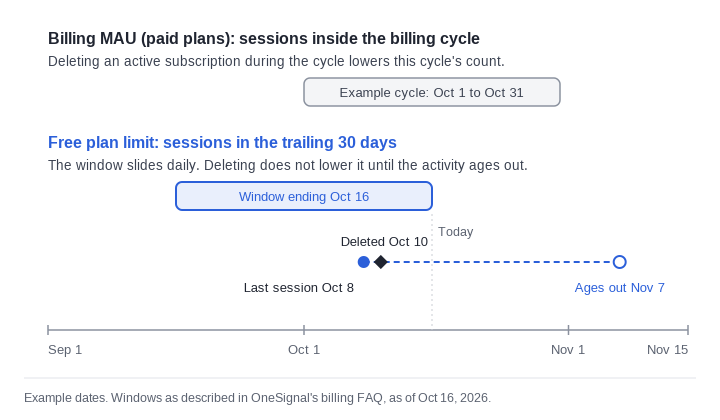
- Two windows. Your invoice uses sessions inside the billing cycle. The Free plan limit of fewer than 1,000 MAU uses a trailing 30 days (same FAQ, as of Oct 16, 2026).
- Prices. We don’t reproduce them. They change, and our editorial rule is not to print anyone’s prices. The current figures are on OneSignal’s pricing page, which we read on Oct 16, 2026.
If you’re deciding whether to stay at all, our guide to OneSignal alternatives groups the options by need. This page stays narrower: get your own count right first, because every vendor quote multiplies something by it.
What a MAU is, and the opted-in trap
Active vs opted in
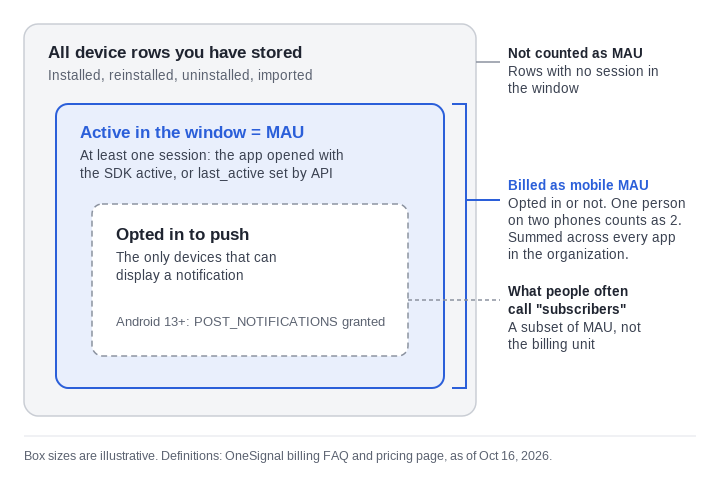
OneSignal’s pricing FAQ is explicit: a MAU is a mobile subscription record active in your app in the last 30 days, “regardless of whether it has opted in” to push. The stated reason is that in-app messages can reach every active app user, so the unit covers everyone who opens the app.
The billing FAQ says a session is recorded in two cases: the app is opened with the OneSignal SDK active, or you update the last_active property through the API. The second case catches teams during migrations: the FAQ says API updates count even when the person never opened the app, data imports included. Mobile here means iOS, Android, Huawei, Amazon, macOS, Windows and Chrome Extensions; web push, email and SMS subscriptions don’t count toward MAU.
The gap between the two sets is structural. On Android 13 (API level 33) and higher, apps have to ask for the POST_NOTIFICATIONS runtime permission (Android Developers), so everyone who declines still opens the app, still records sessions, and still counts as MAU without ever being able to see a push.
The billing FAQ says nothing specific about uninstalled devices. What decides the count is a session in the window, so a stale row matters only if something touches it, such as an import that sets
last_active.
Org-level sum
The FAQ applies the limit at the organization level, as the sum of MAU across all apps in it. For a studio, that changes the math: five small apps with 400 MAU each are 2,000 MAU for the organization, and the Free plan limit (fewer than 1,000 MAU, as of Oct 16, 2026) looks at the 2,000. We walk through that case, and what pauses when, in OneSignal’s 1,000 MAU Free plan limit.
Two details from the FAQ make the sum larger than people expect. Each mobile subscription counts separately, so one person using your app on two devices in the same cycle is 2 MAU. And assigning an External ID links those subscriptions to one user profile without changing the MAU count.
The FAQ also says billing is calculated in increments of 10 MAU, rounded down. Portfolio-wide setups have their own planning issues, covered in push notifications for app studios.
Estimate your own MAU before you look at any price
From your own backend (SQL)
Most apps already keep a device table. The query below assumes a generic one, devices(app_id, device_id, last_seen_at, push_opt_in), plus apps(app_id, org_id) so you can group apps the way a vendor would group them into one organization. It returns MAU and opted-in counts per app, a subtotal per org, and a grand total.
-- Trailing 30-day mobile MAU estimate per app and per org.
-- Assumes: devices(app_id, device_id, last_seen_at timestamptz, push_opt_in boolean)
--          apps(app_id, org_id)
-- Keep only mobile rows (iOS, Android) if web push devices share this table.
WITH bounds AS (
  SELECT now() - interval '30 days' AS from_ts,
         now()                      AS to_ts
),
per_app AS (
  SELECT a.org_id,
         d.app_id,
         count(DISTINCT d.device_id)                              AS active_devices,
         count(DISTINCT d.device_id) FILTER (WHERE d.push_opt_in) AS active_opted_in
  FROM devices d
  JOIN apps a ON a.app_id = d.app_id
  CROSS JOIN bounds b
  WHERE d.last_seen_at >= b.from_ts
    AND d.last_seen_at <  b.to_ts
  GROUP BY a.org_id, d.app_id
)
SELECT org_id,
       app_id,               -- NULL app_id = org subtotal; both NULL = grand total
       sum(active_devices)  AS mau_estimate,
       sum(active_opted_in) AS opted_in
FROM per_app
GROUP BY ROLLUP (org_id, app_id)
ORDER BY org_id NULLS LAST, app_id NULLS LAST;
Four things decide whether this estimate is close:
- What updates
last_seen_at. OneSignal’s session is a foreground open with the SDK active, or an API write tolast_active. If your column also moves on background push receipt or token refresh, your number will run high. - Window shape. A single
last_seen_atcolumn only answers “active in the 30 days ending now.” To rebuild a past billing cycle, say Sep 1 to Sep 30, you need a session events table, because a device seen on Sep 15 and again on Oct 10 now shows only Oct 10. - No dedupe across apps. The org figure is a sum of per-app counts. A person with your fitness app and your recipe app is two subscriptions, so
ROLLUPsums rather than counting distinct devices across the org. - Day intervals, not hours. In PostgreSQL,
interval '30 days'moves the calendar date back and keeps the wall-clock time, which differs frominterval '720 hours'across a DST change. That’s close enough for an estimate.
From OneSignal’s dashboard or export
If you’re already on OneSignal, the FAQ says the total MAU is on the Organizations page in the navigation bar, and billing and usage live under Organization settings > Billing, which needs the Organization Admin role. Free plan customers get alerts as they approach the limit. The two sources disagree on the first threshold: the Free plan blog post says 75%, 90% and 100%, the billing FAQ says 80%, 90% and 100% (both read Oct 16, 2026). Don’t build a process around the first alert; run the SQL weekly.
Worked example: three fictional apps
A fictional studio runs a language-learning app (learners in Mexico City, Lyon, Munich, São Paulo, Osaka and Delhi), a fitness tracker and a recipe app in one organization. Counts are invented for illustration.
| App | Device rows stored | Active, trailing 30 days (MAU) | Of those, opted in to push |
|---|---|---|---|
| Language-learning | 48,000 | 9,200 | 5,100 |
| Fitness tracker | 21,500 | 3,400 | 2,050 |
| Recipe app | 12,000 | 1,900 | 700 |
| Organization | 81,500 | 14,500 | 7,850 |
The studio thinks of itself as having about 7,850 push subscribers. The billing unit sees 14,500, roughly 1.85 times as many. Whatever rate any vendor quotes per MAU, multiply it by the middle column, not the right one.
Which features sit on which plan
Feature and plan names from OneSignal’s pricing comparison table, as of Oct 16, 2026. “Included” means a check mark in that plan’s column; “-” means a dash.
| Feature (OneSignal’s row name) | Free | Growth | Professional | Enterprise |
|---|---|---|---|---|
| Reporting History | Up to 30 days | Up to 90 days | Up to 1 year | Up to 2 years |
| Timezone Delivery | Included | Included | Included | Included |
| Intelligent Delivery | - | Included | Included | Included |
| Confirmed Receipt | - | Included | Included | Included |
| A/B Testing | Up to 2 variants | Up to 2 variants | Up to 10 variants | Up to 10 variants |
| Notification Data Exports (CSV) | - | - | Included | Included |
| Notification History API | - | - | Included | Included |
| Frequency Capping | - | - | - | Included |
To be fair to OneSignal: Timezone Delivery is on every plan, Free included.
The rows that bite are history and exports. Thirty or 90 days of history can’t show you this December against last December, and message-level CSV exports start at Professional. If you’ll want your own archive, check the export path on your plan before you need it. OneSignal’s Sep 1, 2026 post says it is removing several paid-plan gates from Free, so re-check this table before you rely on any row.
Billing units compared, without prices
Different units grow with different things. Knowing which one a vendor uses tells you which of your plans will move the bill.
| Billing unit | What it counts | What makes it grow | What to ask the vendor |
|---|---|---|---|
| Per MAU | Mobile installs with a session in a window, opted in or not | New installs, re-engagement that brings people back, imports that touch activity fields | What records a session? Which window? Per app or per org? |
| Per opted-in subscriber | Devices or browsers that granted permission (OneSignal’s unit for web push) | Prompt acceptance, browsers per person | Are unsubscribed devices removed? How is the count rounded? |
| Per message | Sends (OneSignal’s unit for email and SMS) | Audience size times messages per person | Do bounces and failures count? |
| Per seat | Dashboard users | Team size, not audience | Do read-only or client logins count? |
| Flat per account | One deployment, sized for you | Infrastructure size: throughput, storage | What limits exist, and what triggers a resize? |
OneSignal’s pricing FAQ describes a fixed platform fee plus usage: mobile push by MAU, web push by subscriber, email and SMS by send volume. Its billing FAQ also lists Event Streams volume and Custom Event storage as invoice inputs. A single “push bill” can mix three of these units.
How to project next year’s count
Project the count, not a price. For each app: current MAU, times expected growth, times its seasonal peak, then add apps you plan to launch. Sum month by month rather than adding each app’s peak, because peaks rarely land in the same month.
Continuing the fictional studio: the language-learning app expects 1.5x growth with a September back-to-school peak about 1.3x its average month, which puts that month near 17,900. The fitness tracker expects 1.2x with a January peak of 1.4x, about 5,700 in January.
The recipe app holds flat with a December peak of 1.25x, about 2,400. A puzzle game launching in spring adds a guess of 4,000. Added peak to peak, that’s about 30,000; month by month, the highest month is lower.
Plan for the highest month, not the average. The billing FAQ (as of Oct 16, 2026) says that once total org MAU crosses 1,000 on Free, the limit applies even if activity drops afterward, and it sends organizations above 50,000 MAU to its sales team for annual plans. A one-week campaign or a data import can move you across either line.
Questions to ask any vendor about billing
- What exactly records “active”? Foreground open, background wake, API write, import?
- Which window: billing cycle, calendar month or trailing 30 days? Is the limit window the same as the invoice window?
- Is the count per app or per organization, and can I split apps across organizations?
- Is one person on two devices one unit or two? Does linking an external user ID change it?
- What happens over a limit: overage, pause, or a grace period? As of Oct 16, 2026, OneSignal’s Free plan gives 24 hours, then mobile push and in-app messages stop until you upgrade.
- If I delete records, when does the count drop?
- Are test devices and internal builds exempt, or should they live in a separate organization?
- Can I export every message and delivery record, on which plan, and in what format?
If your app collects consent first, ask how SDK initialization affects the count. OneSignal documents setConsentRequired() and setConsentGiven(), and says that without consent no data is sent and no subscription is created.
What Oricato does here
Early access · launching soon. Oricato runs a dedicated account per customer, so your data and your sending live on a deployment that is yours. Mobile push for Android, iOS and Flutter is the core today; web push and email are in Early access in the same composer. We haven’t published pricing, and we won’t put a number on this page. If you want to talk through how a dedicated account would fit your portfolio count, see the dedicated account page or our side-by-side with OneSignal.
Sources
It is based on OneSignal’s own pricing page, billing FAQ, SDK reference and blog posts, plus Android and PostgreSQL documentation, all read on Oct 16, 2026.
- OneSignal: Pricing (plan comparison table and pricing FAQ), accessed Oct 16, 2026
- OneSignal Documentation: Billing FAQ, accessed Oct 16, 2026
- OneSignal blog: Understanding OneSignal’s pricing (last updated Sep 1, 2026), accessed Oct 16, 2026
- OneSignal blog: What’s changing on OneSignal’s Free plan (Sep 1, 2026), accessed Oct 16, 2026
- OneSignal Documentation: Mobile SDK reference, Privacy, accessed Oct 16, 2026
- Android Developers: Notification runtime permission, accessed Oct 16, 2026
- PostgreSQL 18: Date/Time Functions and Operators, accessed Oct 16, 2026
- PostgreSQL 18: Value Expressions (aggregate FILTER), accessed Oct 16, 2026
- PostgreSQL 18: GROUPING SETS, CUBE, and ROLLUP, accessed Oct 16, 2026
Keep reading
All guides
OneSignal alternatives: an honest guide by use case (2026)
OneSignal alternatives grouped by what your team needs: plain FCM, push-first platforms, lifecycle suites, notification infrastructure or self-hosting.
OneSignal free plan limit: what the 1,000 MAU cap changes
OneSignal's Free plan now pauses mobile push once an organization hits 1,000 MAU. How MAU is counted, who is affected, and your four options, with dates.