GuideChannels and private hosting
Self-hosted push notifications: what it really takes
A self-hosted push notification server still sends through FCM and APNs. Here is what you must build, run and secure, and where a dedicated account fits.
Oricato Team Published 13 min read
You want your app’s notifications to run on servers you control: your database, your keys, your region. Search for self-hosted push notifications and you get ntfy and Gotify. They’re good tools, but they send alerts to phones running the ntfy or Gotify app, not to the people who installed your app. To reach your users, any self-hosted push notification server still sends through Firebase Cloud Messaging (FCM) and Apple Push Notification service (APNs).
Below: both meanings of the term, what a server for your app needs, what it takes to run, and the middle paths. We ran no tests for this guide; every fact comes from the Sources list, read Oct 16, 2026.
Two meanings of self-hosted push notifications
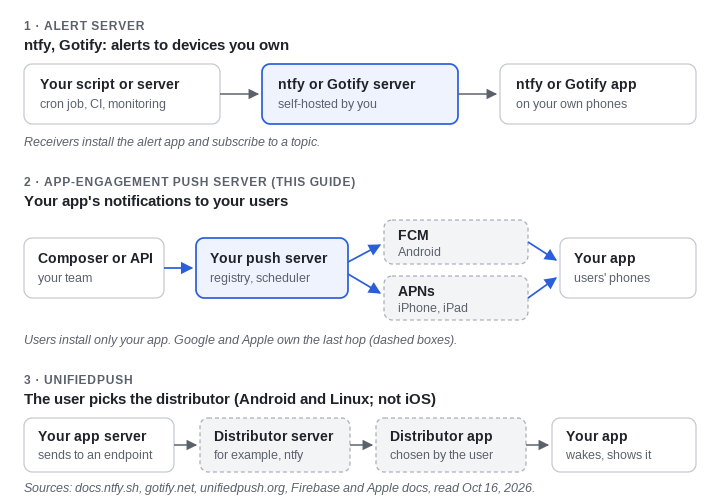
Alert servers. ntfy lets scripts send notifications “to your phone or desktop” with an HTTP PUT or POST to a topic. It’s open source (Apache 2.0 and GPLv2) with apps for Android and iOS. Gotify is an MIT-licensed server: apps send with POST /message and an X-Gotify-Key header, and its Android client receives over a WebSocket. Both move alerts from your machines to devices your team owns.
Even here Apple’s rules show through: because “iOS heavily restricts background processing”, a self-hosted ntfy server must forward poll_request messages through the public ntfy.sh server, which talks to Apple’s push service, for instant iOS notifications.
App-engagement push. What an app team means: a server that sends your app’s reminders, news alerts or offers to everyone who installed it, in their language, on a schedule, with reports. Users install only your app. The rest of this guide is about this server.
UnifiedPush, a third model. An open standard where the user picks a “distributor” app (ntfy is one), and your server sends to that distributor instead of Google. It serves de-Googled Android devices and, through KDE’s KUnifiedPush, Linux. Its FAQ says an iOS distributor isn’t possible “without jailbreaking or Apple’s approval”, so it complements FCM and APNs rather than replacing them.
You still need FCM and APNs
Apple’s docs lay out the chain: your provider server sends a request to APNs, “which handles the delivery of the notification to the user’s device.” While a phone is offline, APNs stores one notification per bundle ID, for up to 30 days depending on your apns-expiration header.
FCM’s architecture page shows the same split: your trusted server builds the request, the FCM backend accepts it, and a transport layer delivers it (Android’s for devices with Google Play services, APNs for Apple devices, web push for browsers). A self-hosted server is only the first box. Three consequences:
- No delivery advantage. Every server ends at
api.push.apple.com:443(or port 2197) andfcm.googleapis.com. Self-hosting moves your data and logic, not the last hop. - Payloads leave your servers. Titles, bodies and data pass through Google or Apple.
- Android without Play services needs another route, such as UnifiedPush.
The full journey of one message is in how push notifications reach a phone.
Architecture of a self-hosted push notification server
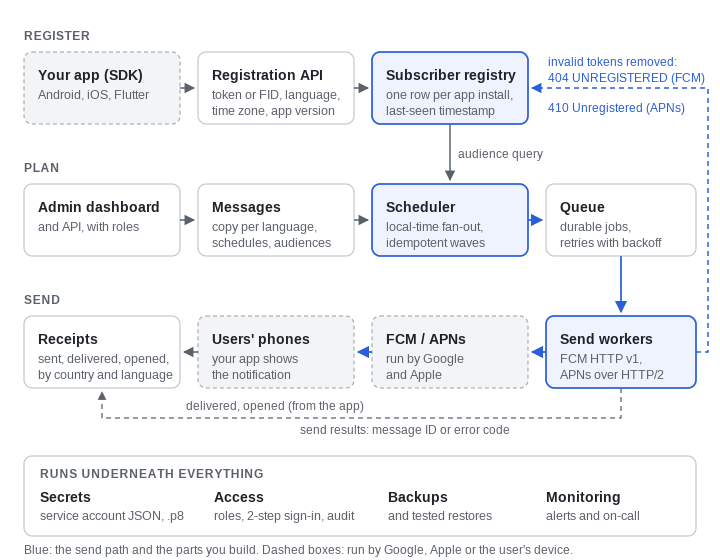
Whatever you build or buy, five parts show up: registry, scheduler, send workers, receipts and admin.
Subscriber registry and tokens
One row per app install. Apple says a device token is unique to the device and your app, and APNs issues a new one after a restore from backup, a new device or an OS reinstall. So the app sends its current token on every launch, and the server upserts.
FCM is mid-change: it “is transitioning from registration tokens to a registration system based on Firebase Installation IDs (FIDs)”. The HTTP v1 Message resource marks token deprecated in favor of fid, and token accepts an FID meanwhile. Label the identifier type so you can hold both.
-- management" (updated 2026-10-15) and Apple's "Registering your app with APNs".
CREATE TABLE subscriber (
  id            uuid PRIMARY KEY,          -- pseudonymous, generated by your SDK
  app_id        text NOT NULL,
  platform      text NOT NULL CHECK (platform IN ('android', 'ios')),
  push_id       text NOT NULL,             -- FCM FID or token, or APNs device token
  push_id_kind  text NOT NULL CHECK (push_id_kind IN ('fcm_fid', 'fcm_token', 'apns_token')),
  language      text,                      -- BCP 47, e.g. 'pt-BR', 'ja', 'ar'
  time_zone     text,                      -- IANA name, e.g. 'Asia/Kathmandu'
  app_version   text,
  last_seen_at  timestamptz NOT NULL,      -- updated on every upload
  invalid_at    timestamptz,               -- set on UNREGISTERED / 410
  UNIQUE (app_id, push_id)
);
FCM calls a registration stale once it hasn’t connected for over a month; on Android it expires after 270 days of inactivity. A send that returns UNREGISTERED (HTTP 404), or INVALID_ARGUMENT (400) for a payload you’ve confirmed is valid, means the registration “will never again be valid.” APNs answers 410 with Unregistered or ExpiredToken. These signals say whether a device can receive, not whether anyone reads.
Scheduler and local-time fan-out
“9:00 AM local time” turns one message into a wave per UTC offset, and offsets aren’t whole hours everywhere. Per the IANA Time Zone Database, Asia/Kolkata is UTC+5:30, Asia/Kathmandu UTC+5:45, and America/St_Johns (Newfoundland) UTC−2:30 in summer and UTC−3:30 in winter. Store the IANA zone name, never a fixed offset, and compute each wave’s UTC time on the day of the send.
Daylight saving breaks naive schedulers: in 2026 Berlin leaves summer time on Oct 25 and New York on Nov 1, so for one week Berlin is five hours ahead of New York instead of six. A scheduler that cached last week’s offsets sends a Berlin user’s lesson reminder an hour early.
Key each wave by message and subscriber so a restart mid-fan-out doesn’t send twice, and resolve language through a fallback chain (es-MX, then es, then your default).
Send workers and rate limits
FCM HTTP v1 takes one message per request, authorized with a short-lived OAuth 2.0 access token minted from a service account, with the https://www.googleapis.com/auth/firebase.messaging scope and the cloudmessaging.messages.create IAM permission.
POST https://fcm.googleapis.com/v1/projects/lingora-app/messages:send HTTP/1.1
Content-Type: application/json
Authorization: Bearer <short-lived OAuth 2.0 access token>

{
  "message": {
    "token": "<FCM registration token or FID>",
    "notification": {
      "title": "Tu lección de hoy",
      "body": "Cinco minutos para mantener tu racha."
    }
  }
}
FCM’s default quota is 600,000 messages per minute per project, counted in messages, not requests. Over it, FCM returns 429 RESOURCE_EXHAUSTED with QUOTA_EXCEEDED, and the error reference says to back off with a minimum initial delay of one minute. For UNAVAILABLE (503), honor Retry-After and use exponential backoff with jitter. On Android, FCM allows up to 240 messages a minute and 5,000 an hour to a single device.
Going direct to APNs means an HTTP/2 connection over TLS 1.2 or later and a JSON Web Token signed with your .p8 key. Apple says to refresh it no more than once every 20 minutes and no less than once every 60; too often returns 429 TooManyProviderTokenUpdates, too old returns 403 ExpiredProviderToken.
{
  "alg": "ES256",
  "kid": "ABC123DEFG"
}
{
  "iss": "DEF123GHIJ",
  "iat": 1437179036
}
Many teams reach iPhones through FCM, which forwards to APNs; you still upload the APNs key to Firebase, and a wrong one returns THIRD_PARTY_AUTH_ERROR (401). More in our FCM HTTP v1 guide.
Receipts and analytics
A 200 from APNs, or a message name like projects/.../messages/0:1500415314455276%31bd1c9631bd1c96 from FCM, means the service accepted the message, not that a phone showed it. For “delivered” and “opened”, your app reports back on arrival and on tap. Sign those reports per message, or anyone can inflate your numbers.
Roll outcomes up by country, language and local hour, and keep dead registrations out of the denominators. FCM’s guide warns that stale registrations can show “a dramatic (but not actually valid) drop in delivery rates.”
Admin, roles and audit
A send to every user is one API call away. Use roles (who drafts, who sends to everyone, who touches keys), require two-step sign-in for admins, log every send, cancel, key upload and role change, and hash API keys. Gotify 3 did the same: its tokens are now “only exposed on creation or rotation.”
What you must run and watch
A rotated key or a skipped wave crashes nothing; sends just stop or double, and you hear about it from a monitor or a support ticket.
| Component | Failure mode | What you monitor | How often it bites |
|---|---|---|---|
| Credentials | Key rotated or revoked, server not updated | THIRD_PARTY_AUTH_ERROR (401), APNs 403 |
Every rotation |
| Registry | Dead registrations distort reports | UNREGISTERED and 410 rates; last_seen_at age |
Daily, in small amounts |
| Scheduler | Wave skipped or doubled after a restart; DST bugs | Planned vs. enqueued count per wave | Every deploy and every DST change |
| Queue | Backlog grows; jobs lost on crash | Depth, age of oldest job | Every large send |
| Send workers | QUOTA_EXCEEDED (429), UNAVAILABLE (503) |
Errors by code, retry volume | Large sends, provider incidents |
| Receipts | Events dropped after an SDK change | Delivered-to-sent ratio by app version | After app releases |
| Database, backups | Disk full; backups that won’t restore | Backup age, restore-drill result | Rarely, and badly |
Platform changes arrive on Google’s and Apple’s schedule. Two are announced: the move to FIDs, and the removal of device groups on Sep 29, 2027, per the HTTP v1 guide.
Security and compliance
A summary of sources, not legal advice. Ask counsel about your own obligations.
Credentials: service account JSON and .p8 keys
The Firebase service account JSON is a long-lived private key, and Google treats such keys “as an exception rather than the norm”: prefer keyless options (Application Default Credentials, Workload Identity), never commit keys, keep them out of binaries, and rotate them. Skip expiry times in production, because “an expired service account key could cause an accidental outage.”
If the APNs .p8 key may be compromised, Apple says to revoke it, request a new one, and reopen all HTTP/2 connections. Team-scoped keys can be limited to Sandbox or Production, at most two per environment, and one APNs connection can’t serve multiple teams, so a studio with several developer accounts needs a pool per account.
Personal data minimization
A push server needs the fields in the schema above, not names or email addresses. Apple’s docs suggest storing tokens with account information; a pseudonymous ID does the same job without tying the registry to a person.
Payloads pass through Google and Apple and show on lock screens, so keep anything private out of them. FCM caps most payloads at 4,096 bytes (2,048 for topic messages), and APNs at 4,096 bytes. Our push notification security checklist goes item by item.
EU data residency and GDPR processor terms
An EU region keeps your registry and reports in the EU, but identifiers and payloads still go to FCM and APNs, and FCM’s architecture page notes those transport layers may apply their own terms.
If a vendor runs the server, it’s a processor. GDPR Article 28(3) says the contract must cover documented instructions, staff confidentiality, Article 32 security, sub-processor rules, help with data-subject requests, deletion or return at the end, and information for audits. Under Article 30, controller and processor each keep a record of processing.
Hosting outside the EU is a transfer question. Article 45 allows transfers to a country the European Commission has decided ensures an adequate level of protection, and it requires periodic reviews. The Commission’s first review of the older decisions, announced Jan 15, 2024, kept all 11 in place; its press release, last updated Mar 12, 2025, lists “Canada (commercial organisations)” among the adequate countries. Check the current list before you rely on it.
Cost in hours: the work to estimate
We haven’t built and timed this stack, and found no sourced public figures, so there are no hour numbers here. Estimate this list against your own team:
- Registration endpoint and Android, iOS and Flutter upload code.
- Registry with upsert and invalid-token clean-up.
- Composer or API with per-language copy and fallbacks.
- Scheduler with IANA zones and idempotent, DST-safe waves.
- Durable queue and workers with quota-aware backoff.
- Signed receipts and reports by country, language and hour.
- Roles, two-step sign-in, audit log, hashed API keys.
- Key rotation runbook and tested backups.
- Alerts for the table above, and on-call.
- Time each quarter for Google and Apple changes.
Your options, from DIY to a private push server
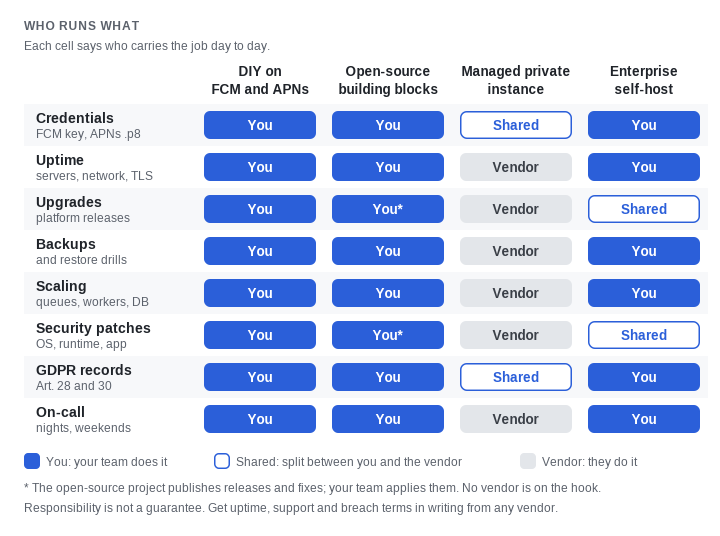
With DIY and open-source parts, every job is yours. A managed dedicated account moves uptime, upgrades, backups, scaling, patches and on-call to the vendor, with credentials and GDPR records shared. Enterprise self-host hands the jobs back, though the vendor ships releases. Either way, get uptime, support and breach-notification terms in writing.
DIY on FCM and APNs
You write every box in the architecture diagram: full control, no vendor, and your own pager. It fits a team with backend engineers who want the whole stack.
Open-source building blocks
gorush is an MIT-licensed Go server that sends to APNs, FCM and Huawei, with a worker queue (local, NSQ, NATS or Redis streams) and Prometheus metrics. It covers the send workers; its README describes no scheduling or segments, so the registry, scheduler and reports are still yours. Novu is self-hostable infrastructure for product notifications; its docs list MongoDB, Redis and S3-compatible storage, and some cloud-only features don’t come with self-hosting. See the self-hosted section of our OneSignal alternatives guide.
A managed dedicated account
A private push notification server run by a vendor: a dedicated deployment and database for you alone. You keep the data separation; the vendor carries the servers and the pager. Ask where it’s hosted, who the sub-processors are, how you export everything, and what happens to your data when you leave. For hosted vendors in general, see OneSignal alternatives.
Enterprise self-host (on-premise push notifications)
The vendor’s platform runs on your servers, so your notification data never reaches the vendor, and uptime, backups and on-call are yours again. It fits when policy says data must stay on your infrastructure: a self-hosted OneSignal alternative with a vendor behind the software.
Checklist before you decide
- Who carries the pager at 2:00 AM on a Sunday, and do they want to?
- Where must the registry and reports live, and is that written down?
- Is there a keyless plan for the service account key, and a
.p8rotation runbook? - Can the scheduler send at 9:00 AM in
Asia/Kathmandu(UTC+5:45) and through the Oct 25 to Nov 1 DST gap? - Do you handle the error codes in the table above?
- Are receipts signed, and is every admin on two-step sign-in?
- If a vendor is involved: Article 28 terms, a sub-processor list and a written exit plan?
What Oricato does here
Early accessDesigned and in development. No results yet. See what's left on the roadmap.Oricato is built around the managed dedicated account described above: each customer gets its own account and database, hosted in Your region, and Enterprise customers can run it on their own servers. Mobile push goes through FCM, which forwards to APNs for iPhones, so everything above about tokens, quotas and payloads still applies.
Some of the jobs above come handled. The registry holds pseudonymous IDs only, and Firebase keys are encrypted at rest. Every admin signs in with a TOTP code, and sends and key changes go into an audit log. If you leave, your data exports as CSV. Web push and email sit in the same composer as Early access channels. More on the dedicated account and security pages.
Request early access: oricato.com/request-access
Sources
- ntfy documentation: https://docs.ntfy.sh/
- ntfy configuration, iOS instant notifications: https://docs.ntfy.sh/config/
- ntfy on GitHub (license): https://github.com/binwiederhier/ntfy
- Gotify documentation, intro: https://gotify.net/docs
- Gotify documentation, push messages: https://gotify.net/docs/pushmsg
- Gotify documentation, migrating to v3: https://gotify.net/docs/migrate-to-3
- gotify/server on GitHub: https://github.com/gotify/server
- UnifiedPush: https://unifiedpush.org/
- UnifiedPush FAQ: https://unifiedpush.org/users/faq/
- Firebase, FCM architectural overview (updated 2026-10-15): https://firebase.google.com/docs/cloud-messaging/fcm-architecture
- Firebase, Send a message using FCM HTTP v1 API (updated 2026-10-15): https://firebase.google.com/docs/cloud-messaging/send/v1-api
- Firebase, projects.messages.send (updated 2026-09-21): https://firebase.google.com/docs/reference/fcm/rest/v1/projects.messages/send
- Firebase, projects.messages resource (updated 2026-09-08): https://firebase.google.com/docs/reference/fcm/rest/v1/projects.messages
- Firebase, ErrorCode (updated 2026-02-03): https://firebase.google.com/docs/reference/fcm/rest/v1/ErrorCode
- Firebase, Best practices for FCM registration management (updated 2026-10-15): https://firebase.google.com/docs/cloud-messaging/manage-tokens
- Firebase, Throttling and quotas (updated 2026-10-15): https://firebase.google.com/docs/cloud-messaging/throttling-and-quotas
- Apple, Setting up a remote notification server: https://developer.apple.com/documentation/usernotifications/setting-up-a-remote-notification-server
- Apple, Establishing a token-based connection to APNs: https://developer.apple.com/documentation/usernotifications/establishing-a-token-based-connection-to-apns
- Apple, Sending notification requests to APNs: https://developer.apple.com/documentation/usernotifications/sending-notification-requests-to-apns
- Apple, Handling notification responses from APNs: https://developer.apple.com/documentation/usernotifications/handling-notification-responses-from-apns
- Apple, Registering your app with APNs: https://developer.apple.com/documentation/usernotifications/registering-your-app-with-apns
- Google Cloud, Best practices for managing service account keys (updated 2026-10-13): https://docs.cloud.google.com/iam/docs/best-practices-for-managing-service-account-keys
- Regulation (EU) 2016/679 (GDPR), Official Journal text, Articles 28, 30 and 45: https://eur-lex.europa.eu/eli/reg/2016/679/oj
- European Commission, press release IP/24/161 on the first review of 11 adequacy decisions (Jan 15, 2024; updated Mar 12, 2025): https://ec.europa.eu/commission/presscorner/detail/en/ip_24_161
- IANA Time Zone Database: https://www.iana.org/time-zones
- gorush: https://github.com/appleboy/gorush
- Novu, self-hosting overview: https://docs.novu.co/community/self-hosting-novu/overview
All accessed Oct 16, 2026.
Frequently asked questions
Can I send push notifications to iPhones without Apple's servers?
Is a dedicated account the same as self-hosting?
Keep reading
All guides
How push notifications work: from your server to a phone
How a push notification travels from your server through FCM and APNs to a phone, what the OS does next, and what can fail at each hop. Diagrams included.
OneSignal alternatives: an honest guide by use case (2026)
OneSignal alternatives grouped by what your team needs: plain FCM, push-first platforms, lifecycle suites, notification infrastructure or self-hosting.