Localized push notifications: send in every user's language
Send push in each user's language: detect the locale, pick server-side or loc-key strings, build fallback chains, and handle plurals and RTL text.
Oricato Team Published 12 min read

Your app has users in São Paulo, Osaka and Cairo, and your reminder still goes out as “Your 5-minute lesson is ready” in English. Localized push notifications fix that, but a 30-character message is harder to localize than a screen: no room to expand, counts and genders change the grammar, and Arabic runs right to left. This guide covers the decisions in order: where the user’s language comes from, whether text is chosen on your server or on the device (loc-key), how to fall back when a translation is missing, and how to handle length, plurals and RTL.
Why bother at all: in CSA Research’s 2020 “Can’t Read, Won’t Buy” survey of 8,709 consumers in 29 countries, 76% said they prefer to buy products with information in their own language. That survey is about shopping, not notifications, so treat it as a reason to care, not a prediction for your open rate.
Where the user’s language comes from
Not from their country. A phone in Zurich can run in French, German or English, and Android’s own docs use a French (Switzerland) user as their fallback example. Even CSA ran its survey in each country’s official language plus Spanish in the US. Ask the device, then store the answer.
Device locale vs per-app language
Both platforms let people pick a language for one app that differs from the system’s, so the phone’s language and the app’s can disagree.
- Android 13 (API level 33) added per-app language preferences in system settings. The app declares its languages with
android:localeConfig(or lets AGP 8.1+ generate it withgenerateLocaleConfig = true). AndroidXAppCompatDelegate.getApplicationLocales()returns the user’s choice and works on older versions too; Google recommends AppCompat 1.6.0-beta01 or higher for that. - iOS 13 added a per-app language setting in the app’s Settings page (WWDC19 session 403).
Locale.preferredLanguagesreturns the user’s languages “regardless of the language that my application supports,” as that session puts it, whileBundle.main.preferredLocalizationsis ordered by the user’s preferences and the localizations the bundle actually has.
The language you want for push is the one the app is running in, because that’s the language the user chose for this app. On Android, read the per-app locale and fall back to the default:
// Report the app's UI language to your backend on every start and after a language change.
val appLocales = AppCompatDelegate.getApplicationLocales()
val tag = if (!appLocales.isEmpty) appLocales.get(0)!!.toLanguageTag()
          else Locale.getDefault().toLanguageTag()
api.updateDevice(languageTag = tag) // your own endpoint
On iOS, if your server has its own list of languages, Apple’s suggestion in the same WWDC session is to let the bundle rank that list against the user’s preferences:
// The languages your push copy exists in, as your server knows them.
let serverLanguages = ["en", "es", "fr", "de", "pt-BR", "ja", "hi", "ar", "zh-Hans"]
// First element = the closest match among these for the user's preferred languages.
let best = Bundle.preferredLocalizations(from: serverLanguages).first ?? "en"
Store a BCP 47 tag
Store one string per device, a BCP 47 language tag as defined in RFC 5646: pt-BR, es-419, zh-Hant-TW, ar. Not Android qualifiers like pt-rBR, not “Português”. Tags are case-insensitive, but RFC 5646 recommends the registry casing: lowercase language, title-case script, uppercase region (zh-Hant-TW). Normalize to that on write and convert underscores to hyphens, so pt_BR, PT-br and pt-BR don’t become three segments in your reports.
Keep the script subtag when you get one. RFC 5646 §2.2.3 says a script subtag should be left out only when it adds nothing; for Chinese it decides whether the user reads 简体 or 繁體.
Server-side text vs loc-key strings
There are two places the words of multilingual push notifications can be chosen, and the choice shapes everything after it.
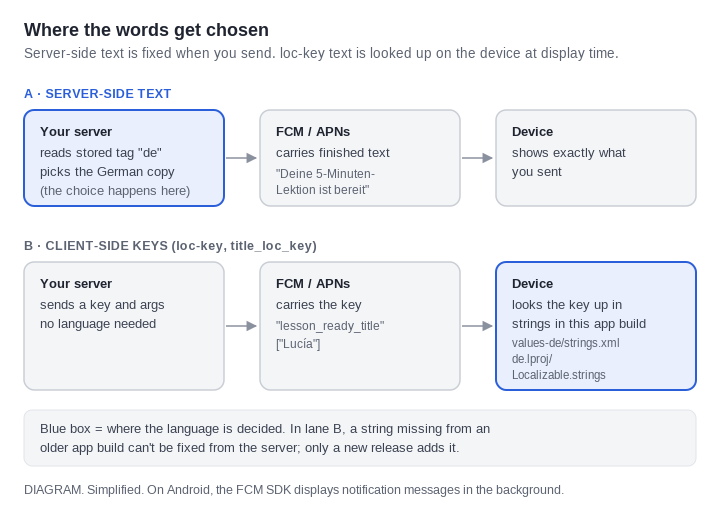
Server-side: one message per language
Your server holds the copy in every language, resolves each device’s tag to one version, and sends finished title and body text. You can write a campaign on Tuesday and send it in nine languages on Wednesday without an app release, preview the exact characters, and test two versions of the Japanese copy against each other.
The cost: your stored tag can be stale. If someone switches the app from English to German and hasn’t opened it since, the server still thinks “en”, which is why the app reports its language on every start.
Client-side: loc-key strings shipped in the app
Both platforms let you send a key instead of text. The device looks the key up in the app’s own string files, in whatever language it is using when the notification is shown.
On iOS, the aps.alert dictionary takes title-loc-key, subtitle-loc-key and loc-key, each naming a key in the app’s Localizable.strings, plus title-loc-args, subtitle-loc-args and loc-args, arrays whose items replace each %@ in order. This is Apple’s own example payload:
{
   "aps" : {
      "alert" : {
         "loc-key" : "GAME_PLAY_REQUEST_FORMAT",
         "loc-args" : [ "Shelly", "Rick"]
      }
   }
}
On Android, FCM HTTP v1’s android.notification has title_loc_key, title_loc_args, body_loc_key and body_loc_args. The reference describes each key as “the key to the title string in the app’s string resources,” used “to localize the title text to the user’s current localization.” One FCM request can carry both platforms; for iOS, apns.payload is the raw APNs JSON, and when present it overrides the top-level notification title and body.
POST https://fcm.googleapis.com/v1/projects/<FIREBASE_PROJECT_ID>/messages:send
Authorization: Bearer YOUR_OAUTH2_ACCESS_TOKEN
Content-Type: application/json

{
  "message": {
    "token": "DEVICE_REGISTRATION_TOKEN",
    "android": {
      "notification": {
        "title_loc_key": "lesson_ready_title",
        "body_loc_key": "lesson_ready_body",
        "body_loc_args": ["Lucía"]
      }
    },
    "apns": {
      "payload": {
        "aps": {
          "alert": {
            "title-loc-key": "LESSON_READY_TITLE",
            "loc-key": "LESSON_READY_BODY",
            "loc-args": ["Lucía"]
          }
        }
      }
    }
  }
}
The matching strings live in the app, for example res/values-es/strings.xml with <string name="lesson_ready_body">%1$s, tu lección de 5 minutos está lista</string> and es.lproj/Localizable.strings with "LESSON_READY_BODY" = "%@, tu lección de 5 minutos está lista";. Use positional specifiers where word order changes: Android documents %1$s, and Apple’s format specifiers accept %1$@.
Two details matter. Arguments are inserted as-is, so pass only things that need no translation, like a name. And on Android the FCM SDK displays notification messages itself only while the app is in the background; in the foreground your code handles the message. In a Flutter app, the strings for these keys belong in the native Android and iOS projects, because the native layer does the lookup.
Trade-offs
| Question | Server-side text | loc-key strings |
|---|---|---|
| Change copy or add a language without an app release | Yes | No, the strings ship in the build |
| A/B test copy within one language | Yes | Only between keys already shipped |
| Follows a language change the server hasn’t heard about yet | No, uses the stored tag | Yes, resolved at display time |
| Plurals and gender | Full ICU MessageFormat on the server | Limited to what one format string can do |
| Older app builds | Unaffected | A key missing from an old build is a gap you can’t patch from the server |
Our view: server-side text for anything written after release (campaigns, offers, news digests), loc-key strings for a few fixed system messages every build ships, such as streak reminders. What happens when a key is missing from the installed build isn’t spelled out in the FCM or APNs references we read, so test that case on both platforms before relying on loc-keys for anything new.
Fallback chains
Every message will someday lack a translation for someone. The fallback chain decides what they get instead.
RFC 4647 §3.4 describes “Lookup”: the requested tag is “progressively truncated from the end until a matching language tag is located,” then a default is returned. Its example starts at zh-Hant-CN-x-private1-private2 and walks through zh-Hant-CN-x-private1, zh-Hant-CN, zh-Hant and zh to the default. That zh hop is the trap: CLDR’s likely subtags expand bare zh to zh-Hans-CN, so a reader of Traditional Chinese whose chain ends at zh silently gets Simplified. CLDR’s own parent-locale data avoids this by making the parent of zh-Hant the root locale, not zh.
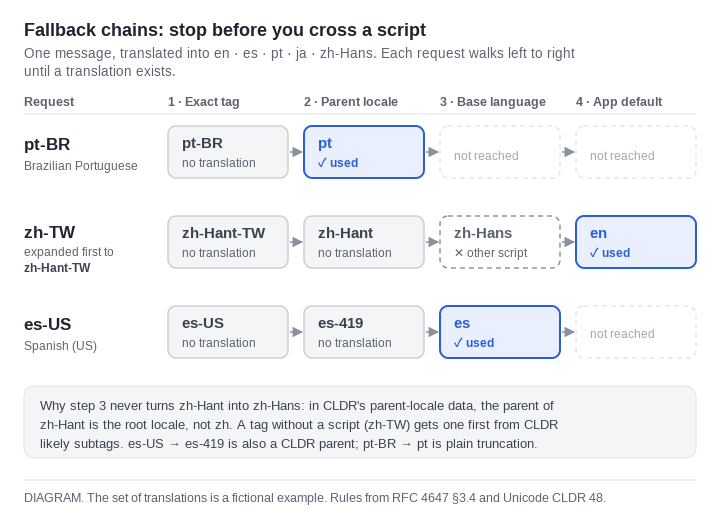
A chain that holds up:
- Fill in the script. If the tag has none, add the likely one: CLDR maps
zh-TWandzh-HKto Traditional (zh-Hant-TW,zh-Hant-HK) and barezhto Simplified. - Exact tag.
pt-BRif you have it. - Parent locale. Use CLDR’s parent data where it exists:
es-USandes-MXboth havees-419(Latin American Spanish) as parent. Otherwise drop the region. - Base language in the same script.
es,pt,zh-Hant. - App default. Usually
en. Never jump to another script of the same language on the way.
Android has done a version of this on the device since 7.0 (API level 24): a fr-CH user with only fr-FR resources gets French, not English, because the system tries “children of fr.” Your server should be as smart as the phone. A minimal resolver:
// Script-aware lookup: RFC 4647 §3.4 truncation, plus CLDR likely scripts and parents.
// `available` holds tags in canonical casing ("pt-BR", "zh-Hans").
const LIKELY_SCRIPT: Record<string, string> = { zh: "Hans", "zh-TW": "Hant", "zh-HK": "Hant", "zh-MO": "Hant" };
const PARENT: Record<string, string> = { "es-US": "es-419", "es-MX": "es-419", "es-AR": "es-419" };

function parse(tag: string): Intl.Locale | undefined {
  try {
    return new Intl.Locale(tag.trim().replace(/_/g, "-")); // "pt_BR" -> "pt-BR"
  } catch {
    return undefined; // RangeError: not a well-formed BCP 47 tag
  }
}

export function resolve(requested: string, available: Set<string>, fallback = "en"): string {
  const loc = parse(requested);
  if (!loc) return fallback;
  const { language: lang, region } = loc;
  const defaultScript = LIKELY_SCRIPT[lang];
  const script = loc.script ?? (region && LIKELY_SCRIPT[`${lang}-${region}`]) ?? defaultScript;
  const otherScript = Boolean(script && defaultScript && script !== defaultScript);
  const chain = [
    [lang, script, region].filter(Boolean).join("-"), // zh-Hant-TW
    region && `${lang}-${region}`,                     // pt-BR, zh-TW stored without script
    region && PARENT[`${lang}-${region}`],             // es-419, also for es-Latn-US
    script && `${lang}-${script}`,                     // zh-Hant
    otherScript ? undefined : lang,                    // es, pt; never zh for Hant
  ].filter((t): t is string => Boolean(t));
  return [...new Set(chain)].find((t) => available.has(t)) ?? fallback;
}
Log both tags on every send, requested and resolved. The fallback report that gives you is the best to-do list a translation team can have.
Length and truncation by script
Neither the FCM reference nor Apple’s payload page gives a character limit for a title or body. The hard limit both state is payload size: 4,096 bytes for an FCM message and 4 KB (4,096 bytes) for a regular APNs notification. Where a lock screen cuts text depends on device, OS version, font size and layout, so we don’t quote truncation numbers here; our character limits guide covers that.
What holds is relative:
- European languages grow. IBM’s guidelines, as summarized by the W3C, put the average expansion of English source text of up to 10 characters at 200 to 300%, and 11 to 20 characters at 180 to 200%. Short strings grow the most, and push titles are short strings.
- CJK shrinks in characters but not in width. The W3C notes Chinese, Japanese and Korean may need “much larger” horizontal space for the same character count; the article cites Flickr counting each Chinese and Korean character as two English characters wide.
- Characters aren’t bytes. In UTF-8 (RFC 3629), ASCII letters take 1 byte; accented Latin letters like é and the Arabic block (U+0600) take 2; Devanagari, kana and Han take 3. Only the payload limit cares about bytes, but it does if you pack several languages into one data payload; see our payload size guide.
- Characters aren’t what you see. Hindi vowel signs combine with the consonant before them, so code-point counts overstate the visible length.
One line for a fictional language-learning app, in nine languages. Counts come from the strings (code points, Intl.Segmenter graphemes, UTF-8 bytes), not from a device.
| Tag | Script | Text | Code points | Graphemes | UTF-8 bytes |
|---|---|---|---|---|---|
en-US | Latin | Your 5-minute lesson is ready | 29 | 29 | 29 |
es | Latin | Tu lección de 5 minutos está lista | 34 | 34 | 36 |
fr | Latin | Ta leçon de 5 minutes est prête | 31 | 31 | 33 |
de | Latin | Deine 5-Minuten-Lektion ist bereit | 34 | 34 | 34 |
pt-BR | Latin | Sua lição de 5 minutos está pronta | 34 | 34 | 37 |
ja | Han + kana | 5分のレッスンの準備ができました | 16 | 16 | 46 |
hi | Devanagari | आपका 5 मिनट का पाठ तैयार है | 27 | 20 | 67 |
ar | Arabic (RTL) | درسك لمدة 5 دقائق جاهز | 22 | 22 | 39 |
zh-Hans | Han (Simplified) | 你的 5 分钟课程已准备好 | 13 | 13 | 33 |
Spanish, German and Portuguese run 5 characters (17%) longer than English, while Japanese and Chinese use about half the characters but more bytes. The French uses informal ta; a formal votre version would be longer, and that register choice is what a glossary should settle once.
The writing rule that follows: put the useful words first in every language, so a cut costs the least. “5-minute lesson ready” survives a truncated banner; “Hey there, just a friendly reminder that…” does not.
Right-to-left text: Arabic and Hebrew
A notification is plain text, so there’s no <span dir="ltr">. The Unicode Bidirectional Algorithm (UAX #9) decides the base direction of a paragraph from its first strong character (rule P2), and inserted Latin names and numbers can then land in the wrong place. Android’s localization guide shows the classic bug: a Hebrew “Did you mean %s?” with the address “15 Bay Street, Laurel, CA” inserted puts the house number on the wrong side.
The W3C’s fix for plain text is the isolate characters: U+2068 FIRST STRONG ISOLATE (FSI) before an inserted value and U+2069 POP DIRECTIONAL ISOLATE (PDI) after it, or U+2066 (LRI) when you know the value is left to right. Android’s BidiFormatter.unicodeWrap() does this for you in app code, and Google says to use it “on every piece of text that you insert into a localized message,” except machine-readable strings like URIs.
On the server, wrap every variable before it goes into the message:
// Wrap each inserted value in FSI (U+2068) ... PDI (U+2069) so a Latin name or a number
// keeps its own direction inside Arabic or Hebrew text.
const isolate = (value: string) => `${value}`;
const body = `${isolate(firstName)}، درسك لمدة 5 دقائق جاهز`;Three rules for Arabic and Hebrew copy:
- Make the first strong character Arabic or Hebrew. Rule P2 skips text inside isolates, so an isolated name at the start is fine. Where the renderer follows UAX #9’s default, an unwrapped Latin name or brand at the start makes the whole line left to right.
- Wrap every inserted value, including loc-args you send for Android and iOS, since the app can’t run
BidiFormatteron them before the system displays the notification. - Decide numerals per locale, not per string. Whether that 5 shows as
5or٥is a formatting choice; format numbers with the user’s locale instead of typing digits into translations.
Variables, plurals and gender
English has two plural forms for counts. CLDR, the Unicode data almost every platform uses, has far more variety:
| Language | CLDR cardinal categories | Note |
|---|---|---|
Arabic (ar) |
zero, one, two, few, many, other | Decided by the last two digits (below) |
Hindi (hi) |
one, other | one covers 0 and 1 |
French (fr) |
one, many, other | one covers 0 and 1 |
Portuguese (pt) |
one, many, other | pt-PT uses one for 1 only |
Spanish (es) |
one, many, other | many is for millions |
German (de) |
one, other | Same as English |
| Japanese, Chinese, Korean | other | One form for every number |
That pt vs pt-PT row is a reason fallback chains matter beyond words: the plural rules belong to the locale too.
A loc-key format string can’t choose between these forms. The FCM reference points body_loc_key at a string resource with format specifiers; Android plurals are a separate resource type (<plurals>, read with getQuantityString), and Apple’s payload page only mentions Localizable.strings. So any message with a count is easier to build on the server with ICU MessageFormat:
{minutes, plural,
  one   {Your {minutes}-minute lesson is ready}
  other {Your #-minute lesson is ready}}
The Arabic translator fills six branches. CLDR’s rules use the number modulo 100: few is any number ending in 03 to 10 (so 3 and 103), many any number ending in 11 to 99 (so 11 and 111), and 100 to 102 fall to other. CLDR’s own Arabic forms for “minute” are zero (# دقيقة), one (دقيقة), two (دقيقتان), few (# دقائق), many (# دقيقة) and other (# دقيقة). The last three look alike on purpose: CLDR uses the same written singular after 0, after 11 to 99 and after 100, and the plural دقائق only for few. The Japanese translator fills one branch.
Gender works the same way with select; ICU’s guide recommends select outside, plurals inside, and full sentences in every branch. French needs it for “Tu es prêt” vs “Tu es prête”; Arabic imperatives change too (ابدأ, ابدئي). If you don’t know a user’s gender, don’t guess: write the sentence so it doesn’t need one, like “Ta leçon est prête” (“your lesson is ready”), where the adjective agrees with leçon, not the reader.
Translation workflow and review
A setup that holds up for 5 to 15 languages:
- A glossary per app. Product terms (“streak”, “lesson”, “XP”), do-not-translate names, and the register per language: tu or vous, du or Sie, você or o senhor. Decide once.
- Character budgets per field, set from your own device measurements, attached to each string so translators see them.
- Context for every string: where it shows, what triggers it, what each placeholder holds. “%1$s” alone tells a translator nothing.
- A named native reviewer per language who approves before anything sends. Machine translation can draft; a person signs off.
- Sampling after launch. Each week the reviewer reads a random sample of what went out, fallback sends included.
Our guide to machine translation for push goes deeper on where machine output fails in 40 characters.
Measuring by language
Report Sent, Delivered and Opened by resolved language, not only by country: a US report hides the gap between English and Spanish readers, and a Swiss report mixes French and German. Add an exact-vs-fallback cut, so you see it when all your zh-Hant users are getting English, and pair language with local-time sending. Small languages give noisy numbers; our push notification metrics guide covers which rates to trust.
What Oricato does here
Early access · launching soon. Oricato’s composer holds one message with a version per language, resolves each device’s tag through a fallback chain, and previews Arabic and Hebrew right to left before you send; reports break Sent, Delivered and Opened down by language. Details are on the multilingual push page. Oricato Intelligence (Early access) adds translation drafts that a named reviewer approves before anything sends; no results are published yet, and it’s described on the AI translation page.
Sources
We did not run these samples on devices for this article. It is based on Apple, Firebase and Android documentation, IETF RFCs, Unicode CLDR and UAX #9, the ICU user guide, W3C Internationalization articles and CSA Research’s 2020 survey, all read on Oct 16, 2026. Character counts in the sample table were computed from the strings.
- Apple Developer Documentation: Generating a remote notification, accessed Oct 16, 2026
- Apple Developer Documentation: Bundle.preferredLocalizations, accessed Oct 16, 2026
- Apple WWDC19 session 403: Creating Great Localized Experiences with Xcode 11, accessed Oct 16, 2026
- Apple Documentation Archive: String Format Specifiers, accessed Oct 16, 2026
- Firebase: REST Resource projects.messages (last updated Sep 8, 2026), accessed Oct 16, 2026
- Firebase: Method projects.messages.send (last updated Sep 21, 2026), accessed Oct 16, 2026
- Firebase: Set the message type (last updated Oct 15, 2026), accessed Oct 16, 2026
- Android Developers: Per-app language preferences (last updated May 11, 2026), accessed Oct 16, 2026
- Android Developers: Language and locale resolution (last updated Feb 10, 2025), accessed Oct 16, 2026
- Android Developers: Support different languages and cultures (last updated Feb 10, 2025), accessed Oct 16, 2026
- Android Developers: String resources (last updated May 14, 2026), accessed Oct 16, 2026
- RFC 5646 (BCP 47): Tags for Identifying Languages (Sep 2009), accessed Oct 16, 2026
- RFC 4647 (BCP 47): Matching of Language Tags (Sep 2006), accessed Oct 16, 2026
- RFC 3629: UTF-8 (Nov 2003), accessed Oct 16, 2026
- Unicode CLDR: Language Plural Rules, accessed Oct 16, 2026
- Unicode CLDR: Likely Subtags, accessed Oct 16, 2026
- Unicode CLDR JSON: Arabic units.json (duration-minute), accessed Oct 16, 2026
- Unicode CLDR JSON 48.2.3: parentLocales.json, accessed Oct 16, 2026
- ICU User Guide: Formatting Messages, accessed Oct 16, 2026
- UAX #9: Unicode Bidirectional Algorithm (Unicode 18.0.0, revision 52, Sep 1, 2026), accessed Oct 16, 2026
- W3C: Inline markup and bidirectional text in HTML, accessed Oct 16, 2026
- W3C: Text size in translation, accessed Oct 16, 2026
- CSA Research: “Can’t Read, Won’t Buy – B2C” press release (Jul 7, 2020; 8,709 consumers, 29 countries), accessed Oct 16, 2026
Frequently asked questions
Should I translate on the server or ship strings in the app?
What language do I use if I don't know the user's?
Keep reading
All guides
Send push notifications in local time: zones, DST, travel
Send push at each user's local time: get the right IANA zone, handle DST and half-hour offsets, fan the job out over 26 hours, and keep quiet hours.
Push notification metrics that matter, and the ones that lie
Sent, delivered, displayed, opened and caused are different numbers. Define each, see what FCM and APNs confirm, and track outcomes over open rate.