Send push notifications in local time: zones, DST, travel
Send push at each user's local time: get the right IANA zone, handle DST and half-hour offsets, fan the job out over 26 hours, and keep quiet hours.
Oricato Team Published 11 min read
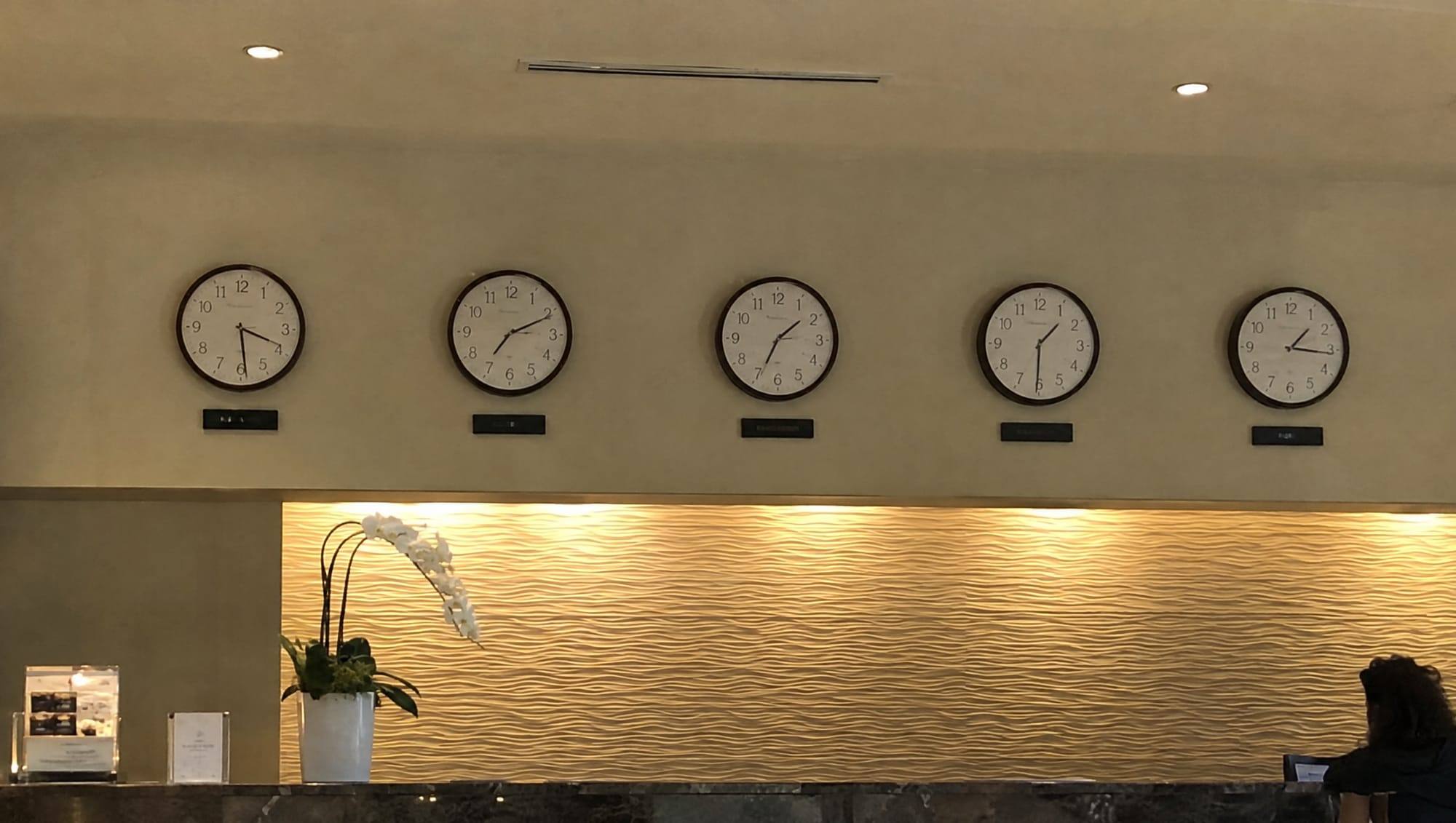
You want a reminder to arrive at 9:00 AM for every user, wherever they live. The short answer: store each person’s IANA time zone name (like Asia/Kolkata), never a fixed offset. Compute each zone’s UTC instant on the send date with current tz data, and run one job per distinct instant, spread over about 26 hours of UTC. Then decide in advance what happens on daylight saving nights, when people travel, and during quiet hours.
Why UTC scheduling fails global apps
A single send at 14:00 UTC on a July day lands at 10:00 AM in New York, 3:00 PM in London, 7:30 PM in Delhi and 11:00 PM in Tokyo. For a language-learning app with learners in all four cities, one of those is a morning lesson nudge and one is a notification at bedtime.
No single UTC hour fixes it. Offsets in the tz data run from UTC−12 (Etc/GMT+12) to UTC+14 (Pacific/Kiritimati, Etc/GMT-14), so there is no hour that is daytime everywhere. Whether 9:00 AM is a good hour is a separate question, covered in the best time to send push notifications. This guide makes 9:00 AM mean 9:00 AM for each person.
Finding each user’s time zone
Read the device’s IANA zone
Every major platform gives you a tz database name. Send it when the app registers its push token and whenever it changes.
On Android, java.time.ZoneId was added in API level 26. ZoneId.systemDefault() “gets the system default time-zone” and getId() returns the name. Below API 26, java.util.TimeZone.getDefault().getID() gives the same kind of ID.
import java.time.ZoneId

val zone: String = ZoneId.systemDefault().id   // for example "Europe/Berlin"
// minSdk below 26: java.util.TimeZone.getDefault().id
On iOS, TimeZone.current is “the time zone currently used by the system”, and identifier is the region name.
let zone = TimeZone.current.identifier // for example "Asia/Tokyo"Flutter is the odd one out. Dart’s DateTime.timeZoneName comes from the operating system and is often an abbreviation such as “CET” or “CEST”, or on Windows a long name like “Pacific Standard Time”. Neither is an IANA name, and abbreviations are ambiguous (“CST” can mean several different zones).
Use a plugin that asks the platform, such as flutter_timezone. Since 5.0.0, getLocalTimezone() returns a TimezoneInfo whose identifier field holds the IANA ID.
import 'package:flutter_timezone/flutter_timezone.dart';

final info = await FlutterTimezone.getLocalTimezone();
final String zone = info.identifier; // for example "America/Sao_Paulo"
In a browser, Intl.DateTimeFormat().resolvedOptions().timeZone returns an IANA name, the runtime’s default zone.
const zone = Intl.DateTimeFormat().resolvedOptions().timeZone; // for example "Asia/Riyadh"Why not IP geolocation or a stored offset
A stored offset is wrong for part of every year in any zone with daylight saving time. Berlin is UTC+1:00 in winter and UTC+2:00 from the last Sunday of March to the last Sunday of October, so a saved “+01:00” sends Berlin users an hour late for about seven months. The tz project’s own theory file warns against relying on particular offsets or abbreviations, and notes that even a zone’s base offset can change.
IP geolocation is a weaker fallback. VPNs, corporate proxies and mobile carrier gateways can put a user in another city or country. Use it only when you have nothing else, such as a subscriber who signed up on a website and never installed the app, and replace it as soon as a device reports a real zone.
What to store per subscriber:
| Field | Example | Why |
|---|---|---|
device_tz |
America/St_Johns |
The IANA name the device reported |
device_tz_seen_at |
2026-10-16T08:12:00Z |
Spot stale zones from people who haven’t opened the app in months |
preferred_tz |
America/New_York or empty |
Only if the user chose a zone in your settings; it wins over the device |
tz_source |
device, profile, ip |
So reports and debugging can tell a guess from a fact |
Two cleanups pay off. Old names still arrive from some devices: the tz backward file links Asia/Calcutta to Asia/Kolkata and Europe/Kiev to Europe/Kyiv, so canonicalize before you group or report.
Also treat fixed-offset IDs like GMT+05:30 or a bare UTC with suspicion. ZoneId accepts offset-style IDs, but they never change for DST. A sudden spike of UTC is worth a look: it can come from emulators, test devices or a bug in your SDK wrapper.
Travelers: update on app open
A fitness app user who flies from Madrid to Mexico City should get the 7:00 AM workout reminder at 7:00 AM Mexico City time. Report the zone on every app open. On Android you can also listen for ACTION_TIMEZONE_CHANGED, which carries the new ID in the time-zone extra and is on Android’s list of implicit broadcasts that manifest receivers can still get. On iOS, NSSystemTimeZoneDidChange is posted when the time zone changes.
Read the zone when the job runs, not when the campaign was created. One edge case: someone who flies from Tokyo to Berlin after Tokyo’s job fired but before Berlin’s matches both. Keep a per-message, per-subscriber “already sent” record.
DST and odd offsets
Half-hour and 45-minute offsets are normal, not exotic. So are zones that dropped daylight saving time recently. This table is from the tz data, release 2026e (Sep 29, 2026).
| Zone | Standard offset | Daylight saving time (tz 2026e) | Watch out for |
|---|---|---|---|
America/New_York |
UTC−5:00 | UTC−4:00 from the 2nd Sunday of March to the 1st Sunday of November, at 2:00 AM local (rule since 2007) | Next changes: Nov 1, 2026 and Mar 14, 2027 |
Europe/Berlin |
UTC+1:00 | UTC+2:00 from the last Sunday of March to the last Sunday of October, at 01:00 UTC | All EU zones change at the same instant, not the same local hour |
America/Sao_Paulo |
UTC−3:00 | None since Feb 2019. tz notes Brazil’s decree ending DST was signed Apr 25, 2019 | Old devices or old tz copies may still apply Brazilian DST |
America/Mexico_City |
UTC−6:00 | None since Oct 30, 2022, after a law that tz records as published Oct 28, 2022 | UTC instants computed before that law came out are an hour off for summer 2023 onward |
America/St_Johns |
UTC−3:30 | UTC−2:30, same dates as the US | A half-hour zone west of UTC |
Asia/Kolkata |
UTC+5:30 | None since 1945 | Rounding to the hour sends at 8:30 or 9:30 AM |
Asia/Kathmandu |
UTC+5:45 (since 1986) | None | 15 minutes before Delhi; needs its own slot |
Australia/Adelaide |
UTC+9:30 | UTC+10:30 from the 1st Sunday of October to the 1st Sunday of April | A half-hour zone that also changes clocks |
Australia/Lord_Howe |
UTC+10:30 | UTC+11:00, a 30-minute shift, same Sundays as Adelaide | The DST gap and overlap are 30 minutes, not 60 |
Pacific/Kiritimati |
UTC+14:00 (since the end of 1994) | None | Reaches every local hour first |
Pacific/Pago_Pago |
UTC−11:00 | None | Among the last to reach a given local time |
The southern hemisphere runs its daylight saving time in the northern winter. On Nov 12, 2026, Sydney is UTC+11:00 and Adelaide UTC+10:30 while New York is back on UTC−5:00. A hard-coded “Sydney is +10” table is wrong for half the year.
The fan-out schedule
One job per distinct zone
Store the intent, not the instant: “9:00 AM local on Thursday, Nov 12, 2026, expires after 4 hours”. Then, close to the send date, collect the distinct zones in the audience, compute each zone’s UTC instant, and group zones that land on the same instant. Auckland and Tonga share one on that date; Kathmandu and Delhi, 15 minutes apart, do not.
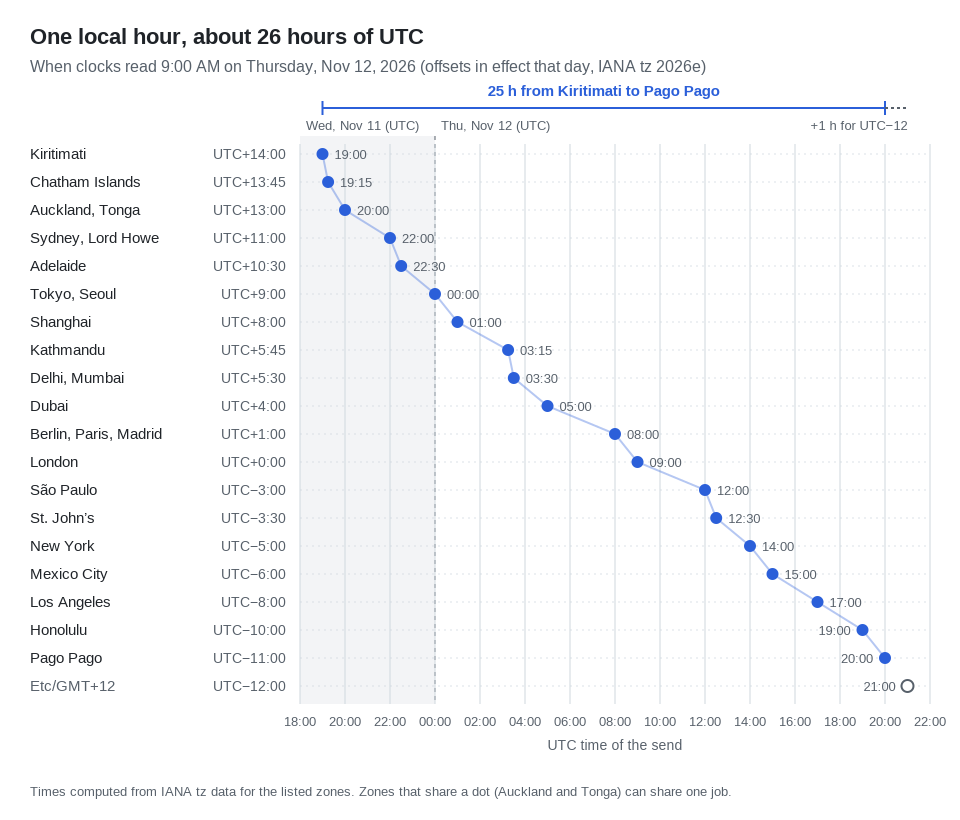
The first job for “Thursday 9:00 AM” fires at 19:00 UTC on Wednesday, for Kiritimati. Pago Pago’s fires 25 hours later, and anything in Etc/GMT+12 one hour after that. So a campaign for Thursday 9:00 AM must exist before Wednesday 19:00 UTC to reach everyone. If it is created later, decide up front what happens to zones whose 9:00 AM has passed: send the next day, or skip them.
Here is the core of a scheduler in Go. UTCFor turns a local date and time into an instant for one zone, with explicit rules for daylight saving nights. FanOut groups zones by that instant.
package localtime

import (
	"fmt"
	"time"
	_ "time/tzdata" // embedded fallback if the host has no zoneinfo (about 450 KB)
)

// UTCFor returns the instant when the wall clock in loc shows the given
// local date and time.
//   - Gap (clocks spring forward): the time moves later by the length of
//     the gap, so 2:30 AM in a 2:00-3:00 gap becomes 3:30 AM.
//   - Overlap (clocks fall back): the earlier of the two instants.
// These match the rules documented for java.time.ZonedDateTime.of.
func UTCFor(y int, m time.Month, d, hour, min int, loc *time.Location) time.Time {
	// The wall-clock reading, written down as if it were UTC.
	wall := time.Date(y, m, d, hour, min, 0, 0, time.UTC)

	// Offsets in effect a day before and a day after cover both sides
	// of any transition on that date.
	_, offBefore := wall.Add(-24 * time.Hour).In(loc).Zone()
	_, offAfter := wall.Add(24 * time.Hour).In(loc).Zone()

	var valid []time.Time
	for _, off := range []int{offBefore, offAfter} {
		t := wall.Add(-time.Duration(off) * time.Second)
		lt := t.In(loc)
		if lt.Year() == y && lt.Month() == m && lt.Day() == d &&
			lt.Hour() == hour && lt.Minute() == min {
			valid = append(valid, t)
		}
	}

	switch {
	case len(valid) == 0: // gap: use the offset from before the jump
		return wall.Add(-time.Duration(offBefore) * time.Second)
	case len(valid) == 2 && valid[1].Before(valid[0]): // overlap
		return valid[1]
	default:
		return valid[0]
	}
}

// FanOut groups zone names by the Unix second at which they reach the
// local time. Each key becomes one send job.
func FanOut(y int, m time.Month, d, hour, min int, zones []string) (map[int64][]string, error) {
	jobs := make(map[int64][]string)
	for _, name := range zones {
		loc, err := time.LoadLocation(name)
		if err != nil {
			return nil, fmt.Errorf("zone %q: %w", name, err)
		}
		at := UTCFor(y, m, d, hour, min, loc).Unix()
		jobs[at] = append(jobs[at], name)
	}
	return jobs, nil
}
Why not call time.Date with the zone? Its docs say that inside a transition it “does not guarantee which” of the two zones you get. Make the rule explicit, then test it.
Three operational details matter more than the code:
- Resolve late. The tz theory file states plainly that predictions of future timestamps go wrong when governments change the rules. Mexico is the recent example: a summer 2023 send to Mexico City computed in early 2022 assumed DST that no longer existed. Compute instants when you create the jobs for that day, and recompute if your tz data changes in between.
- Know your tz version. Go’s
LoadLocationlooks inZONEINFO, then the system zoneinfo, then$GOROOT/lib/time/zoneinfo.zip, then the embeddedtime/tzdatacopy, only if imported. So two servers can disagree. Pin one copy (ZONEINFOorLoadLocationFromTZData) and update it when IANA ships a release; the latest is 2026e, released Sep 29, 2026. - Load each zone once per job, not once per subscriber, and pass the
*time.Locationaround.
Nonexistent and repeated local times on DST days
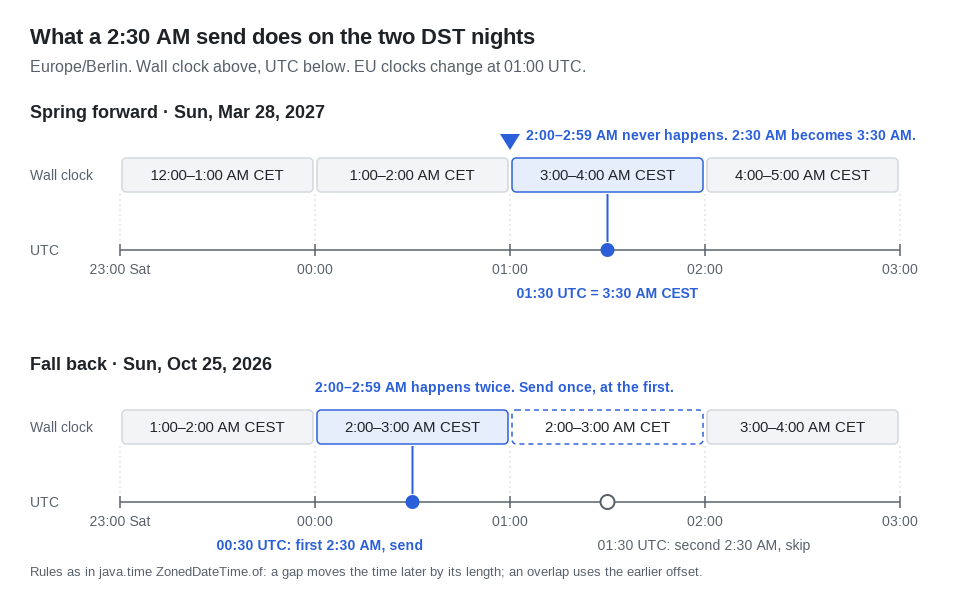
Twice a year, many zones have a local time that never happens and one that happens twice. Decide what your scheduler does with both.
| Case | Example (tz 2026e) | Options | Our pick |
|---|---|---|---|
| Gap (spring forward) | Berlin, Mar 28, 2027: 2:00 to 2:59 AM never happens | Move later by the gap (3:30 AM); snap to the first valid minute (3:00 AM); skip | Move later by the gap, the java.time rule |
| Overlap (fall back) | Berlin, Oct 25, 2026: 2:00 to 2:59 AM happens twice | First occurrence; second occurrence; both (a bug) | First occurrence, sent once |
| 30-minute shift | Lord Howe, Oct 4, 2026: 2:00 to 2:29 AM never happens | Same as above | Same rule; a 2:15 AM send becomes 2:45 AM |
The gap rule matters most for times users pick themselves: a 2:30 AM reminder should fire a little late, not vanish.
Quiet hours
Quiet hours belong to the person, in their local time. A sensible default for marketing and engagement messages is something like 9:00 PM to 8:00 AM local, adjustable per user; treat that as a starting point, not a standard. Check it at dispatch, against the subscriber’s zone at that moment, so a traveler’s night is still a night.
The easy part to miss is the offline phone. In the FCM HTTP v1 API, android.ttl defaults to the maximum of 4 weeks if you don’t set it. For iOS messages sent through FCM, the backend sets apns-expiration to 30 days by default.
So a 9:00 AM streak reminder to a phone that was off overnight can arrive whenever it reconnects, including 3:00 AM two days later. Set an expiry that matches the message.
{
  "message": {
    "token": "DEVICE_REGISTRATION_TOKEN",
    "notification": {
      "title": "Your Spanish streak is waiting",
      "body": "Five minutes keeps it alive."
    },
    "android": {
      "ttl": "14400s"
    },
    "apns": {
      "headers": {
        "apns-expiration": "1794484800"
      }
    }
  }
}
Apple calls apns-expiration best effort: a message can still arrive after the timestamp. Two more rules: reminders the user set for themselves (a 6:00 AM class) ignore marketing quiet hours, and a job that misses its window after downtime is skipped and reported, not sent at night.
Testing
Time zone bugs show up twice a year, so your tests have to bring those dates to you.
- Inject the clock. Pass a
func() time.Timeinto the scheduler instead of callingtime.Now()deep inside it. - Never depend on the host zone. In Go,
time.Localconsults theTZenvironment variable on Unix. Run your suite withTZ=Asia/KathmanduandTZ=Pacific/Chathamas well as UTC; anything that silently uses local time will fail. - Pin the tz version in CI so a new IANA release changes test results only when you update it on purpose.
- Test the real transition dates. The next ones: US Nov 1, 2026 and Mar 14, 2027; EU Oct 25, 2026 and Mar 28, 2027; Adelaide and Lord Howe Oct 4, 2026 and Apr 4, 2027.
func TestUTCForTransitions(t *testing.T) {
	cases := []struct {
		zone         string
		y            int
		m            time.Month
		d, hour, min int
		want         string // the UTC instant, RFC 3339
	}{
		{"Europe/Berlin", 2027, time.March, 28, 2, 30, "2027-03-28T01:30:00Z"},      // gap: 3:30 AM CEST
		{"Europe/Berlin", 2026, time.October, 25, 2, 30, "2026-10-25T00:30:00Z"},    // overlap: first 2:30 AM
		{"America/New_York", 2027, time.March, 14, 2, 30, "2027-03-14T07:30:00Z"},   // gap: 3:30 AM EDT
		{"America/New_York", 2026, time.November, 1, 1, 30, "2026-11-01T05:30:00Z"}, // overlap: first 1:30 AM
		{"Australia/Lord_Howe", 2026, time.October, 4, 2, 15, "2026-10-03T15:45:00Z"}, // 30-minute gap
		{"Asia/Kathmandu", 2026, time.November, 12, 9, 0, "2026-11-12T03:15:00Z"},
		{"America/Sao_Paulo", 2026, time.November, 12, 9, 0, "2026-11-12T12:00:00Z"}, // no DST since 2019
	}
	for _, c := range cases {
		loc, err := time.LoadLocation(c.zone)
		if err != nil {
			t.Fatal(err)
		}
		got := UTCFor(c.y, c.m, c.d, c.hour, c.min, loc).UTC().Format(time.RFC3339)
		if got != c.want {
			t.Errorf("%s %d-%02d-%02d %02d:%02d: got %s, want %s",
				c.zone, c.y, c.m, c.d, c.hour, c.min, got, c.want)
		}
	}
}
Add one date-line case too. On Nov 12, 2026, Thursday 9:00 AM in Tonga (UTC+13) is 20:00 UTC on Wednesday, and Thursday 9:00 AM in Pago Pago (UTC−11) is 20:00 UTC on Thursday. Same clock reading, 24 hours apart. If your code treats “same offset modulo 24” as “same job”, this test catches it.
How OneSignal does it
OneSignal offers this as Timezone Delivery, and it is a fair baseline. Its pricing page lists Timezone Delivery on every plan, including Free, as of Oct 16, 2026. In the API, delayed_option: "timezone" sends “at the same local time across time zones”, with delivery_time_of_day setting the hour; send_after schedules a future start in UTC. The user’s zone lives in a timezone_id property based on the tz database identifier.
Their blog post on time zone delivery advises starting at least 24 hours ahead to cover every zone, and says zones that have already passed the target time get the message the next day. If you use OneSignal, check those two behaviors against your campaigns before building your own.
What Oricato does here
Status: built (mobile push). Oricato is pre-launch: Early access · launching soon.
Oricato’s Android, iOS and Flutter SDKs report each device’s IANA zone and send it again when it changes. For a message at 8:00 AM local, the scheduler computes the instant for every zone in your audience on that date with IANA tz data, half-hour and 45-minute zones included. A local time that doesn’t exist moves later by the gap; a repeated one is used once, at the first occurrence.
Local-time messages expire after four hours by default, so a phone that reconnects in the afternoon doesn’t show a morning message. Autopilot’s daily slots, such as 8:00 AM and 7:00 PM, use the same scheduler, under a daily limit per person. Web push and email (Early access) are designed to use it too.
Local-time delivery does not pick a “best” hour per person. Testing hours is covered in our send-time optimization guide, and Oricato Intelligence (Early access, no results yet) is designed to run that test against a holdout. For several languages, see localized push notifications; scheduler details are on the local-time delivery page.
Request early access: oricato.com/request-access
Sources
Facts in this guide come from the following pages, all read on Oct 16, 2026. Code samples have not been run; each caption names the documentation it follows.
- IANA Time Zone Database (release 2026e, Sep 29, 2026)
- Theory and pragmatics of the tz code and data
- tz source files: northamerica, southamerica, europe, asia, australasia, etcetera, backward
- Go time package and time/tzdata
- Android API reference: ZoneId, ZonedDateTime, TimeZone, ACTION_TIMEZONE_CHANGED, implicit broadcast exceptions
- Apple Developer: TimeZone, NSSystemTimeZoneDidChange, Sending notification requests to APNs
- Dart DateTime.timeZoneName; flutter_timezone and its TimezoneInfo API
- MDN: Intl.DateTimeFormat.prototype.resolvedOptions()
- Firebase: FCM HTTP v1 REST reference, projects.messages
- OneSignal: Create message, Update user, Deliver by time zone (blog), Pricing (Timezone Delivery row, as of Oct 16, 2026)
Frequently asked questions
Should I use the device time zone or the user's profile setting?
What happens to a 2:30 AM send on the night clocks spring forward?
Keep reading
All guides
Best time to send push notifications: find yours
Generic send-time windows mislead. Learn why opens follow your schedule, and find your own best hours from sessions that notifications didn't trigger.
Send-time optimization explained, and how to test it
How send-time optimization models work, why they can learn your own schedule back, the cold-start problem, and the one test that shows if it helps.